Mostrando entradas con la etiqueta ABAP. Mostrar todas las entradas

viernes, 29 de agosto de 2014

LED is my new Hello World - ABAP Time

It's been a long time since I did any ABAP development...so just for the good all times I decided to build the LED Number application on ABAP as well... -;)

I'm might be a little bit rusty...but I think I still remember most of the all tricks -:P

This goes out to all my ABAP friends...there are plenty -:)

ZLED
REPORT  zled.

TYPES: BEGIN OF ty_lines,
       line(1) TYPE c,
       index(1) TYPE c,
       map TYPE string,
       END OF ty_lines.

DATA: s_number TYPE string,
      counter TYPE i,
      num_counter TYPE i,
      line1 TYPE string,
      line2 TYPE string,
      line3 TYPE string.

DATA: t_lines TYPE STANDARD TABLE OF ty_lines.
FIELD-SYMBOLS: <fs_lines> LIKE LINE OF t_lines.

SELECTION-SCREEN BEGIN OF BLOCK params.
PARAMETERS: p_number TYPE i.
SELECTION-SCREEN END OF BLOCK params.

START-OF-SELECTION.
  PERFORM load_data.
  num_counter = 0.
  s_number = p_number.
  counter = strlen( s_number ) - 1.
  DO counter TIMES.
    READ TABLE t_lines ASSIGNING <fs_lines>
    WITH KEY line = 1
             index = s_number+num_counter(1).
    CONCATENATE line1 <fs_lines>-map INTO line1 SEPARATED BY space.
    READ TABLE t_lines ASSIGNING <fs_lines>
    WITH KEY line = 2
             index = s_number+num_counter(1).
    CONCATENATE line2 <fs_lines>-map INTO line2 SEPARATED BY space.
    READ TABLE t_lines ASSIGNING <fs_lines>
    WITH KEY line = 3
             index = s_number+num_counter(1).
    CONCATENATE line3 <fs_lines>-map INTO line3 SEPARATED BY space.
    num_counter = num_counter + 1.
  ENDDO.
  REPLACE ALL OCCURRENCES OF '%' IN line1 WITH ` ` IN CHARACTER MODE.
  REPLACE ALL OCCURRENCES OF '%' IN line2 WITH ` ` IN CHARACTER MODE.
  REPLACE ALL OCCURRENCES OF '%' IN line3 WITH ` ` IN CHARACTER MODE.
  WRITE:/ line1.
  WRITE:/ line2.
  WRITE:/ line3.

*&---------------------------------------------------------------------*
*&      Form  LOAD_DATA
*&---------------------------------------------------------------------*
FORM load_data.

  PERFORM add_lines USING '1' '0' '%_%%'.
  PERFORM add_lines USING '2' '0' '| |%'.
  PERFORM add_lines USING '3' '0' '|_|%'.
  PERFORM add_lines USING '1' '1' '%%'.
  PERFORM add_lines USING '2' '1' '|%'.
  PERFORM add_lines USING '3' '1' '|%'.
  PERFORM add_lines USING '1' '2' '%_%%'.
  PERFORM add_lines USING '2' '2' ' _|%'.
  PERFORM add_lines USING '3' '2' '|_%%'.
  PERFORM add_lines USING '1' '3' '_%%'.
  PERFORM add_lines USING '2' '3' '_|%'.
  PERFORM add_lines USING '3' '3' '_|%'.
  PERFORM add_lines USING '1' '4' '%%%%'.
  PERFORM add_lines USING '2' '4' '|_|%'.
  PERFORM add_lines USING '3' '4' '  |%'.
  PERFORM add_lines USING '1' '5' '%_%%'.
  PERFORM add_lines USING '2' '5' '|_ %'.
  PERFORM add_lines USING '3' '5' ' _|%'.
  PERFORM add_lines USING '1' '6' '%_%%'.
  PERFORM add_lines USING '2' '6' '|_%%'.
  PERFORM add_lines USING '3' '6' '|_|%'.
  PERFORM add_lines USING '1' '7' '_%%'.
  PERFORM add_lines USING '2' '7' '%|%'.
  PERFORM add_lines USING '3' '7' '%|%'.
  PERFORM add_lines USING '1' '8' '%_%%'.
  PERFORM add_lines USING '2' '8' '|_|%'.
  PERFORM add_lines USING '3' '8' '|_|%'.
  PERFORM add_lines USING '1' '9' '%_%%'.
  PERFORM add_lines USING '2' '9' '|_|%'.
  PERFORM add_lines USING '3' '9' ' _|%'.

ENDFORM.                    " LOAD_DATA

*&---------------------------------------------------------------------*
*&      Form  add_lines
*&---------------------------------------------------------------------*
FORM add_lines USING p_line p_index p_map.
  APPEND INITIAL LINE TO t_lines ASSIGNING <fs_lines>.
  <fs_lines>-line = p_line.
  <fs_lines>-index = p_index.
  <fs_lines>-map = p_map.
ENDFORM.                    "add_lines

Pics or it didn't happen -:)


Greetings,

Blag.
Development Culture.


martes, 19 de noviembre de 2013

Calling R from the ERP - A dirty little hack

Since I joined SAP around 2 years ago, I simply stopped using ABAP…even when I use it for almost 11 years when I was a consultant…

A week ago, I was thinking about writing a new blog…something nice…some hacky…something that would allow me to just rest and don’t blog for the rest of the year…

I thought about ERP and R…while some things have been done already like Analytics with SAP and R from Piers Harding. I wanted to actually call R from the ERP instead of the ERP from R -;)

While thinking about this…I thought the best way to do it would be to reuse something that I before on my blog Consuming R from SAP Mobile Platform where I used Rook on Heroku to create a REST page that could be consumable…

So…for this particular blog…I wanted to something simple…call R, generate a graphic and show it on my ABAP program…here’s a small diagram to get things a little bit more clear…


Of course, when I tried this the first time…it failed…miserably…simply because the current implementation of Rook on Heroku doesn't have graphic capabilities on it…so it was impossible to actually generate a graphic…

Let’s get our hands dirty and let’s separate this blogs into steps so it become easier to handle -:)

Compile R with graphic capabilities on Heroku

This step was really a pain…it took me almost a week to get it done…and funny enough the rest of the steps took me about 6 hours…anyway…let’s keep going…

I started by looking at this two awesome projects on Github…rookonheroku and heroku-buildpack-r-build-r I took some chips from both and then create my own script and steps…

If you don’t have Heroku Tool Belt installed…go ahead and grab it…Log into Heroku and do the following…

Steps to install R on Heroku with graphic capabilities
mkdir myproject && cd myproject
mkdir bin
echo "puts 'OK'" > config.ru
echo "source 'http://rubygems.org'\n gem 'rack'" > Gemfile
#Open your project folder and modify the Gemfile in Notepad…replace the "\n" by an actual line break.
bundle install
git init . && git add . && git commit -m "Init"
heroku apps:create myproject --stack=cedar
git push heroku master
#Copy and paste the content of my installR.sh file into your project folder, 
#also copy the files features.h #and features-orig.h from heroku-buildpack-r-build-r)
git add . && git commit -am "message" && git push heroku master
heroku ps:scale web=0
heroku run bash
cd bin/
./installR.sh

Here's the code for the installR.sh script...

installR.sh
#!/bin/bash
 
# NOTE: Heroku Cedar Stack
#  gcc needs to be 4.3
 
# See http://cran.r-project.org/doc/manuals/R-admin.html for details on building R
 
## HELPERS
 
function download() {
  if [ ! -f "$2" ]; then
    echo Downloading $2...
    curl $1 -o $2
  else
    echo Got $2...
  fi
}
 
function build() {
  echo ----------------------------------------------------------------------
  echo Building $@...
  echo ----------------------------------------------------------------------
  echo
  pushd $1
    ./configure --prefix=$vendordir/$2 ${@:3} && make && make install && make clean
  popd > /dev/null
  echo
  echo
 
  # add to libraries and pkg-config
  export LD_LIBRARY_PATH="$vendordir/$2:$LD_LIBRARY_PATH"
  export PKG_CONFIG_PATH="$vendordir/$2/lib/pkgconfig:$PKG_CONFIG_PATH"
 
}
 
## SCRIPT
 
set -e
 
r_version="${1:-2.13.1}"
r_version_major=${r_version:0:1}
 
if [ -z "$r_version" ]; then
  echo "USAGE: $0 VERSION"
  exit 1
fi
 
basedir="$( cd -P "$( dirname "$0" )" && pwd )"
 
# create output directory
vendordir=/app/vendor
mkdir -p $vendordir
 
echo ======================================================================
echo Downloading and unpacking dependancies...
echo ======================================================================

# We need to install xz to be able to unzip the gcc package we're going to download in a minute
curl http://gfortran.com/download/x86_64/xz.tar.gz -o xz.tar.gz
tar xzvf xz.tar.gz 

# Get and unpack gcc-4.3 binary, including gfortran
curl http://gfortran.com/download/x86_64/snapshots/gcc-4.3.tar.xz 
-o gcc-4.3.tar.xz
./usr/bin/unxz gcc-4.3.tar.xz 
tar xvf gcc-4.3.tar 
 
# http://www.freetype.org/freetype2/
freetype_version=2.5.0
download http://www.mirrorservice.org/sites/download.savannah.gnu.org/releases/freetype/freetype-$freetype_version.tar.gz 
freetype-$freetype_version.tar.gz
tar xzf freetype-$freetype_version.tar.gz
 
# http://directfb.org/
directfb_version=1.2.9
directfb_ver_major=${directfb_version:0:3}
download http://directfb.org/downloads/Core/DirectFB-$directfb_ver_major/DirectFB-$directfb_version.tar.gz 
DirectFB-$directfb_version.tar.gz
tar xzf DirectFB-$directfb_version.tar.gz
 
# http://www.libpng.org/pub/png/libpng.html
libpng_version=1.2.50
download ftp://ftp.simplesystems.org/pub/libpng/png/src/libpng12/libpng-$libpng_version.tar.gz 
libpng-$libpng_version.tar.gz
tar xzf libpng-$libpng_version.tar.gz
 
# http://www.cairographics.org
pixman_version=0.29.4
download http://www.cairographics.org/snapshots/pixman-$pixman_version.tar.gz 
pixman-$pixman_version.tar.gz
tar xzf $basedir/pixman-$pixman_version.tar.gz
 
# http://www.freedesktop.org/software/fontconfig
fontconfig_version=2.9.0
download http://www.freedesktop.org/software/fontconfig/release/fontconfig-$fontconfig_version.tar.gz 
fontconfig-$fontconfig_version.tar.gz
tar xzf $basedir/fontconfig-$fontconfig_version.tar.gz
 
# http://www.cairographics.org
cairo_version=1.9.14
download http://www.cairographics.org/snapshots/cairo-$cairo_version.tar.gz 
cairo-$cairo_version.tar.gz
tar xzf $basedir/cairo-$cairo_version.tar.gz
 
# http://www.pango.org
#pango_ver=1.35
#pango_version=$pango_ver.0
#download http://ftp.gnome.org/pub/GNOME/sources/pango/$pango_ver/pango-$pango_version.tar.xz 
#pango-$pango_version.tar.xz
#tar xJf $basedir/pango-$pango_version.tar.xz
 
# R
download http://cran.r-project.org/src/base/R-$r_version_major/R-$r_version.tar.gz 
R-$r_version.tar.gz
tar xzf R-$r_version.tar.gz
 
# http://gcc.gnu.org/wiki/GFortran
gcc_version=4.3
download http://gfortran.com/download/x86_64/snapshots/gcc-$gcc_version.tar.xz 
gcc-$gcc_version.tar.xz
tar xJf $basedir/gcc-$gcc_version.tar.xz -C $vendordir
 
# patch gcc features.h file
# see http://permalink.gmane.org/gmane.comp.gcc.help/40166
mkdir -p $vendordir/gcc-$gcc_version/lib/gcc/x86_64-unknown-linux-gnu/$gcc_version/include-fixed
cp $basedir/features.h $vendordir/gcc-$gcc_version/lib/gcc/x86_64-unknown-linux-gnu/$gcc_version/include-fixed/features.h
 
# https://www.gnu.org/software/libc/
glibc_version=2.7
glibc_version_x=2.7ds1
download ftp://ftp.gunadarma.ac.id/linux/debian/pool/main/g/glibc/glibc_2.7.orig.tar.gz 
glibc_$glibc_version.tar.gz
tar xzf $basedir/glibc_$glibc_version.tar.gz -C $vendordir
tar xjf $vendordir/glibc-$glibc_version/glibc-$glibc_version_x.tar.bz2 -C $vendordir
 
echo ============================================================
echo Building dependencies...
echo ======================================================================
 
build "$basedir/freetype-$freetype_version" freetype
build "$basedir/DirectFB-$directfb_version" DirectFB
build "$basedir/libpng-$libpng_version" libpng
build "$basedir/pixman-$pixman_version" pixman
build "$basedir/fontconfig-$fontconfig_version" fontconfig
build "$basedir/cairo-$cairo_version" cairo
 
# copy over missing header files
cp $basedir/cairo-$cairo_version/src/*.h $vendordir/cairo/include
 
#build $basedir/pango-$pango_version pango
 
# build R
echo ============================================================
echo Building R
echo ============================================================
cd $basedir/R-$r_version/
 
export LDFLAGS="-L$vendordir/gcc-$gcc_version/lib64"
export CPPFLAGS="-I$vendordir/glibc-$glibc_version/string/ -I$vendordir/glibc-$glibc_version/time"
export PATH="$vendordir/gcc-$gcc_version/bin:$PATH"
 
echo ----------------------------------------------------------------------
echo LD_LIBRARY_PATH=$LD_LIBRARY_PATH
echo PKG_CONFIG_PATH=$PKG_CONFIG_PATH
echo ----------------------------------------------------------------------
 
./configure --prefix=$vendordir/R --enable-R-shlib --with-readline=no --with-x=yes
make

cd /app/bin
#ln -s R-2.15-1/bin/R
ln -s R-2.13.1/bin/R 

rm gcc-4.3.tar 
rm glibc_2.7.orig.tar.gz 
rm R.tar.gz 
rm xz.tar.gz 
rm -rf usr/
rm -rf gcc-4.3/bin
rm -rf gcc-4.3/lib
rm -rf gcc-4.3/libexec
rm -rf gcc-4.3/info
rm -rf gcc-4.3/man
rm -rf gcc-4.3/share
rm -rf gcc-4.3/include

rm glibc-2.7/*.tar.bz 
cd bin/glibc-2.7/
rm -rf abilist/ abi-tags aclocal.m4  argp assert/ b* BUGS  C* c* d* e* F* g* h* i* I* l* m* M* N* aout/ 
rm -rf LICENSES  n* o* p* P* R* r* scripts/ setjmp/ shadow/ shlib-versions signal/ socket/ soft-fp/ 
rm -rf stdio-common/ stdlib/ streams/ sunrpc/ sysdeps/ sysvipc/ termios/ test-skeleton.c timezone 
rm -rf tls.make.c version.h Versions.def wcsmbs/ wctype/ WUR-REPORT 

cd ../R-2.13.1
rm -rf src
rm Make*
rm -rf doc
rm NEWS*
rm -rf test
rm config*
rm O* README ChangeLog COPYING INSTALL SVN-REVISION VERSION
NEED etc

With that…you will have a full R installation with graphic capabilities…of course…you will need to delete all the garbage generated…but we will get there later…

Now…we need to install Rook…but we need version 1.0-2 so we need to download it and install it from the source…

Download Rook 1.0-2
Wget http://cran.r-project.org/src/contrib/Archive/Rook/Rook_1.0-2.tar.gz -o Rook_1.0-2.tar.gz

Then launch R…simply call it by saying…

Calling R
R

As it will launch the R environment…

Installing Rook
install.packages(/Rook_1.0-2.tar.gz, repos = NULL, type="source")
#Now we can simply quit R
q()

As I was lazy to work more on the script to delete those files automatically…basically…the “bin” folder should look like this…


And the “vendor” folder like this…


Please remove the folders by using…

Removing folders
rm –rf name_of_folder

Once we’re done…we need to pack our stuff and sent it somewhere else, as Heroku is read only…once we log off…we lost everything…

Backup your work
tar -cvzf bin.tar.gz bin
tar -cvzf vendor.tar.gz vendor
scp bin.tar.gz me@myserver.com:/myproject/bin.tar.gz
scp vendor.tar.gz me@myserver.com:/myproject/vendor.tar.gz
 
#For scp you actually need a server…and I had my R on AWS…so I did used that…it might look like this…
scp -i XXX_X.pem bin.tar.gz root@XX.XX.XXX.XXX:/Blag/bin.tar.gz

Once we have everything saved…we can close the Heroku session and keep going…we can use WinSCP to copy our packed folders from our AWS server into our local project folder…uncompressed them and copy the following files from rookonheroku…
  • config.ru
  • demo.R
  • Procfile
Then…you can simply send everything back to Heroku…

Last push on Heroku
git add . && git commit -am "message" && git push heroku master
heroku ps:scale web=1

Of course…this is a lot of work…and I mean it…lot

So…I have upload the final compiled version to GitHub -;) To get it…simply do this…

Getting Blagrook
git clone git:// github.com/atejada/BlagRook.git yourproject 
#(This will clone my Github and create a folder called yourproject to store the codes)
heroku create myapp #(Create an application for the Rook script)
git push heroku master #(This allows to pass everything from my yourproject folder to your Heroku account)

Create the code for the Rook application

On last thing we need to do…is to create the Rook application that it’s going to work on our Rook server…

demo.R
library(Rook)
 
newapp<-function(env){
 req<-Rook::Request$new(env)
 res<-Rook::Response$new()
 
 carrid_param<-c(req$params()$carrid)
 seats_param<-c(req$params()$seats)
 
 carrid_param<-strsplit(carrid_param,",")
 carrid_param<-c(carrid_param[[1]][1],carrid_param[[1]][2],
                 carrid_param[[1]][3])
 seats_param<-strsplit(seats_param,",")
 seats_param<-c(as.numeric(seats_param[[1]][1]),as.numeric(seats_param[[1]][2]),
                   as.numeric(seats_param[[1]][3]))

 params<-data.frame(carrid_param,seats_param)

 bmp("R_Plot.bmp",type=c("cairo"))
 dotchart(params$seats_param,labels=params$carrid_param,
          xlab="Number of seats",ylab="Carriers")
 dev.off()
  
 to.read = file("R_Plot.bmp", "rb")
 x<-readBin(to.read, raw(),n=231488)
 hex<-paste(x, collapse = "")

  res$write(hex)
 
  res$finish()
}
 
 
server = Rhttpd$new()
server$add(app = newapp, name = "summarize")
server$start(listen="0.0.0.0", port=as.numeric(Sys.getenv("PORT")))
 
 
while(T) {
  Sys.sleep(10000)
}

In a few words what is happening here is simple...we receive the parameters "carrid" and "seats"...both came as a string with "," so we use strsplit to separate them and then create a factor with the values. In the case of "seats" we need it to be numeric so we use the as.numeric function. Finally we create a data.frame combining "carrid" and "seats". Using "Cairo" (That's why we needed graphic capabilities on R) we create a Bitmap file which is going to be the result of creating a dotchart. Once it has been created, we read it, using the readBin function we get it's Hexadecimal representation. Using the function paste and its collapse method, we put everything on a big string and send it back...easy as pie -;)

I’m sure that you will wonder how I came out with the number 231488 on the readBin line…well…I download a nice Hexadecimal Editor called HxD then I create the graphic on my local R and load it…the I went to the last line and took the Hex number…


Using the calculator I simply changed the Hex value 38830 to decimal, multiply it by 16 and then add 16 more as the first line doesn’t count…simply and easy -;)

Create the function module ZUPLOAD_GRAPHICS_TABLE

This function module will allow us to upload the generated graphic into SE78.

ZUPLOAD_GRAPHICS_TABLE
FUNCTION ZUPLOAD_GRAPHICS_TABLE.
*"----------------------------------------------------------------------
*"*"Local Interface:
*"  IMPORTING
*"     REFERENCE(OBJECT) TYPE  TDOBJECT DEFAULT 'GRAPHICS'
*"     REFERENCE(NAME) TYPE  TDOBNAME
*"     REFERENCE(BTYPE) TYPE  TDBTYPE
*"     REFERENCE(ID) TYPE  TDID DEFAULT 'BMAP'
*"     REFERENCE(RESOLUTION) TYPE  TDRESIDENT OPTIONAL
*"     REFERENCE(RESIDENT) TYPE  TDRESIDENT OPTIONAL
*"     REFERENCE(AUTOHEIGHT) TYPE  TDAUTOHGHT OPTIONAL
*"  TABLES
*"      T_BITMAP OPTIONAL
*"----------------------------------------------------------------------

  TYPES: TY_BOOLEAN(1) TYPE C.

  TYPES: BEGIN OF TY_SBDST_CONTENT.
          INCLUDE STRUCTURE BAPICONTEN.
  TYPES: END OF TY_SBDST_CONTENT.

  TYPES: SBDST_COMPONENTS LIKE BAPICOMPON OCCURS 1,
         SBDST_PROPERTIES LIKE BAPIPROPER OCCURS 1,
         SBDST_SIGNATURE LIKE BAPISIGNAT OCCURS 1,
         SBDST_CONTENT LIKE BAPICONTEN OCCURS 1.

  DATA: T_BDS_CONTENT TYPE STANDARD TABLE OF
        TY_SBDST_CONTENT,
        WA_BDS_COMPONENTS TYPE LINE OF SBDST_COMPONENTS,
        L_BDS_PROPERTIES  TYPE SBDST_PROPERTIES,
        L_BDS_COMPONENTS  TYPE SBDST_COMPONENTS,
        T_STXBITMAPS TYPE STANDARD TABLE OF STXBITMAPS
        WITH HEADER LINE,
        WA_BDS_SIGNATURE TYPE LINE OF SBDST_SIGNATURE,
        L_BDS_SIGNATURE TYPE SBDST_SIGNATURE,
        L_BDS_CONTENT TYPE SBDST_CONTENT,
        WA_STXBITMAPS TYPE STXBITMAPS,
        WA_BDS_PROPERTIES TYPE LINE OF SBDST_PROPERTIES.

  DATA: W_BYTECOUNT TYPE I,
        W_COLOR(1) TYPE C,
        W_WIDTH_TW TYPE STXBITMAPS-WIDTHTW,
        W_HEIGHT_TW TYPE STXBITMAPS-HEIGHTTW,
        W_WIDTH_PIX TYPE STXBITMAPS-WIDTHPIX,
        W_HEIGHT_PIX TYPE STXBITMAPS-HEIGHTPIX,
        W_RESOLUTION TYPE STXBITMAPS-RESOLUTION,
        W_BDS_BYTECOUNT TYPE I,
        W_TYPE TYPE STXBITMAPS-TDBTYPE,
        W_DOCID TYPE STXBITMAPS-DOCID.

  DATA: L_BDS_OBJECT TYPE REF TO CL_BDS_DOCUMENT_SET.

  CONSTANTS:
    C_TRUE  TYPE TY_BOOLEAN VALUE 'X',
    C_FALSE TYPE TY_BOOLEAN VALUE SPACE,
    C_BDS_MIMETYPE  TYPE BDS_MIMETP VALUE 'application/octet-stream',
    C_BDS_CLASSNAME TYPE SBDST_CLASSNAME VALUE 'DEVC_STXD_BITMAP',
    C_BDS_CLASSTYPE TYPE SBDST_CLASSTYPE VALUE 'OT'.

  IF BTYPE = 'BMON'.
    W_COLOR = C_FALSE.
  ELSE.
    W_COLOR = C_TRUE.
  ENDIF.

  CALL FUNCTION 'SAPSCRIPT_CONVERT_BITMAP_BDS'
    EXPORTING
      COLOR                    = W_COLOR
      FORMAT                   = 'BMP'
      BITMAP_BYTECOUNT         = W_BYTECOUNT
      compress_bitmap          = 'X'
    IMPORTING
      WIDTH_TW                 = W_WIDTH_TW
      HEIGHT_TW                = W_HEIGHT_TW
      WIDTH_PIX                = W_WIDTH_PIX
      HEIGHT_PIX               = W_HEIGHT_PIX
      DPI                      = W_RESOLUTION
      BDS_BYTECOUNT            = W_BDS_BYTECOUNT
    TABLES
      BITMAP_FILE              = T_BITMAP
      BITMAP_FILE_BDS          = T_BDS_CONTENT
    EXCEPTIONS
      FORMAT_NOT_SUPPORTED     = 1
      NO_BMP_FILE              = 2
      BMPERR_INVALID_FORMAT    = 3
      BMPERR_NO_COLORTABLE     = 4
      BMPERR_UNSUP_COMPRESSION = 5
      BMPERR_CORRUPT_RLE_DATA  = 6
      OTHERS                   = 7.

  CREATE OBJECT L_BDS_OBJECT.

  WA_BDS_COMPONENTS-DOC_COUNT  = '1'.
  WA_BDS_COMPONENTS-COMP_COUNT = '1'.
  WA_BDS_COMPONENTS-MIMETYPE   = C_BDS_MIMETYPE.
  WA_BDS_COMPONENTS-COMP_SIZE  = W_BYTECOUNT.
  APPEND WA_BDS_COMPONENTS TO L_BDS_COMPONENTS.

  W_TYPE = 'BSD'.

  SELECT SINGLE *
  INTO T_STXBITMAPS
  FROM STXBITMAPS WHERE TDOBJECT = OBJECT
                                  AND   TDNAME   = NAME
                                  AND   TDID     = ID
                                  AND   TDBTYPE  = BTYPE.
  IF SY-SUBRC = 0.
    READ TABLE T_STXBITMAPS INDEX 1.
    W_DOCID = T_STXBITMAPS-DOCID.
  ELSE.
    CLEAR W_DOCID.
  ENDIF.

  IF W_DOCID IS INITIAL.
    WA_BDS_SIGNATURE-DOC_COUNT = '1'.
    APPEND WA_BDS_SIGNATURE TO L_BDS_SIGNATURE.

    CALL METHOD L_BDS_OBJECT->CREATE_WITH_TABLE
      EXPORTING
        CLASSNAME  = C_BDS_CLASSNAME
        CLASSTYPE  = C_BDS_CLASSTYPE
        COMPONENTS = L_BDS_COMPONENTS
        CONTENT    = T_BDS_CONTENT
      CHANGING
        SIGNATURE  = L_BDS_SIGNATURE
      EXCEPTIONS
        OTHERS     = 1.

    READ TABLE L_BDS_SIGNATURE INDEX 1 INTO WA_BDS_SIGNATURE
    TRANSPORTING DOC_ID.
    IF SY-SUBRC = 0.
      W_DOCID = WA_BDS_SIGNATURE-DOC_ID.
    ENDIF.
  ELSE.
    CALL METHOD L_BDS_OBJECT->UPDATE_WITH_TABLE
      EXPORTING
        CLASSNAME     = C_BDS_CLASSNAME
        CLASSTYPE     = C_BDS_CLASSTYPE
        DOC_ID        = W_DOCID
        DOC_VER_NO    = '1'
        DOC_VAR_ID    = '1'
      CHANGING
        COMPONENTS    = L_BDS_COMPONENTS
        CONTENT       = T_BDS_CONTENT
      EXCEPTIONS
        NOTHING_FOUND = 1
        OTHERS        = 2.
  ENDIF.

  WA_STXBITMAPS-TDNAME     = NAME.
  WA_STXBITMAPS-TDOBJECT   = OBJECT.
  WA_STXBITMAPS-TDID       = ID.
  WA_STXBITMAPS-TDBTYPE    = BTYPE.
  WA_STXBITMAPS-DOCID      = W_DOCID.
  WA_STXBITMAPS-WIDTHPIX   = W_WIDTH_PIX.
  WA_STXBITMAPS-HEIGHTPIX  = W_HEIGHT_PIX.
  WA_STXBITMAPS-WIDTHTW    = W_WIDTH_TW.
  WA_STXBITMAPS-HEIGHTTW   = W_HEIGHT_TW.
  WA_STXBITMAPS-RESOLUTION = RESOLUTION.
  WA_STXBITMAPS-RESIDENT   = RESIDENT.
  WA_STXBITMAPS-AUTOHEIGHT = AUTOHEIGHT.
  WA_STXBITMAPS-BMCOMP     = 'X'.
  INSERT INTO STXBITMAPS VALUES WA_STXBITMAPS.

ENDFUNCTION.

Create the ABAP program to make it all happen…


ZROOK
*&--------------------------------------------------------------------&*
*& Report  ZROOK                                                      &*
*&--------------------------------------------------------------------&*
*& Author: Alvaro "Blag" Tejada Galindo                               &*
*& Company: SAP Labs Palo Alto                                        &*
*& Date: November 11, 2013                                            &*
*& Modified on: November 18, 2013                                     &*
*& Reason: Finish the code -;)                                        &*
*&********************************************************************&*

REPORT  ZROOK NO STANDARD PAGE HEADING.

TYPES : BEGIN OF ty_bitmap,
        l(64) TYPE x,
        END OF ty_bitmap.

TYPES: BEGIN OF TY_GRAPHIC_TABLE,
       LINE(255) TYPE X,
       END OF TY_GRAPHIC_TABLE.

types: begin of ty_flights,
       carrid type sflight-carrid,
       seatsocc type sflights-seatsocc,
       end of ty_flights.

DATA: it_bitmap TYPE STANDARD TABLE OF ty_bitmap,
      i_po_data TYPE STANDARD TABLE OF string,
      i_bitmap TYPE STANDARD TABLE OF string,
      T_GRAPHIC_TABLE TYPE STANDARD TABLE OF TY_GRAPHIC_TABLE,
      t_flights type STANDARD TABLE OF ty_flights,
      bitmap type string,
      client TYPE REF TO if_http_client,
      container TYPE REF TO cl_gui_custom_container,
      lv_length   TYPE i,
      lv_content  TYPE xstring,
      lr_mime_rep TYPE REF TO if_mr_api,
      OUTXSTRING type xstring,
      URL(255) TYPE C,
      PICTURE TYPE REF TO CL_GUI_PICTURE,
      L_BYTECOUNT TYPE I,
      L_CONTENT TYPE STANDARD TABLE OF BAPICONTEN,
      GRAPHIC_SIZE TYPE I,
      bin TYPE xstring,
      conv TYPE REF TO cl_abap_conv_in_ce,
      response TYPE string,
      carrid type string,
      seats type string,
      seatsocc type string,
      param type string.

FIELD-SYMBOLS: <fs_bitmap> like line of i_bitmap,
               <fs_itbitmap> like line of it_bitmap,
               <fs_po_data> like line of i_po_data,
               <fs_flight> like line of t_flights.

START-OF-SELECTION.
  perform get_data.
  perform call_rook.
  perform create_graphic.
  perform show_graphic.

*&---------------------------------------------------------------------*
*&      Form  GET_DATA
*&---------------------------------------------------------------------*
FORM GET_DATA.

  select carrid sum( seatsocc ) into table t_flights
  from sflights
  group by carrid.

  loop at t_flights ASSIGNING <fs_flight>.
    seatsocc = <fs_flight>-seatsocc.
    CONDENSE seatsocc NO-GAPS.
    CONCATENATE carrid <fs_flight>-carrid into carrid SEPARATED BY ','.
    CONCATENATE seats seatsocc into seats SEPARATED BY ','.
  ENDLOOP.

  replace regex '\A,' in carrid with space.
  replace regex '\A,' in seats with space.

  CONCATENATE '/custom/summarize?carrid=''' carrid '''&seats=' seats into param.

ENDFORM.                    " GET_DATA

*&---------------------------------------------------------------------*
*&      Form  CALL_ROOK
*&---------------------------------------------------------------------*
FORM CALL_ROOK.

  CALL METHOD cl_http_client=>create
    EXPORTING
      host   = 'blagrook.herokuapp.com'
      scheme = 1
    IMPORTING
      client = client.

  client->request->set_method( if_http_request=>co_request_method_get ).
  cl_http_utility=>set_request_uri( request = client->request uri = param ).

  client->send( ).
  client->receive( ).

  bin = client->response->get_data( ).

  conv = cl_abap_conv_in_ce=>create( input = bin ).
  conv->read( IMPORTING data = response ).

  client->close( ).

ENDFORM.                    " CALL_ROOK

*&---------------------------------------------------------------------*
*&      Form  CREATE_GRAPHIC
*&---------------------------------------------------------------------*
FORM CREATE_GRAPHIC.

  bitmap = response.
  TRANSLATE bitmap TO UPPER CASE.

  CALL FUNCTION 'SOTR_SERV_STRING_TO_TABLE'
    EXPORTING
      TEXT        = bitmap
      LINE_LENGTH = 128
    TABLES
      TEXT_TAB    = i_bitmap.

  loop at i_bitmap ASSIGNING <fs_bitmap>.
    APPEND INITIAL LINE TO it_bitmap ASSIGNING <fs_itbitmap>.
    <fs_itbitmap>-l = <fs_bitmap>.
  ENDLOOP.

  CALL FUNCTION 'ZUPLOAD_GRAPHICS_TABLE'
    EXPORTING
      OBJECT   = 'GRAPHICS'
      NAME     = 'BLAG'
      BTYPE    = 'BMON'
      ID       = 'BMAP'
    TABLES
      T_BITMAP = it_bitmap.

ENDFORM.                    " CREATE_GRAPHIC

*&---------------------------------------------------------------------*
*&      Form  SHOW_GRAPHIC
*&---------------------------------------------------------------------*
FORM SHOW_GRAPHIC.

  CALL FUNCTION 'SAPSCRIPT_GET_GRAPHIC_BDS'
    EXPORTING
      I_OBJECT       = 'GRAPHICS'
      I_NAME         = 'BLAG'
      I_ID           = 'BMAP'
      I_BTYPE        = 'BMON'
    IMPORTING
      E_BYTECOUNT    = L_BYTECOUNT
    TABLES
      CONTENT        = L_CONTENT
    EXCEPTIONS
      NOT_FOUND      = 1
      BDS_GET_FAILED = 2
      BDS_NO_CONTENT = 3
      OTHERS         = 4.

  CALL FUNCTION 'SAPSCRIPT_CONVERT_BITMAP'
    EXPORTING
      OLD_FORMAT               = 'BDS'
      NEW_FORMAT               = 'BMP'
      BITMAP_FILE_BYTECOUNT_IN = L_BYTECOUNT
    IMPORTING
      BITMAP_FILE_BYTECOUNT    = GRAPHIC_SIZE
    TABLES
      BDS_BITMAP_FILE          = L_CONTENT
      BITMAP_FILE              = T_GRAPHIC_TABLE
    EXCEPTIONS
      OTHERS                   = 1.

  CALL FUNCTION 'DP_CREATE_URL'
    EXPORTING
      TYPE    = 'IMAGE'
      SUBTYPE = 'BMP'
    TABLES
      DATA    = T_GRAPHIC_TABLE
    CHANGING
      URL     = URL.

  CREATE OBJECT container
    EXPORTING
      container_name = ''
      repid          = 'SAPMSSY0'
      dynnr          = '0120'.

  container->set_top( -85 ).
  container->set_left( 120 ).
  container->set_width( 580 ).
  container->set_height( 580 ).

  CREATE OBJECT PICTURE
    EXPORTING
      PARENT = container.

  CALL METHOD PICTURE->LOAD_PICTURE_FROM_URL
    EXPORTING
      URL = URL.
  CALL METHOD PICTURE->SET_DISPLAY_MODE
    EXPORTING
      DISPLAY_MODE = PICTURE->DISPLAY_MODE_FIT_CENTER.

  WRITE ''.

ENDFORM.                    " SHOW_GRAPHIC

When we run our program…we will call our Rook application on Heroku, which will receive the sum of seats for three carriers and then create a graphic, read it’s hexadecimal representation, give back to ABAP which will in turn create it on SE78 and then read it to show it on screen…now…you will not get the best resolution ever…and will assume it’s because “Cairo” doesn’t really support bmp files, or because the graphic is getting transported and changed all the way…so…it doesn't look good…but heck! We’re calling R from the ERP…what else do you want? -:D


It was really fun…so see you next year -;)

Greetings,

Blag.
Developer Experience.

domingo, 13 de enero de 2013

From ERP to SAP HANA (Small ABAP App)


Disclaimer: This is a personal project. It's not endorsed or supported by SAP in any means. It's not aimed or supposed to replace any SAP migration tool. It's just something I did for fun and it's still on beta phase. Use it at your own risk.

In my daytime job, I don't need to use ABAP...but after 11 years...it's hard not to use it sometimes

As everything is SAP HANA, I decided (some time ago) to build a small ABAP program to move tables from the ERP to SAP HANA. It's still on Beta and of course it's not the best way of doing this kind of job, because as you will see later, for each record I generate an INSERT clause...and the SAP HANA editor has a limit of lines. Why didn't I generate an CSV file and upload with SAP HANA Studio? Because...this is a personal project...and I'm sharing it only because someone might find it useful...

I need to thank my friend Kumar Mayuresh who took some quality time to beta test and send me all the error he found so I could fix them.

Here's the source code...

ZERP_TO_HANA
*&---------------------------------------------------------------------*
*& Report  ZERP_TO_HANA                                                *
*&---------------------------------------------------------------------*
*& Author: Alvaro "Blag" Tejada Galindo.                               *
*& Developer Experience                                                *
*& Company: SAP Labs Montreal.                                         *
*& Date: June 04, 2012.                                                *
*&---------------------------------------------------------------------*
*& This program comes with no warranty. Use it at your own risk.       *
*& This is just a personal project no aimed for productive             *
*& environments and not sponsored or supported by SAP.                 *
*& I'm not responsible for any caused damage.                          *
*&---------------------------------------------------------------------*
*& Reviewed on: December 11, 2012.                                     *
*& Reviewer: Alvaro "Blag" Tejada Galindo.                             *
*& Reason: Definition of the Data download structure.                  *
*&---------------------------------------------------------------------*
*& Reviewed on: January 11, 2013.                                      *
*& Reviewer: Alvaro "Blag" Tejada Galindo.                             *
*& Reason: Definition of the Struct/Data download structure.           *
*&---------------------------------------------------------------------*
*& Reviewed on: January 13, 2013.                                      *
*& Reviewer: Alvaro "Blag" Tejada Galindo.                             *
*& Reason: Check the Outputlen of the Domain.                          *
*&---------------------------------------------------------------------*

REPORT ZERP_TO_HANA.

TYPES: BEGIN OF TY_DD03L,
       FIELDNAME TYPE DD03L-FIELDNAME,
       POSITION TYPE DD03L-POSITION,
       KEYFLAG TYPE DD03L-KEYFLAG,
       ROLLNAME TYPE DD03L-ROLLNAME,
       DATATYPE TYPE DD03L-DATATYPE,
       LENG TYPE DD03L-LENG,
       DECIMALS TYPE DD03L-DECIMALS,
       DOMNAME TYPE DD03L-DOMNAME,
       END OF TY_DD03L.

TYPES: BEGIN OF TY_DD04L,
       ROLLNAME TYPE DD04L-ROLLNAME,
       DOMNAME TYPE DD04L-DOMNAME,
       OUTPUTLEN TYPE DD04L-OUTPUTLEN,
       END OF TY_DD04L.

TYPES: BEGIN OF TY_LINES,
       LINE TYPE STRING,
       END OF TY_LINES.

TYPES: BEGIN OF TY_TYPES,
       ERP TYPE STRING,
       HANA TYPE STRING,
       END OF TY_TYPES.

DATA: T_DD03L TYPE TABLE OF TY_DD03L,
      T_DD04L TYPE TABLE OF TY_DD04L,
      T_LINES TYPE TABLE OF TY_LINES,
      T_TYPES TYPE TABLE OF TY_TYPES.

DATA: V_FILENAME TYPE STRING.

FIELD-SYMBOLS: <FS_DD03L> LIKE LINE OF T_DD03L,
               <FS_DD04L> LIKE LINE OF T_DD04L,
               <FS_LINES> LIKE LINE OF T_LINES,
               <FS_TYPES> LIKE LINE OF T_TYPES.

SELECTION-SCREEN BEGIN OF BLOCK B1 WITH FRAME TITLE TEXT-T01.
PARAMETERS:
           P_SCHEMA(12) TYPE C OBLIGATORY,
           P_TABLE TYPE DATABROWSE-TABLENAME OBLIGATORY,
           P_FOLDER TYPE STRING OBLIGATORY,
           P_STRUC RADIOBUTTON GROUP RDN DEFAULT 'X',
           P_DATA RADIOBUTTON GROUP RDN.
SELECTION-SCREEN END OF BLOCK B1.

AT SELECTION-SCREEN ON VALUE-REQUEST FOR P_FOLDER.
  CALL METHOD CL_GUI_FRONTEND_SERVICES=>DIRECTORY_BROWSE
    EXPORTING
      WINDOW_TITLE    = 'Select a Folder'
      INITIAL_FOLDER  = 'C:\'
    CHANGING
      SELECTED_FOLDER = P_FOLDER.

START-OF-SELECTION.
  PERFORM GET_TYPES.
  IF P_STRUC EQ 'X'.
    PERFORM GET_STRUCTURE USING P_TABLE.
  ELSE.
    PERFORM GET_DATA USING P_TABLE.
  ENDIF.

*&---------------------------------------------------------------------*
*&      Form  GET_TYPES                                                *
*&---------------------------------------------------------------------*
FORM GET_TYPES.

  SELECT FIELDNAME POSITION KEYFLAG ROLLNAME
         DATATYPE LENG DECIMALS DOMNAME
  INTO TABLE T_DD03L
  FROM DD03L
  WHERE TABNAME EQ P_TABLE.

  SORT T_DD03L BY POSITION ASCENDING.

  SELECT ROLLNAME DOMNAME OUTPUTLEN
  INTO TABLE T_DD04L
  FROM DD04L
  FOR ALL ENTRIES IN T_DD03L
  WHERE ROLLNAME EQ T_DD03L-ROLLNAME
    AND DOMNAME EQ T_DD03L-DOMNAME.

  "NVARCHAR
  APPEND INITIAL LINE TO T_TYPES ASSIGNING <FS_TYPES>.
  <FS_TYPES>-ERP = 'CLNT'.
  <FS_TYPES>-HANA = 'NVARCHAR'.
  APPEND INITIAL LINE TO T_TYPES ASSIGNING <FS_TYPES>.
  <FS_TYPES>-ERP = 'CHAR'.
  <FS_TYPES>-HANA = 'NVARCHAR'.
  APPEND INITIAL LINE TO T_TYPES ASSIGNING <FS_TYPES>.
  <FS_TYPES>-ERP = 'NUMC'.
  <FS_TYPES>-HANA = 'NVARCHAR'.
  APPEND INITIAL LINE TO T_TYPES ASSIGNING <FS_TYPES>.
  <FS_TYPES>-ERP = 'UNIT'.
  <FS_TYPES>-HANA = 'NVARCHAR'.
  APPEND INITIAL LINE TO T_TYPES ASSIGNING <FS_TYPES>.
  <FS_TYPES>-ERP = 'CUKY'.
  <FS_TYPES>-HANA = 'NVARCHAR'.
  "INTEGER
  APPEND INITIAL LINE TO T_TYPES ASSIGNING <FS_TYPES>.
  <FS_TYPES>-ERP = 'INT4'.
  <FS_TYPES>-HANA = 'INTEGER'.
  "DECIMAL
  APPEND INITIAL LINE TO T_TYPES ASSIGNING <FS_TYPES>.
  <FS_TYPES>-ERP = 'QUAN'.
  <FS_TYPES>-HANA = 'DECIMAL'.
  APPEND INITIAL LINE TO T_TYPES ASSIGNING <FS_TYPES>.
  <FS_TYPES>-ERP = 'DEC'.
  <FS_TYPES>-HANA = 'DECIMAL'.
  "FLOAT
  APPEND INITIAL LINE TO T_TYPES ASSIGNING <FS_TYPES>.
  <FS_TYPES>-ERP = 'FLTP'.
  <FS_TYPES>-HANA = 'FLOAT'.
  "TINYINT
  APPEND INITIAL LINE TO T_TYPES ASSIGNING <FS_TYPES>.
  <FS_TYPES>-ERP = 'INT1'.
  <FS_TYPES>-HANA = 'TINYINT'.

ENDFORM.                    " GET_TYPES

*&---------------------------------------------------------------------*
*&      Form  GET_STRUCTURE                                            *
*&---------------------------------------------------------------------*
FORM GET_STRUCTURE USING P_TABLE.

  DATA: PKEY TYPE STRING,
        L_TYPE TYPE STRING.

  CONCATENATE P_FOLDER '\' P_TABLE '_STRUCT.txt'
  INTO V_FILENAME.

  APPEND INITIAL LINE TO T_LINES ASSIGNING <FS_LINES>.
  CONCATENATE 'CREATE COLUMN TABLE' P_SCHEMA
  INTO <FS_LINES>-LINE SEPARATED BY SPACE.
  CONCATENATE <FS_LINES>-LINE '."' P_TABLE  '" (' INTO
  <FS_LINES>-LINE.
  LOOP AT T_DD03L ASSIGNING <FS_DD03L>.
    FIND REGEX '\.' IN <FS_DD03L>-FIELDNAME.
    IF SY-SUBRC EQ 0.
      CONTINUE.
    ENDIF.
    APPEND INITIAL LINE TO T_LINES ASSIGNING <FS_LINES>.
    READ TABLE T_TYPES ASSIGNING <FS_TYPES>
    WITH KEY ERP = <FS_DD03L>-DATATYPE.
    L_TYPE = <FS_TYPES>-HANA.
    PERFORM DELETE_ZEROS CHANGING <FS_DD03L>-LENG.

    READ TABLE T_DD04L ASSIGNING <FS_DD04L>
    WITH KEY ROLLNAME = <FS_DD03L>-ROLLNAME
             DOMNAME = <FS_DD03L>-DOMNAME.
    IF SY-SUBRC EQ 0 AND NOT <FS_DD04L> IS INITIAL.
      PERFORM DELETE_ZEROS CHANGING <FS_DD04L>-OUTPUTLEN.
      IF <FS_DD04L>-OUTPUTLEN GT <FS_DD03L>-LENG.
        <FS_DD03L>-LENG = <FS_DD04L>-OUTPUTLEN.
      ENDIF.
    ENDIF.

    PERFORM DELETE_ZEROS CHANGING <FS_DD03L>-DECIMALS.
    CASE L_TYPE.
      WHEN 'NVARCHAR' OR 'FLOAT' OR 'TINYINT'.
        CONCATENATE L_TYPE '(' <FS_DD03L>-LENG ')'
        INTO L_TYPE.
      WHEN 'DECIMAL'.
        CONCATENATE L_TYPE '(' <FS_DD03L>-LENG ',' <FS_DD03L>-DECIMALS ')'
        INTO L_TYPE.
    ENDCASE.
    FIND REGEX '\/' IN <FS_DD03L>-FIELDNAME.
    IF SY-SUBRC EQ 0.
      CONCATENATE '"' <FS_DD03L>-FIELDNAME '"'
      INTO <FS_DD03L>-FIELDNAME.
    ENDIF.
    CONCATENATE <FS_DD03L>-FIELDNAME L_TYPE
    INTO <FS_LINES>-LINE SEPARATED BY SPACE.
    CONCATENATE <FS_LINES>-LINE ',' INTO <FS_LINES>-LINE.
    IF <FS_DD03L>-KEYFLAG EQ 'X'.
      CONCATENATE PKEY '"' <FS_DD03L>-FIELDNAME '",'
      INTO PKEY.
    ENDIF.
  ENDLOOP.
  REPLACE REGEX ',\Z' IN PKEY WITH SPACE.

  APPEND INITIAL LINE TO T_LINES ASSIGNING <FS_LINES>.
  CONCATENATE 'PRIMARY KEY (' PKEY '));'
  INTO <FS_LINES>-LINE.

  PERFORM DOWNLOAD_FILE USING V_FILENAME
                              T_LINES.

ENDFORM.                    " GET_STRUCTURE

*&---------------------------------------------------------------------*
*&      Form  GET_DATA                                                 *
*&---------------------------------------------------------------------*
FORM GET_DATA USING P_TABLE.

  DATA: L_TABLE TYPE REF TO DATA,
        L_LINE TYPE STRING,
        L_LINEAUX TYPE STRING,
        L_WHERE TYPE STRING,
        L_TYPE TYPE STRING.

  FIELD-SYMBOLS: <FS_TABLE> TYPE ANY TABLE,
                 <FS_TABLE_HEADER> TYPE ANY,
                 <FS_LINE>.

  CONCATENATE P_FOLDER '\' P_TABLE '_DATA.txt'
  INTO V_FILENAME.

  CREATE DATA L_TABLE TYPE TABLE OF (P_TABLE).
  ASSIGN L_TABLE->* TO <FS_TABLE>.

  read table t_dd03l ASSIGNING <fs_dd03l>
  with key domname = 'SPRAS'.
  IF SY-SUBrC EQ 0.
    CONCATENATE <fs_dd03l>-FIELDNAME 'EQ ''E''' INTO L_WHERE
    SEPARATED BY SPACE.
    SELECT *
    FROM (P_TABLE)
    INTO TABLE <FS_TABLE>
    WHERE (L_WHERE).
  ELSE.
    SELECT *
    FROM (P_TABLE)
    INTO TABLE <FS_TABLE>.
  ENDIF.

  LOOP AT <FS_TABLE> ASSIGNING <FS_TABLE_HEADER>.
    APPEND INITIAL LINE TO T_LINES ASSIGNING <FS_LINES>.
    CONCATENATE 'insert into "' P_SCHEMA '"."' P_TABLE '" values(' into <FS_LINES>-LINE.
    LOOP AT T_DD03L ASSIGNING <FS_DD03L>.
      FIND REGEX '\.' IN <FS_DD03L>-FIELDNAME.
      IF SY-SUBRC EQ 0.
        CONTINUE.
        DELETE T_LINES FROM <FS_LINES>.
      ENDIF.
      CONCATENATE '<FS_TABLE_HEADER>-' <FS_DD03L>-FIELDNAME
      INTO L_LINE.
      ASSIGN (L_LINE) TO <FS_LINE>.
      MOVE <FS_LINE> TO L_LINEAUX.
      CONDENSE L_LINEAUX NO-GAPS.
      READ TABLE T_TYPES ASSIGNING <FS_TYPES>
      WITH KEY ERP = <FS_DD03L>-DATATYPE.
      L_TYPE = <FS_TYPES>-HANA.
      CASE L_TYPE.
        WHEN 'NVARCHAR'.
          CONCATENATE <FS_LINES>-LINE '''' L_LINEAUX ''',' into <FS_LINES>-LINE.
        WHEN 'DECIMAL' OR 'INTEGER' OR 'TINYINT' OR 'FLOAT'.
          CONDENSE L_LINEAUX NO-GAPS.
          CONCATENATE <FS_LINES>-LINE L_LINEAUX ',' into <FS_LINES>-LINE.
      ENDCASE.
    ENDLOOP.
    REPLACE REGEX ',\Z' IN <FS_LINES>-LINE WITH ');'.
  ENDLOOP.

  PERFORM DOWNLOAD_FILE USING V_FILENAME
                              T_LINES.

ENDFORM.                    " GET_DATA

*&---------------------------------------------------------------------*
*&      Form  download_file                                            *
*&---------------------------------------------------------------------*
FORM DOWNLOAD_FILE USING P_FILENAME
                         P_TABLE.

  DATA: SIZE TYPE I.

  CALL METHOD CL_GUI_FRONTEND_SERVICES=>GUI_DOWNLOAD
    EXPORTING
      BIN_FILESIZE = SIZE
      FILENAME     = P_FILENAME
      FILETYPE     = 'ASC'
    CHANGING
      DATA_TAB     = P_TABLE.

ENDFORM.                    "download_file

*&---------------------------------------------------------------------*
*&      Form  DELETE_ZEROS                                             *
*&---------------------------------------------------------------------*
FORM DELETE_ZEROS CHANGING P_VALUE.

  CALL FUNCTION 'CONVERSION_EXIT_ALPHA_OUTPUT'
    EXPORTING
      INPUT  = P_VALUE
    IMPORTING
      OUTPUT = P_VALUE.

ENDFORM.                    "DELETE_ZEROS

The usage is very simple...we execute it and we need to provide the Schema, Table and the Folder were we're going to store the files. We can download the Structure or the Data.


With the two files ready, we simply copy and paste in an SQL Editor of SAP HANA and let it run.


Of course...the downside is that we need to copy the records in batch mode...meaning...100 lines or something like that...run them...and then continue with the other 100 or so...


As you can see...this is only for fun and for small testing...and might not work with all the tables...hope you like it anyway -:)

Greetings,

Blag.

viernes, 6 de julio de 2012

RSAP, Rook and ERP

As I wrote in my blog Analytics with SAP and R (Windows version) we can use RSAP to connect to our ERP system and play with the data. This time I wanted of course, to keep exploring the capabilities of RSAP, but using something else. As everybody knows, I love micro-frameworks, so for R that not an exception...gladly, Rook came to the rescue... Rook is a simple web server that will run locally and will allow us to do some really nice things...enough talk...let's go to the source code...


Start the Rserve server
library("RSAP")
require("Rook")
setwd("C:/Blag/R_Scripts")
 
conn = RSAPConnect("sap.yml")
parms <- list('DELIMITER' = ';',
                 'FIELDS' = list(FIELDNAME = list('CARRID', 'CARRNAME')),
                 'QUERY_TABLE' = 'SCARR')
res<-RSAPInvoke(conn, "RFC_READ_TABLE", parms)
scarr<-res$DATA
flds<-sub("\\s+$", "", res$FIELDS$FIELDNAME)
scarr<-data.frame(colsplit(scarr$WA,";", names=flds))
 
parms<-list('DELIMITER' = ';',
               'FIELDS' = list(FIELDNAME = list('CITYFROM')),
               'QUERY_TABLE' = 'SPFLI')
res<-RSAPInvoke(conn, "RFC_READ_TABLE", parms)
spfli<-res$DATA
flds<-sub("\\s+$", "", res$FIELDS$FIELDNAME)
spfli<-data.frame(colsplit(spfli$WA,";", names=flds))
spfli<-unique(spfli)
 
get_data<-function(p_carrid,p_cityfrom){
  parms<-list('DELIMITER' = ';',
                 'FIELDS' = list(FIELDNAME = list('CITYTO','FLTIME')),
                 'OPTIONS' = list(TEXT = list(p_carrid, p_cityfrom)),
                 'QUERY_TABLE' = 'SPFLI')
  res<-RSAPInvoke(conn, "RFC_READ_TABLE", parms)
  RSAPClose(conn)
  spfli<-res$DATA
  flds<-sub("\\s+$", "", res$FIELDS$FIELDNAME)
  if(length(spfli$WA)>0){
  spfli<-data.frame(colsplit(spfli$WA,";", names=flds))
  return(spfli)
  }else{
   return(spfli)
  }
}
 
newapp<-function(env){
  req<-Rook::Request$new(env)
  res<-Rook::Response$new()
  res$write('<form method="POST">\n')
  res$write('<div align="center"><table><tr>') 
  res$write('<td>Select a carrier: <select name=CARRID>')
  for(i in 1:length(scarr$CARRID)) {
    res$write(sprintf('<OPTION VALUE=%s>%s</OPTION>',
                      scarr$CARRID[i],scarr$CARRNAME[i]))
  }
  res$write('</select></td><td>')
  res$write('Select a city: <select name=CITYFROM>')
  for(i in 1:length(spfli$CITYFROM)) {
    res$write(sprintf('<OPTION VALUE=%s>%s
                       </OPTION>',spfli$CITYFROM[i],spfli$CITYFROM[i]))
  }
  res$write('</select></td>')
  res$write('<td><input type="submit" name="Get Flights"></td>')
  res$write('</tr></table></div>')
  res$write('</form>')
 
  if (!is.null(req$POST())) {
    p_carrid = req$POST()[["CARRID"]]
    p_cityfrom = req$POST()[["CITYFROM"]]
    flights_from<-paste('Distance in Flights from ',p_cityfrom,sep='')
 
    p_carrid<-paste('CARRID = \'',p_carrid,'\'',sep='')
    p_cityfrom<-paste('AND CITYFROM =\'',p_cityfrom,'\'',sep='')
 
    spfli<-get_data(p_carrid,p_cityfrom)
 
    if(length(spfli$CITYTO) > 0){
    png("Flights.png",width=800,height=500)
    plot(spfli$FLTIME,type="n",axes=FALSE,ann=FALSE)
    lines(spfli$FLTIME,col="blue")
    points(spfli$FLTIME, pch=21, bg="lightcyan", cex=1.25)
    box()
    xy<-length(spfli$CITYTO)
    axis(2, col.axis="blue", las=1)
    axis(1, at=1:xy, lab=spfli$CITYTO, col.axis="purple")
    title(main=flights_from, col.main="red", font.main=4)
    dev.off()
    res$write("<div align='center'>")
    res$write(paste("<img src='", server$full_url("pic"), "/", 
                    "Flights.png'", "/>", sep = ""))
    res$write("</div>")
    }else{
      res$write("<p>No data to select...</p>")
    }
  }
  res$finish()
}
 
server = Rhttpd$new()
server$add(app = newapp, name = "Flights")
server$add(app = File$new("C:/Blag/R_Scripts"), name = "pic")
server$start()
server$browse("Flights")

This is the result...


As you can see, we're getting the data from SAP to fill both SELECT's and then call out the query. We generate a PNG graphic showing the distance from the City From to the City To and then call it from our Web Page to show it on the screen.

As you can see, RSAP give us a lot of opportunities that we can take advantage by simply putting some effort and imagination. Hope this boots your R interest -;)

Greetings,

Blag.

viernes, 22 de junio de 2012

Analytics with SAP and R (Windows version)


My good friend and programming guru Piers Harding wrote a blog called Analytics with SAP and R where he showed us how to link the wonderful worlds of R and SAP. Yes...SAP...not SAP HANA...but the good old NetWeaver...

Piers build the RSAP extension using Linux...but I'm a Windows user...so we start the discussion and collaboration on how to build the extension for Windows 64 bits.

I gotta say...it wasn't easy...Piers doesn't have a Windows machine...so I needed to test everything...but I don't have previous R extension building experience...so after a lot of hard work from both sides, I'm happy to say that we make it work

Here are the steps to follow...


  • Install the following packages on RStudio: yaml, reshape and RUnit.
  • Go to this thread http://scn.sap.com/thread/950318 and download the latest NWRFCSDK library.
  • Download the RSAP source code from Pier's Github https://github.com/piersharding/RSAP
  • Download RTools for your R installation version
  • Inside the /src folder copy all the content from the following folders:
    • /include from your R installation
    • /include from your nwrfcsdk folder
    • /lib from your nwrfcsdk folder
  • Change the file Makevars.win (located in RSAP/src) and use this line:
    • PKG_LIBS=sapnwrfc.dll libsapucum.dll

Make sure that you're using the right R for the NWRFCSDK folder...R 64bit for NWRFCSDK 64bits. You can check this is you go to Environment Variables --> Path and look for something like this C:\Program Files\R\R-2.15.0\bin\x64 (x32 or x64)

With that ready, we can open a CMD session and write the following:

C:\> R CMD INSTALL --build --preclean --clean --no-multiarch -l C:/RSAP RSAP

You're going to sure to receive some warnings, but no worries...it should be fine as long as you see these lines...


installing to C:/RSAP/RSAP/libs/x64
** R
** preparing package for lazy loading
** help
*** installing help indices
** building package indices
** testing if installed package can be loaded
* MD5 sums
packaged installation of 'RSAP' as RSAP_0.03.zip


* DONE (RSAP)

I'm not really sure, if that's enough to have RSAP installed and ready to work...so for the sake of completion you can do this...


  • Go to your RSAP folder...and .zip the RSAP folder that it's inside.
  • Go to your RStudio and select Tools --> Install Packages --> Choose (.zip) --> Browse your .zip and press Install.

Now, we're ready to rock...just like Piers did, I'm going to use a .yml file to host my connection parameters:

ashost: "X.X.X.X"
sysnr: "00"
client: "520"
user: "idadmin"
passwd: "XXXXXXXX"
lang: EN
trace: 1
lcheck: 1
loglevel: warn

And here's the source code to our example...(For this example you need the libraries: wordcloud and tm).

library("RSAP")
library("tm")
library("wordcloud")
setwd("C:/Blag/R_Scripts")
 
 
conn = RSAPConnect("sap.yml")
parms<-list('DELIMITER' = ';',
               'FIELDS' = list(FIELDNAME = list('CARRNAME', 'FORCURAM')),
               'QUERY_TABLE' = 'ZSBOOK')
res<-RSAPInvoke(conn, "RFC_READ_TABLE", parms)
RSAPClose(conn)
 
 
sbook<-res$DATA
flds<-sub("\\s+$", "", res$FIELDS$FIELDNAME)
sbook<-data.frame(colsplit(sbook$WA,";", names=flds))
sbook_agg=aggregate(FORCURAM ~ CARRNAME, data=sbook, FUN=sum)
vect<-cbind(sbook_agg$CARRNAME,sbook_agg$FORCURAM)
new_vect<-vect[order(vect[,2]),]
new_vect<-c(new_vect[,1])
n<-length(new_vect)
new_array<-c(n,1)
carrname<-levels(sbook_agg$CARRNAME)
for(i in 1:n) new_array[i]<-carrname[new_vect[i]]
d<-data.frame(word=new_array,freq=new_vect)

To make the graphic easier to read, I add the PDF option, so a PDF would get generated.


Hope you liked this blog...Piers and I put a big effort and the rewards are awesome...now Linux and Windows users can enjoy RSAP! -:D

miércoles, 7 de diciembre de 2011

Christmas Sale!


Again...up to 30% of discount in my books (printed version) in...

Blag's books in Lulu.com

Available until the first week of January...hurry up and take the deal -;)

Greetings,

Blag.

jueves, 2 de diciembre de 2010

Programming non-sense #2


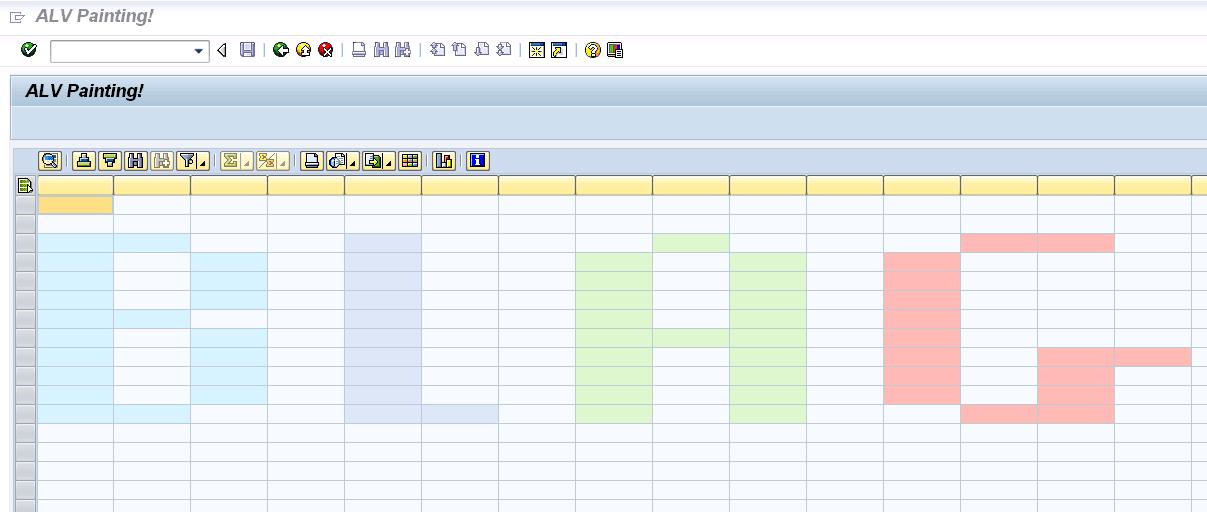
One of my hobbies is to get ABAP to make things that were not really planned in the design of the language...so when I learned how to put colors on ALV cells...I always had the idea to make something using that...so, I came out with a Paint like.

In this scenario, we have 4 available colors, that get activated by doing a doble click on each cell...if the cell is empty...it's color change...if we double click again...the color changes again...and so on until we hit the cell is empty again, so we can start all over again.

Here's a pic, so you can know what I'm talking about...


And this is the source code...I hope you like it -;)


REPORT zalv_painting NO STANDARD PAGE HEADING.

TYPE-POOLS: abap.
CLASS lcl_event_receiver DEFINITION DEFERRED.

DATA: it_fieldcatalog TYPE lvc_t_fcat,
wa_fcat TYPE lvc_s_fcat,
dataref TYPE REF TO data,
new_line TYPE REF TO data,
l_fieldname TYPE string,
data_catalog TYPE REF TO data,
t_stable TYPE STANDARD TABLE OF
lvc_s_stbl WITH HEADER LINE,
ct_fieldcat TYPE lvc_t_fcat,
gs_layout TYPE lvc_s_layo,
gs_variant TYPE disvariant,
custom_container TYPE REF TO
cl_gui_custom_container,
it_color TYPE TABLE OF lvc_s_scol,
it_color_aux TYPE TABLE OF lvc_s_scol,
wa_color_aux TYPE lvc_s_scol,
it_celltab TYPE lvc_t_styl,
event_receiver TYPE REF TO lcl_event_receiver,
grid1 TYPE REF TO cl_gui_alv_grid,
mycontainer TYPE scrfname VALUE 'CUSTOM_ALV',
ls_celltab TYPE lvc_s_styl,
wa_color TYPE lvc_s_scol,
l_color TYPE lvc_col,
l_tabix(2) TYPE c,
ok_code TYPE sy-ucomm,
x_save.

FIELD-SYMBOLS: <row> TYPE table,
<l_line> TYPE ANY,
<l_field> TYPE ANY,
<fs_catalog> TYPE lvc_s_fcat,
<fs_color> LIKE LINE OF it_color,
<fs_color_aux> LIKE LINE OF it_color_aux,
<ct_fieldcat> LIKE LINE OF ct_fieldcat.

*-----------------------------------------------------*
* CLASS LCL_EVENT_RECEIVER DEFINITION *
*-----------------------------------------------------*
CLASS lcl_event_receiver DEFINITION.
PUBLIC SECTION.
METHODS: handle_double_click
FOR EVENT double_click OF cl_gui_alv_grid
IMPORTING e_row e_column.
ENDCLASS. "LCL_EVENT_RECEIVER DEFINITION

*-----------------------------------------------------*
* CLASS lcl_event_receiver IMPLEMENTATION *
*-----------------------------------------------------*
CLASS lcl_event_receiver IMPLEMENTATION.
METHOD handle_double_click.
PERFORM paint_cell USING e_row e_column.
ENDMETHOD. "handle_double_click
ENDCLASS. "LCL_EVENT_RECEIVER IMPLEMENTATION

*=====================================================*
* START-OF-SELECTION *
*=====================================================*
START-OF-SELECTION.
PERFORM create_structure.
PERFORM fill_layout.
PERFORM generate_alv_catalog.
PERFORM call_alv.
CALL SCREEN 0100.

*&----------------------------------------------------*
*& Form CREATE_STRUCTURE *
*&----------------------------------------------------*
FORM create_structure.

DO 20 TIMES.
l_tabix = l_tabix + 1.
CONCATENATE 'FIELD' l_tabix INTO l_fieldname.
wa_fcat-fieldname = l_fieldname.
wa_fcat-ref_table = 'PERF_STRING_STRUCT'.
wa_fcat-ref_field = 'DATA'.
APPEND wa_fcat TO it_fieldcatalog.
ENDDO.

wa_fcat-fieldname = 'COLOR'.
wa_fcat-ref_table = 'PERF_STRING_STRUCT'.
wa_fcat-ref_field = 'DATA'.
APPEND wa_fcat TO it_fieldcatalog.

wa_fcat-fieldname = 'COLOR_CELL'.
wa_fcat-ref_table = 'RESC_DEFAULT_ALV_FIELDS'.
wa_fcat-ref_field = 'COLORTAB'.
APPEND wa_fcat TO it_fieldcatalog.

CALL METHOD cl_alv_table_create=>create_dynamic_table
EXPORTING
it_fieldcatalog = it_fieldcatalog
IMPORTING
ep_table = dataref
EXCEPTIONS
generate_subpool_dir_full = 1
OTHERS = 2.

ASSIGN dataref->* TO <row>.
CREATE DATA new_line LIKE LINE OF <row>.
ASSIGN new_line->* TO <l_line>.

DO 40 TIMES.
INSERT <l_line> INTO TABLE <row>.
ENDDO.

ENDFORM. " CREATE_STRUCTURE

*&----------------------------------------------------*
*& Form FILL_LAYOUT *
*&----------------------------------------------------*
FORM fill_layout.

gs_layout-sel_mode = 'A'.
gs_layout-ctab_fname = 'COLOR_CELL'.

ENDFORM. " FILL_LAYOUT

*&-----------------------------------------------------*
*& Form GENERATE_ALV_CATALOG *
*&-----------------------------------------------------*
FORM generate_alv_catalog.

CREATE DATA data_catalog TYPE lvc_s_fcat.
ASSIGN data_catalog->* TO <fs_catalog>.

CLEAR l_tabix.

DO 20 TIMES.
l_tabix = l_tabix + 1.
CONCATENATE 'FIELD' l_tabix INTO l_fieldname.
APPEND INITIAL LINE TO ct_fieldcat
ASSIGNING <ct_fieldcat>.
<ct_fieldcat>-fieldname = l_fieldname.
ENDDO.

ENDFORM. " GENERATE_ALV_CATALOG

*&------------------------------------------------------*
*& Form CALL_ALV *
*&------------------------------------------------------*
FORM call_alv.

IF custom_container IS INITIAL.
CREATE OBJECT custom_container
EXPORTING
container_name = mycontainer
EXCEPTIONS
cntl_error = 1
cntl_system_error = 2
create_error = 3
lifetime_error = 4
lifetime_dynpro_dynpro_link = 5.
ENDIF.

CREATE OBJECT grid1
EXPORTING
i_parent = custom_container.

CREATE OBJECT event_receiver.

SET HANDLER event_receiver->handle_double_click FOR grid1.

CALL METHOD grid1->set_table_for_first_display
EXPORTING
is_variant = gs_variant
i_save = x_save
i_default = 'X'
is_layout = gs_layout
CHANGING
it_fieldcatalog = ct_fieldcat
it_outtab = <row>.

ENDFORM. " CALL_ALV

*&----------------------------------------------------*
*& Module STATUS_0100 OUTPUT *
*&----------------------------------------------------*
MODULE status_0100 OUTPUT.

SET PF-STATUS '0100'.
SET TITLEBAR 'TITLE'.

ENDMODULE. " STATUS_0100 OUTPUT

*&----------------------------------------------------*
*& Module USER_COMMAND_0100 INPUT *
*&----------------------------------------------------*
MODULE user_command_0100 INPUT.

ok_code = sy-ucomm.

CASE ok_code.
WHEN 'BACK' OR 'STOP' OR 'CANCEL'.
SET SCREEN 0.
LEAVE SCREEN.
ENDCASE.

ENDMODULE. " USER_COMMAND_0100 INPUT

*&----------------------------------------------------*
*& Form PAINT_CELL *
*&----------------------------------------------------*
FORM paint_cell USING p_row
p_column.

READ TABLE <row> ASSIGNING <l_line>
INDEX p_row.
IF sy-subrc EQ 0 AND <l_line> IS ASSIGNED.
ASSIGN COMPONENT 22 OF STRUCTURE <l_line> TO <l_field>.
it_color[] = <l_field>.
READ TABLE it_color ASSIGNING <fs_color>
WITH KEY fname = p_column.
IF sy-subrc EQ 0 AND <fs_color> IS ASSIGNED.
CASE <fs_color>-color-col.
WHEN space or 2.
l_color = 1.
WHEN 1.
l_color = 4.
WHEN 4.
l_color = 5.
WHEN 5.
l_color = 6.
WHEN 6.
l_color = 2. "White
ENDCASE.

MOVE l_color TO <fs_color>-color-col.
MOVE p_column TO <fs_color>-fname.
ELSE.
l_color = 1.
MOVE l_color TO wa_color-color-col.
MOVE p_column TO wa_color-fname.
APPEND wa_color TO it_color.
ENDIF.

ASSIGN COMPONENT 22 OF STRUCTURE <l_line> TO <l_field>.
<l_field> = it_color[].

CALL METHOD grid1->refresh_table_display
EXPORTING
is_stable = t_stable.
ENDIF.

ENDFORM. " PAINT_CELL


Greetings,

Blag.

martes, 30 de noviembre de 2010

Chrstimas Sale!


Starting today and for all December...get a 25% discount in all my books!

Blag en Lulu.com

Go get this awesome sale!

Greetings,

Blag.

miércoles, 10 de noviembre de 2010

XML and RegEx again...


Today I was thinking about XML and RegEx...You can parse an XML document using RegEx, not the best way, but surely is fun...so...what about creating an XML file using RegEx? More fun for sure! -:D Of course...and just to make it clear...there are other more standard and easier ways to achieve the same: Simple Transformations, XLST Transformation y XML DOM.

But as always...this code was very fun to made -;)


TYPES: BEGIN OF TY_XML,
FIELD TYPE STRING,
END OF TY_XML.

DATA: T_DD03P_TAB TYPE STANDARD TABLE OF DD03P,
T_FILETAB TYPE FILETABLE,
T_XML TYPE STANDARD TABLE OF TY_XML.

DATA: L_FLAG TYPE C,
L_AUX TYPE STRING,
L_STRING TYPE STRING,
L_XML_LINE TYPE STRING,
DATA_TAB TYPE REF TO DATA,
SIZE TYPE I,
W_SUBRC TYPE SY-SUBRC,
W_FILE_OUT TYPE STRING.

FIELD-SYMBOLS: TYPE STANDARD TABLE,
TYPE ANY,
TYPE ANY,
LIKE LINE OF T_XML,
LIKE LINE OF T_DD03P_TAB,
LIKE LINE OF T_FILETAB.

SELECTION-SCREEN BEGIN OF BLOCK TEST WITH FRAME.
PARAMETERS:
TABNAME TYPE DD02L-TABNAME,
FILE_OUT LIKE RLGRAP-FILENAME.
SELECTION-SCREEN END OF BLOCK TEST.

START-OF-SELECTION.
PERFORM VALIDATE_TABLE USING TABNAME
CHANGING L_FLAG.
IF L_FLAG EQ SPACE.
PERFORM LOAD_TABLE_STRUCT USING TABNAME.
PERFORM LOAD_TABLE_INFO USING TABNAME.
PERFORM CREATE_XML.
PERFORM DOWNLOAD_XML.
ENDIF.

AT SELECTION-SCREEN ON VALUE-REQUEST FOR FILE_OUT.
CALL METHOD CL_GUI_FRONTEND_SERVICES=>FILE_OPEN_DIALOG
EXPORTING
WINDOW_TITLE = 'Seleccionar archivo'
DEFAULT_FILENAME = '*.xml'
FILE_FILTER = '*.xml'
CHANGING
FILE_TABLE = T_FILETAB
RC = W_SUBRC.

READ TABLE T_FILETAB INDEX 1
ASSIGNING .
FILE_OUT = .
W_FILE_OUT = FILE_OUT.

IF FILE_OUT IS INITIAL.
EXIT.
ENDIF.

*&------------------------------------------------------*
*& Form VALIDATE_TABLE *
*&------------------------------------------------------*
FORM VALIDATE_TABLE USING P_TABNAME
CHANGING P_FLAG.

SELECT SINGLE TABNAME
INTO P_TABNAME
FROM DD02L
WHERE TABNAME EQ P_TABNAME.
IF SY-SUBRC NE 0.
P_FLAG = 'X'.
ELSE.
CLEAR P_FLAG.
ENDIF.

ENDFORM. " VALIDATE_TABLE

*&------------------------------------------------------*
*& Form LOAD_TABLE_STRUCT *
*&------------------------------------------------------*
FORM LOAD_TABLE_STRUCT USING P_TABNAME.

CALL FUNCTION 'DDIF_TABL_GET'
EXPORTING
NAME = P_TABNAME
TABLES
DD03P_TAB = T_DD03P_TAB
EXCEPTIONS
ILLEGAL_INPUT = 1
OTHERS = 2.

ENDFORM. " LOAD_TABLE_STRUCT

*&------------------------------------------------------*
*& Form LOAD_TABLE_INFO *
*&------------------------------------------------------*
FORM LOAD_TABLE_INFO USING P_TABNAME.

CREATE DATA DATA_TAB TYPE STANDARD TABLE OF (P_TABNAME).
ASSIGN DATA_TAB->* TO .
SELECT *
FROM (P_TABNAME)
INTO TABLE .

ENDFORM. " LOAD_TABLE_INFO

*&------------------------------------------------------*
*& Form CREATE_XML *
*&------------------------------------------------------*
FORM CREATE_XML.

APPEND INITIAL LINE TO T_XML ASSIGNING .
-FIELD = ''.
APPEND INITIAL LINE TO T_XML ASSIGNING .
-FIELD = ''.
*XML Logic here!
LOOP AT ASSIGNING .
L_XML_LINE = ''.
LOOP AT T_DD03P_TAB ASSIGNING .
ASSIGN COMPONENT -FIELDNAME OF
STRUCTURE TO .
L_AUX = .
CONDENSE L_AUX NO-GAPS.
CONCATENATE -FIELDNAME '/' L_AUX
INTO L_STRING.
REPLACE REGEX '(\w+)[\/](\w+)' IN L_STRING
WITH '<$1>$2'.
CONCATENATE L_XML_LINE L_STRING INTO L_XML_LINE.
ENDLOOP.
APPEND INITIAL LINE TO T_XML ASSIGNING .
-FIELD = L_XML_LINE.
CONCATENATE -FIELD '
'
INTO -FIELD.
ENDLOOP.
*XML Logic here!
APPEND INITIAL LINE TO T_XML ASSIGNING .
-FIELD = '
'.

ENDFORM. " CREATE_XML

*&------------------------------------------------------*
*& Form DOWNLOAD_XML *
*&------------------------------------------------------*
FORM DOWNLOAD_XML.

CALL METHOD CL_GUI_FRONTEND_SERVICES=>GUI_DOWNLOAD
EXPORTING
BIN_FILESIZE = SIZE
FILENAME = W_FILE_OUT
FILETYPE = 'DAT'
CHANGING
DATA_TAB = T_XML.

ENDFORM. " DOWNLOAD_XML


Greetings,

Blag.

jueves, 4 de noviembre de 2010

Programming non-sense #1


With this post, I want to start a small series about ABAP programs that doesn't bring any value but are fun to code -:) I believe that ABAP coding is fun...believe it or not...

Anyway...my first code, that by the way doesn't work in the best possible way, it's a clock...we simply read the system time and show it on digital form...then, we activate a temporizer that it's going to be executed every second and it's going to read again the system timeand show it on digital format...of course, as we don't have in ABAP and CLRSCR(); or an CLS, we must read every line and modify their contents.


DATA: temporizador TYPE REF TO cl_gui_timer,
hour(2) TYPE c,
minute(2) TYPE c,
second(2) TYPE c,
one(1) TYPE c,
two(1) TYPE c,
line1 TYPE string,
line2 TYPE string,
line3 TYPE string.

*----------------------------------------------------------------------*
* CLASS clock DEFINITION *
*----------------------------------------------------------------------*
CLASS clock DEFINITION.
PUBLIC SECTION.
METHODS: zero IMPORTING line TYPE string,
one IMPORTING line TYPE string,
two IMPORTING line TYPE string,
three IMPORTING line TYPE string,
four IMPORTING line TYPE string,
five IMPORTING line TYPE string,
six IMPORTING line TYPE string,
seven IMPORTING line TYPE string,
eight IMPORTING line TYPE string,
nine IMPORTING line TYPE string,
periods IMPORTING line TYPE string,
show IMPORTING number TYPE c.
ENDCLASS. "clock DEFINITION

*----------------------------------------------------------------------*
* CLASS clock IMPLEMENTATION *
*----------------------------------------------------------------------*
CLASS clock IMPLEMENTATION.
METHOD zero.
CASE line.
WHEN 1.
CONCATENATE line1 ' _ ' INTO line1 SEPARATED BY space RESPECTING BLANKS.
WHEN 2.
CONCATENATE line2 '| |' INTO line2 SEPARATED BY space RESPECTING BLANKS.
WHEN 3.
CONCATENATE line3 '|_|' INTO line3 SEPARATED BY space RESPECTING BLANKS.
ENDCASE.
ENDMETHOD. "zero
METHOD one.
CASE line.
WHEN 1.
CONCATENATE line1 ' ' INTO line1 SEPARATED BY space RESPECTING BLANKS.
WHEN 2.
CONCATENATE line2 ' |' INTO line2 SEPARATED BY space RESPECTING BLANKS.
WHEN 3.
CONCATENATE line3 ' |' INTO line3 SEPARATED BY space RESPECTING BLANKS.
ENDCASE.
ENDMETHOD. "one
METHOD two.
CASE line.
WHEN 1.
CONCATENATE line1 ' _ ' INTO line1 SEPARATED BY space RESPECTING BLANKS.
WHEN 2.
CONCATENATE line2 ' _|' INTO line2 SEPARATED BY space RESPECTING BLANKS.
WHEN 3.
CONCATENATE line3 '|_ ' INTO line3 SEPARATED BY space RESPECTING BLANKS.
ENDCASE.
ENDMETHOD. "two
METHOD three.
CASE line.
WHEN 1.
CONCATENATE line1 ' _ ' INTO line1 SEPARATED BY space RESPECTING BLANKS.
WHEN 2.
CONCATENATE line2 ' _|' INTO line2 SEPARATED BY space RESPECTING BLANKS.
WHEN 3.
CONCATENATE line3 ' _|' INTO line3 SEPARATED BY space RESPECTING BLANKS.
ENDCASE.
ENDMETHOD. "three
METHOD four.
CASE line.
WHEN 1.
CONCATENATE line1 ' ' INTO line1 SEPARATED BY space RESPECTING BLANKS.
WHEN 2.
CONCATENATE line2 '|_|' INTO line2 SEPARATED BY space RESPECTING BLANKS.
WHEN 3.
CONCATENATE line3 ' |' INTO line3 SEPARATED BY space RESPECTING BLANKS.
ENDCASE.
ENDMETHOD. "four
METHOD five.
CASE line.
WHEN 1.
CONCATENATE line1 ' _ ' INTO line1 SEPARATED BY space RESPECTING BLANKS.
WHEN 2.
CONCATENATE line2 '|_ ' INTO line2 SEPARATED BY space RESPECTING BLANKS.
WHEN 3.
CONCATENATE line3 ' _|' INTO line3 SEPARATED BY space RESPECTING BLANKS.
ENDCASE.
ENDMETHOD. "five
METHOD six.
CASE line.
WHEN 1.
CONCATENATE line1 ' _ ' INTO line1 SEPARATED BY space RESPECTING BLANKS.
WHEN 2.
CONCATENATE line2 '|_ ' INTO line2 SEPARATED BY space RESPECTING BLANKS.
WHEN 3.
CONCATENATE line3 '|_|' INTO line3 SEPARATED BY space RESPECTING BLANKS.
ENDCASE.
ENDMETHOD. "six
METHOD seven.
CASE line.
WHEN 1.
CONCATENATE line1 '_ ' INTO line1 SEPARATED BY space RESPECTING BLANKS.
WHEN 2.
CONCATENATE line2 ' | ' INTO line2 SEPARATED BY space RESPECTING BLANKS.
WHEN 3.
CONCATENATE line3 ' | ' INTO line3 SEPARATED BY space RESPECTING BLANKS.
ENDCASE.
ENDMETHOD. "seven
METHOD eight.
CASE line.
WHEN 1.
CONCATENATE line1 ' _ ' INTO line1 SEPARATED BY space RESPECTING BLANKS.
WHEN 2.
CONCATENATE line2 '|_|' INTO line2 SEPARATED BY space RESPECTING BLANKS.
WHEN 3.
CONCATENATE line3 '|_|' INTO line3 SEPARATED BY space RESPECTING BLANKS.
ENDCASE.
ENDMETHOD. "eight
METHOD nine.
CASE line.
WHEN 1.
CONCATENATE line1 ' _ ' INTO line1 SEPARATED BY space RESPECTING BLANKS.
WHEN 2.
CONCATENATE line2 '|_|' INTO line2 SEPARATED BY space RESPECTING BLANKS.
WHEN 3.
CONCATENATE line3 ' _|' INTO line3 SEPARATED BY space RESPECTING BLANKS.
ENDCASE.
ENDMETHOD. "nine
METHOD periods.
CASE line.
WHEN 1.
CONCATENATE line1 ' ' INTO line1 SEPARATED BY space RESPECTING BLANKS.
WHEN 2.
CONCATENATE line2 ' * ' INTO line2 SEPARATED BY space RESPECTING BLANKS.
WHEN 3.
CONCATENATE line3 ' * ' INTO line3 SEPARATED BY space RESPECTING BLANKS.
ENDCASE.
ENDMETHOD. "periods
METHOD show.
CASE number.
WHEN 0.
zero( EXPORTING line = '1' ).
zero( EXPORTING line = '2' ).
zero( EXPORTING line = '3' ).
WHEN 1.
one( EXPORTING line = '1' ).
one( EXPORTING line = '2' ).
one( EXPORTING line = '3' ).
WHEN 2.
two( EXPORTING line = '1' ).
two( EXPORTING line = '2' ).
two( EXPORTING line = '3' ).
WHEN 3.
three( EXPORTING line = '1' ).
three( EXPORTING line = '2' ).
three( EXPORTING line = '3' ).
WHEN 4.
four( EXPORTING line = '1' ).
four( EXPORTING line = '2' ).
four( EXPORTING line = '3' ).
WHEN 5.
five( EXPORTING line = '1' ).
five( EXPORTING line = '2' ).
five( EXPORTING line = '3' ).
WHEN 6.
six( EXPORTING line = '1' ).
six( EXPORTING line = '2' ).
six( EXPORTING line = '3' ).
WHEN 7.
seven( EXPORTING line = '1' ).
seven( EXPORTING line = '2' ).
seven( EXPORTING line = '3' ).
WHEN 8.
eight( EXPORTING line = '1' ).
eight( EXPORTING line = '2' ).
eight( EXPORTING line = '3' ).
WHEN 9.
nine( EXPORTING line = '1' ).
nine( EXPORTING line = '2' ).
nine( EXPORTING line = '3' ).
ENDCASE.
ENDMETHOD. "show
ENDCLASS. "clock IMPLEMENTATION

*----------------------------------------------------------------------*
* CLASS lcl_event_handler DEFINITION *
*----------------------------------------------------------------------*
CLASS lcl_event_handler DEFINITION.
PUBLIC SECTION.
CLASS-METHODS: on_timer FOR EVENT finished OF cl_gui_timer
IMPORTING sender.
ENDCLASS. "lcl_event_handler DEFINITION

*----------------------------------------------------------------------*
* CLASS lcl_event_handler IMPLEMENTATION *
*----------------------------------------------------------------------*
CLASS lcl_event_handler IMPLEMENTATION.
METHOD on_timer.
DATA: g_clock TYPE REF TO clock.

IF NOT g_clock IS BOUND.
CREATE OBJECT g_clock.
ENDIF.

CLEAR: line1, line2, line3.

hour = sy-uzeit+0(2).
one = hour+0(1).
g_clock->show( EXPORTING number = one ).
two = hour+1(1).
g_clock->show( EXPORTING number = two ).
g_clock->periods( EXPORTING line = '1' ).
g_clock->periods( EXPORTING line = '2' ).
g_clock->periods( EXPORTING line = '3' ).
minute = sy-uzeit+2(2).
one = minute+0(1).
g_clock->show( EXPORTING number = one ).
two = minute+1(1).
g_clock->show( EXPORTING number = two ).
g_clock->periods( EXPORTING line = '1' ).
g_clock->periods( EXPORTING line = '2' ).
g_clock->periods( EXPORTING line = '3' ).
second = sy-uzeit+4(2).
one = second+0(1).
g_clock->show( EXPORTING number = one ).
two = second+1(1).
g_clock->show( EXPORTING number = two ).

READ LINE 1.
MODIFY LINE 1 FIELD VALUE line1 FROM line1.
READ LINE 2.
MODIFY LINE 2 FIELD VALUE line2 FROM line2.
READ LINE 3.
MODIFY LINE 3 FIELD VALUE line3 FROM line3.

sender->run( ).
ENDMETHOD.
ENDCLASS.

START-OF-SELECTION.
CREATE OBJECT temporizador.
SET HANDLER lcl_event_handler=>on_timer FOR temporizador.

temporizador->interval = 1.
temporizador->run( ).

DATA: g_clock TYPE REF TO clock.
CREATE OBJECT g_clock.

hour = sy-uzeit+0(2).
one = hour+0(1).
g_clock->show( EXPORTING number = one ).
two = hour+1(1).
g_clock->show( EXPORTING number = two ).
g_clock->periods( EXPORTING line = '1' ).
g_clock->periods( EXPORTING line = '2' ).
g_clock->periods( EXPORTING line = '3' ).
minute = sy-uzeit+2(2).
one = minute+0(1).
g_clock->show( EXPORTING number = one ).
two = minute+1(1).
g_clock->show( EXPORTING number = two ).
g_clock->periods( EXPORTING line = '1' ).
g_clock->periods( EXPORTING line = '2' ).
g_clock->periods( EXPORTING line = '3' ).
second = sy-uzeit+4(2).
one = second+0(1).
g_clock->show( EXPORTING number = one ).
two = second+1(1).
g_clock->show( EXPORTING number = two ).

WRITE:/ line1.
WRITE:/ line2.
WRITE:/ line3.


Greetings,

Blag.