viernes, 15 de julio de 2011

wxPython and SAP


Original Post: Tasting the mix of Python and SAP - Volume 3

Hello and welcome back to this little corner of Scripting Languages fun -:)

Today, we're going to see how can we use wxPython and SAP to make an SE16 emulation.

So, what's wxPython? It's a Python wrapper of the C++'s wxWidgets that allows us to create rich UI applications.

For this blog I was tempted to use Tkinter but gotta admit that I like wxPython more...as I have already used it in my Ruby projects. Anyway in Ruby it was a little bit easier than in Python -:P

Enough talk, let's go to the source code...(That could fit nice on a T-Shirt, right?)

Again, and as always in my Python/SAP projects...I used YAML to host the SAP connections parameters.

sap.yml

ashost: localhost
sysnr: "00"
client: "001"
lang: EN
trace: 1
loglevel: warn

SE16_wxPython.py

import wx
import sapnwrfc
import wx.grid as wxGrid

conn = ""
table = ""


class MyApp(wx.App):

def OnInit(self):
self.frame = MyFrame(None, title="Login")
self.SetTopWindow(self.frame)
self.frame.Show()
return True


class MyFrame(wx.Frame):

def __init__(self, parent, id=wx.ID_ANY, title="",
pos=wx.DefaultPosition, size=(210, 150),
style=wx.DEFAULT_FRAME_STYLE,
name="MyFrame"):
super(MyFrame, self).__init__(parent, id, title, pos,
size, style, name)

self.panel = wx.Panel(self)
self.text_font = wx.Font(12, wx.DEFAULT, wx.NORMAL, wx.NORMAL)
self.t_user = wx.StaticText(self.panel, -1, "User",
size=(40, 20), pos=(10, 12))
self.t_password = wx.StaticText(self.panel, -1, "Password",
size=(40, 20), pos=(10, 32))
self.t_user.SetFont(self.text_font)
self.t_password.SetFont(self.text_font)
self.user = wx.TextCtrl(self.panel, value="", pos=(90, 10))
self.password = wx.TextCtrl(self.panel, value="",
pos=(90, 30),
style=wx.TE_PASSWORD)
self.btnConnect = wx.Button(self.panel, label="Connect",
pos=(70, 80))

self.Bind(wx.EVT_BUTTON, self.OnButtonConnect,
self.btnConnect)

def OnButtonConnect(self, event):
global conn
user = self.user.GetValue()
password = self.password.GetValue()
sapnwrfc.base.config_location = "sap.yml"
sapnwrfc.base.load_config()
conn = sapnwrfc.base.rfc_connect({'user': user,
'passwd': password})
self.Close()
myGrid = GridFrame(None, title="SE16 Emulator")
myGrid.Show()


class GridFrame(wx.Frame):

def __init__(self, parent, id=wx.ID_ANY, title="",
pos=wx.DefaultPosition, size=(600, 400),
style=wx.DEFAULT_FRAME_STYLE,
name="GridFrame"):
super(GridFrame, self).__init__(parent, id, title, pos,
size, style, name)

self.panel = wx.Panel(self)
self.text_font = wx.Font(12, wx.DEFAULT, wx.NORMAL, wx.NORMAL)
self.t_table = wx.StaticText(self.panel, -1, "Table",
size=(40, 20), pos=(180, 12))
self.t_table.SetFont(self.text_font)
self.table = wx.TextCtrl(self.panel, value="", pos=(225, 10))
self.btnShow = wx.Button(self.panel, label="Show Table",
pos=(330, 10))

self.Bind(wx.EVT_BUTTON, self.OnButtonShow, self.btnShow)

def OnButtonShow(self, event):
global conn
table = self.table.GetValue()
fields = []
fields_name = []
func_disc = conn.discover("RFC_READ_TABLE")
func = func_disc.create_function_call()
func.QUERY_TABLE(str(table))
func.DELIMITER("|")
func.invoke()
data_fields = func.DATA.value
data_names = func.FIELDS.value
long_fields = len(func.DATA())
long_names = len(func.FIELDS())

for line in range(0, long_fields):
fields.append(data_fields[line]["WA"].strip())
for line in range(0, long_names):
fields_name.append(data_names[line]["FIELDNAME"].strip())

self.grid = wxGrid.Grid(self.panel, pos=(0, 40),
size=(853, 320))
self.grid.EnableEditing(False)
self.grid.CreateGrid(long_fields, long_names)

for line in range(0, long_names):
field_name = fields_name[line]
self.grid.SetColLabelValue(line, field_name)
for line_f in range(0, long_fields):
data_split = fields[line_f].split("|")
for line_n in range(0, long_names):
self.grid.SetCellValue(line_f, line_n,
data_split[line_n])

def onClose(self, event):
global conn
conn.close()


if __name__ == "__main__":
app = MyApp(False)
app.MainLoop() 

Now, the images:


So basically, what we have here is a Login screen with the Username and Password and a connection button. When we connect to SAP, then the window dissapeared and a new window pops out. This new windows ask us for a table name and displays a grid containing all the information.

See ya next time -;)

Blag.

lunes, 4 de julio de 2011

Decimals to Romans and LCD Number in Python


As part of my Python learning, I'm taking my old Ruby codes and ported them to Python...and believe me...there's no better way to learn -:)

The first program that I took off was Decimals to Romans, which I discovered that wasn't working right for big numbers -:( After a few tweaks on Python, it's ready for action -;)


Roman_Table = {1000: 'M', 900: 'CM', 500: 'D', 400: 'CD',
100: 'C', 90: 'XC', 50: 'L', 40: 'XL',
10: 'X', 9: 'IX', 5: 'V', 4: 'IV', 1: 'I'}

global result
keys = []

def reverse_numeric(x, y):
return y - x

def Roman_Number(number):
result = ""
keys = Roman_Table.keys()
keys = sorted(keys, cmp=reverse_numeric)
while number > 0:
for i in keys:
if number >= i:
result += str(Roman_Table.get(i, 0))
number -= i
break
return result

number = input("\nEnter a number: ")
result = Roman_Number(number)
print ("\n" + result)


The next one was LCD Numbers which believe it or not...I manage to cut down from the 160 lines of Ruby code, to only 35 lines...awesome, right?


global line1, line2, line3

line1 = ""
line2 = ""
line3 = ""

zero = {1: ' _ ', 2: '| | ', 3: '|_| '}
one = {1: ' ', 2: '| ', 3: '| '}
two = {1: ' _ ', 2: ' _| ', 3: '|_ '}
three = {1: '_ ', 2: '_| ', 3: '_| '}
four = {1: ' ', 2: '|_| ', 3: ' | '}
five = {1: ' _ ', 2: '|_ ', 3: ' _| '}
six = {1: ' _ ', 2: '|_ ', 3: '|_| '}
seven = {1: '_ ', 2: ' | ', 3: ' | '}
eight = {1: ' _ ', 2: '|_| ', 3: '|_| '}
nine = {1: ' _ ', 2: '|_| ', 3: ' _| '}

num_lines = {0: zero, 1: one, 2: two, 3: three, 4: four,
5: five, 6: six, 7: seven, 8: eight, 9: nine}

def Lines(number):
global line1, line2, line3
line1 += number.get(1, 0)
line2 += number.get(2, 0)
line3 += number.get(3, 0)

number = str(input("\nEnter a number: "))
length = len(number)
for i in range(0, length):
Lines(num_lines.get(int(number[i:i+1]), 0))

print ("\n")
print line1
print line2
print line3
print ("\n")


I'm really sorry about Ruby, because I still love it...but Python is making so much efforts to become my scripting language of choice -;)

Greetings,

Blag.

miércoles, 22 de junio de 2011

Python, EasyGui and SAP


Original Post: Tasting the mix of Python and SAP - Volume 2

This blog post continues my Python learning adventures, and as I love Web Micro Frameworks, I also love simple graphical frameworks...this time, we're going to use EasyGui, which is wrapper for Tkinter which is also a layer for Tk.

So what's the fuzz about EasyGui? Well...it's an easy way to do GUI's...got it? Easy-Gui...

Anyway, it's not as complete as TKinter but it's for sure easier to learn and easier to develop. Enough talk...let's see the source code...

First, I used Yaml again to hide most of the connection parameters from the user.


ashost: localhost
sysnr: "00"
client: "001"
lang: EN
trace: 1
loglevel: warn

SE16_EasyGui.py

from easygui import *
import sapnwrfc

TITLE = "Python (Easy Gui) & SAP - SE16 Emulator"
conn = ""
table = ""


def Login():
global conn
msg = "Python (Easy Gui) & SAP - SE16 Emulator"
title = "Login"
fieldNames = ["User", "Passwd"]
fieldValues = []
fieldValues = multpasswordbox(msg, title, fieldNames)
user, passwd = fieldValues[0], fieldValues[1]
sapnwrfc.base.config_location = "sap.yml"
sapnwrfc.base.load_config()
conn = sapnwrfc.base.rfc_connect({'user': user, 'passwd': passwd})
ChooseTable()


def ChooseTable():
global table
table = enterbox("Show Table")
if table != " ":
ShowTable()


def ShowTable():
global conn, table
fields = []
fields_name = []
fields_length = []
output = []
header = ""
lines = ""
separator = ""
counter = 0
func_disc = conn.discover("RFC_READ_TABLE")
func = func_disc.create_function_call()
func.QUERY_TABLE(table)
func.DELIMITER("|")
func.invoke()
data_fields = func.DATA.value
data_names = func.FIELDS.value
long_fields = len(func.DATA())
long_names = len(func.FIELDS())

for line in range(0, long_fields):
fields.append(data_fields[line]["WA"].strip())
for line in range(0, long_names):
counter = counter + 1
fields_name.append(data_names[line]["FIELDNAME"].strip())
fields_length.append(data_names[line]["LENGTH"].strip())

for line in range(0, long_names):
field_name = fields_name[line]
field_length = fields_length[line]
if len(field_name) > field_length:
field_length = len(field_name)
field_length = int(field_length) - len(field_name)
spaces = " " * int(field_length)
counter = counter + len(field_name) + len(spaces)
header = header + field_name + spaces + "|"

separator = "-" * counter
output.append(header)
output.append(separator)

for line in range(0, long_fields):
lines = ""
field_length = ""
spaces = ""
data_split = fields[line].split("|")
for line in range(0, long_names):
field_name = fields_name[line]
field_length = fields_length[line]
if len(field_name) > int(field_length):
field_length = len(field_name)
field_length = int(field_length) -
len(data_split[line])
else:
field_length = 0
spaces = " " * int(field_length)
lines = lines + data_split[line] + spaces + "|"
output.append(lines)


codebox("", TITLE, "\n".join(output))

if __name__ == "__main__":
Login()

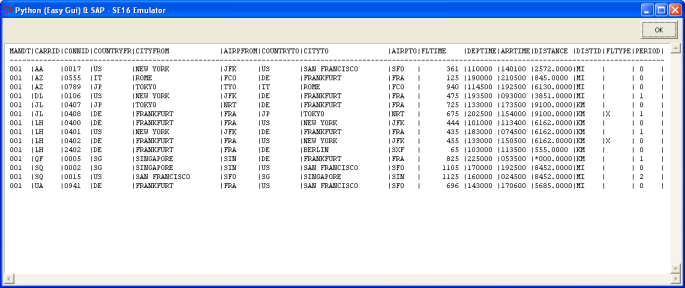
Now, some images of course -:)


Hope you like this one...see ya next time...

Greetings,

Blag.

Python, Bottle, Flask and SAP


Original post: Tasting the mix of Python and SAP

It's been a very long time since my last "Tasting the mix of" blog post...but here we are to change that -;)

Lately, I have been learning Python...a sexy, powerful and easy to learn programming language...so of course...every time I learn something new, I want to apply it to the SAP world...and lucky me, Piers Harding had already creating an Python SAPRfc connector -:D

So, with everything setup and working I proceeded to start working on the SE16 emulator using the DOS screen...but then I realized that even when didn't do an SE16, my good friend David Hull was already using Python, SAPRfc and DOS screen in his blog entitled Python and SAP Adventures.

As I had already worked with Micro Frameworks in Ruby, I thought it was a good idea to implement the same using Python...so after my research I found two nice candidates (Take note that I love Micro Frameworks and not so streamed Frameworks...meaning that I don't like, don't know and don't use Rails or Djanjo...I like to keep it simple).

These Micro Frameworks are called Bottle and Flask (Weird name, huh?).

So, to make things simple, I used the YAML approach, where we use a configuration like file where we are going to put our connection strings...something like the SAPLogon.ini


ashost: localhost
sysnr: "00"
client: "001"
lang: EN
trace: 1
loglevel: warn

For the source codes, let's start with Bottle.

SE16_Bottle.py

from bottle import get, post, request, run, redirect, route
import sapnwrfc

conn = ""


@get('/login')
def login_form():
return '''<DIV ALIGN='CENTER'><BR><BR><BR><BR>
<H1>Python (Bottle) & SAP - SE16 Emulator</H1>
<BR><TABLE BORDER='1' BORDERCOLOR='BLUE'
BGCOLOR='WHITE'>
<FORM METHOD='POST'>
<TR><TD>User</TD><TD>
<INPUT TYPE='TEXT' NAME='User'></TD></TR>
<TR><TD>Password</TD>
<TD><INPUT TYPE='PASSWORD' NAME='Passwd'></TD></TR>
<TR><TD COLSPAN='2' ALIGN='CENTER'>
<INPUT TYPE='SUBMIT' value='Log In' NAME='LOG_IN'>
<INPUT TYPE='RESET' value='Clear'></TD></TR>
</FORM>
<TABLE>
</DIV>'''


@post('/login')
def login_submit():
global conn
user = request.forms.get('User')
passwd = request.forms.get('Passwd')
sapnwrfc.base.config_location = "sap.yml"
sapnwrfc.base.load_config()
conn = sapnwrfc.base.rfc_connect({'user': user, 'passwd': passwd})
redirect("/choose")


@get('/choose')
def choose_table():
return '''<CENTER>
<FORM METHOD='POST'>
<INPUT TYPE='TEXT' NAME='Table'><BR>
<INPUT TYPE='SUBMIT' value='Show Table'
NAME='Show_Table'>
</FORM>
</CENTER>'''


@post('/choose')
def show_table():
global conn
fields = []
fields_name = []
table = request.forms.get('Table')
func_disc = conn.discover("RFC_READ_TABLE")
func = func_disc.create_function_call()
func.QUERY_TABLE(table)
func.DELIMITER("|")
func.invoke()
data_fields = func.DATA.value
data_names = func.FIELDS.value
long_fields = len(func.DATA())
long_names = len(func.FIELDS())

for line in range(0, long_fields):
fields.append(data_fields[line]["WA"].strip())
for line in range(0, long_names):
fields_name.append(data_names[line]["FIELDNAME"].strip())

output = "<table border='1'><tr>"
for line in range(0, long_names):
field_name = fields_name[line]
output += "<th> %s </th>" % field_name
output += "</tr>"
for line in range(0, long_fields):
output += "<tr>"
data_split = fields[line].split("|")
for line in range(0, long_names):
output += "<td> %s </td>" % data_split[line]
output += "</tr>"
output += "</table>"
return output
conn.close()

run(host='localhost', port=8080)


Now, let's continue with Flask:

SE16_Flask.py

from flask import Flask, redirect, request
import sapnwrfc
app = Flask(__name__)

conn = ""


@app.route("/")
def login():
return '''<DIV ALIGN='CENTER'><BR><BR><BR><BR>
<H1>Python (Flask) & SAP - SE16 Emulator</H1>
<BR><TABLE BORDER='1' BORDERCOLOR='BLUE'
BGCOLOR='WHITE'>
<FORM ACTION='/login_submit' METHOD='POST'>
<TR><TD>User</TD><TD>
<INPUT TYPE='TEXT' NAME='User'></TD></TR>
<TR><TD>Password</TD>
<TD><INPUT TYPE='PASSWORD' NAME='Passwd'></TD></TR>
<TR><TD COLSPAN='2' ALIGN='CENTER'>
<INPUT TYPE='SUBMIT' value='Log In' NAME='LOG_IN'>
<INPUT TYPE='RESET' value='Clear'></TD></TR>
</FORM>
<TABLE>
</DIV>'''


@app.route("/login_submit", methods=['GET', 'POST'])
def login_submit():
global conn
if request.method == 'POST':
user = request.form['User']
passwd = request.form['Passwd']
sapnwrfc.base.config_location = "sap.yml"
sapnwrfc.base.load_config()
conn = sapnwrfc.base.rfc_connect({'user': user,
'passwd': passwd})
return redirect("/choose")


@app.route("/choose")
def choose_table():
return '''<CENTER>
<FORM ACTION='/show' METHOD='POST'>
<INPUT TYPE='TEXT' NAME='Table'><BR>
<INPUT TYPE='SUBMIT' value='Show Table'
NAME='Show_Table'>
</FORM>
</CENTER>'''


@app.route("/show", methods=['GET', 'POST'])
def show_table():
global conn
if request.method == 'POST':
fields = []
fields_name = []
table = str(request.form['Table'])
func_disc = conn.discover("RFC_READ_TABLE")
func = func_disc.create_function_call()
func.QUERY_TABLE(table)
func.DELIMITER("|")
func.invoke()
data_fields = func.DATA.value
data_names = func.FIELDS.value
long_fields = len(func.DATA())
long_names = len(func.FIELDS())

for line in range(0, long_fields):
fields.append(data_fields[line]["WA"].strip())
for line in range(0, long_names):
fields_name.append(data_names[line]["FIELDNAME"].strip())

output = "<table border='1'><tr>"
for line in range(0, long_names):
field_name = fields_name[line]
output += "<th> %s </th>" % field_name
output += "</tr>"
for line in range(0, long_fields):
output += "<tr>"
data_split = fields[line].split("|")
for line in range(0, long_names):
output += "<td> %s </td>" % data_split[line]
output += "</tr>"
output += "</table>"
return output
conn.close()

if __name__ == "__main__":
app.run()


Same output, different Micro Frameworks...nice, isn't it?

See you soon with another recipe for the "Tasting the mix of..."

Greetings,

Blag.

viernes, 20 de mayo de 2011

Tic-Tac-Toe - A Python game


Python? Is that one of the coolest programming languages? Yes it is -:)
So yes, I started learning Python a couple of weeks ago...a month maybe...so how did it started?

I knew Python by name for quite a long time ago...doing Ruby stuff I knew that Ruby inherit a lot from Python (from Perl as well), but I never give it too much of attention.

One day, I said to myself...you must try Python dude! It looks like a nice one...so I put myself in the journey of learning a new programming language.
Most Python people say "Python is easy to learn, it's sexy, it makes write beautiful code"...and you know what? It's damn true -:)

So, as part of my learning process I took a Tic-Tac-Toe I made on Ruby 5 years ago and ported to Python...believe or not...the code is more robust and I managed to cut to 38 less lines...nice, huh?

So here's the code...and keep in mind that I'm a Python newbie...so don't came to me with your "Oh, if you were a real Pythonist, you should thing like this"...because I'm not a Pythonist...at least not yet -;) I'm an ABAPist -:P


#TIC_TAC_TOE
#Made by Blag - 2011

game = False
coordenates = ""
player_won = ""
player_turn = "1"
line1 = ""
line2 = ""
line3 = ""
line4 = ""
line5 = ""

board_array = [" ", " ", " ", " ", " ", " ", " ", " ", " "]
played_moves = [" ", " ", " ", " ", " ", " ", " ", " ", " "]


def clean_lines():
line1 = " "
line2 = " "
line3 = " "
line4 = " "
line5 = " "


def initial_board():
clean_lines()
line1 = " | | "
line2 = "---+---+---"
line3 = " | | "
line4 = "---+---+---"
line5 = " | | "

print "\n"
print (line1)
print (line2)
print (line3)
print (line4)
print (line5)
print "\n"


def board(coordenates, player):
clean_lines()

if board_array[coordenates] == " ":
board_array[coordenates] = player
else:
cheat = True

Move_1 = board_array[0]
Move_2 = board_array[1]
Move_3 = board_array[2]
Move_4 = board_array[3]
Move_5 = board_array[4]
Move_6 = board_array[5]
Move_7 = board_array[6]
Move_8 = board_array[7]
Move_9 = board_array[8]

print "\n"
print " %s | %s | %s " % (Move_1, Move_2, Move_3)
print "---+---+---"
print " %s | %s | %s " % (Move_4, Move_5, Move_6)
print "---+---+--- "
print " %s | %s | %s " % (Move_7, Move_8, Move_9)
print "\n\n"


def print_winner(player):
print "Player ", player, " won\n\n"


def check_who_wins():
game = False
if (board_array[0] != " " and board_array[0] == board_array[1] and
board_array[1] == board_array[2]):
game = True
if board_array[0] == "*":
print_winner(1)
else:
print_winner(2)

if (board_array[3] != " " and board_array[3] == board_array[4] and
board_array[4] == board_array[5]):
game = True
if board_array[3] == "*":
print_winner(1)
else:
print_winner(2)

if (board_array[0] != " " and board_array[0] == board_array[3] and
board_array[3] == board_array[6]):
game = True
if board_array[0] == "*":
print_winner(1)
else:
print_winner(2)

if (board_array[1] != " " and board_array[1] == board_array[4] and
board_array[4] == board_array[7]):
game = True
if board_array[1] == "*":
print_winner(1)
else:
print_winner(2)

if (board_array[2] != " " and board_array[2] == board_array[5] and
board_array[5] == board_array[8]):
game = True

if board_array[2] == "*":
print_winner(1)
else:
print_winner(2)

if (board_array[0] != " " and board_array[0] == board_array[4] and
board_array[4] == board_array[8]):
game = True
if board_array[0] == "*":
print_winner(1)
else:
print_winner(2)

if (board_array[2] != " " and board_array[2] == board_array[4] and
board_array[4] == board_array[6]):
game = True
if board_array[2] == "*":
print_winner(1)
else:
print_winner(2)

wins = 0

for board in board_array:
if board != " ":
wins += 1

if wins == 9:
game = True
print "It's a Tie'.\n\n"

return game


def make_move(player_turn, game, coordenates):
index_coordenates = 0
if game == False:
cheat = False
if player_turn == "1":
coordenates = input("Player 1: ")
coordenates = coordenates
if coordenates <= 0 or coordenates > 9:
print "Please, only values from 1 to 9\n"
make_move(player_turn, game, coordenates)
for moves in played_moves:
if moves == coordenates:
cheat = True
if cheat == True:
cheat = False
print "That move was already made!\n"
make_move(player_turn, game, coordenates)
index_coordenates = coordenates - 1
played_moves[index_coordenates] = coordenates
player = "*"
board(index_coordenates, player)
game = check_who_wins()

if game == False:
cheat = False
player_turn = "2"
if player_turn == "2":
coordenates = input("Player 2: ")
coordenates = coordenates
if coordenates <= 0 or coordenates > 9:
print "Please, only values from 1 to 9\n"
make_move(player_turn, game, coordenates)

for moves in played_moves:
if moves == coordenates:
cheat = True

if cheat == True:
cheat = False
print "That move was already made!\n"
make_move(player_turn, game, coordenates)

index_coordenates = coordenates - 1
played_moves[index_coordenates] = coordenates
player = "O"
board(index_coordenates, player)
game = check_who_wins()
player_turn = "1"
return game

initial_board()


while(game == False):
game = make_move(player_turn, game, coordenates)


Greetings,

Blag.

domingo, 13 de febrero de 2011

Regular Expressions Book


My newest book is ready to be bought -;)


Printed Book
PDF
Ebook

Enjoy!

Greetings,

Blag.

jueves, 2 de diciembre de 2010

Programming non-sense #2


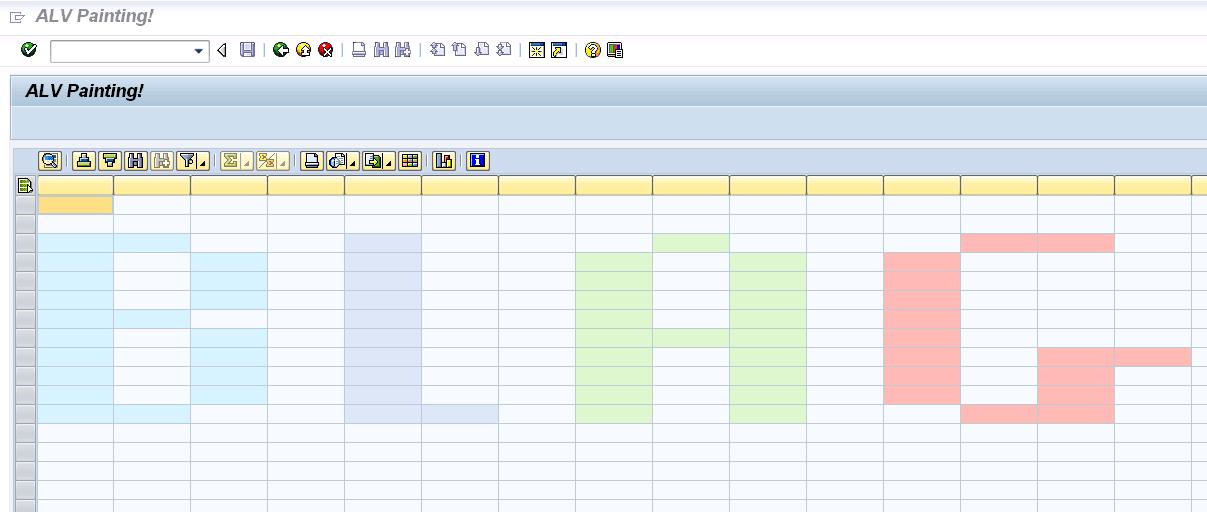
One of my hobbies is to get ABAP to make things that were not really planned in the design of the language...so when I learned how to put colors on ALV cells...I always had the idea to make something using that...so, I came out with a Paint like.

In this scenario, we have 4 available colors, that get activated by doing a doble click on each cell...if the cell is empty...it's color change...if we double click again...the color changes again...and so on until we hit the cell is empty again, so we can start all over again.

Here's a pic, so you can know what I'm talking about...


And this is the source code...I hope you like it -;)


REPORT zalv_painting NO STANDARD PAGE HEADING.

TYPE-POOLS: abap.
CLASS lcl_event_receiver DEFINITION DEFERRED.

DATA: it_fieldcatalog TYPE lvc_t_fcat,
wa_fcat TYPE lvc_s_fcat,
dataref TYPE REF TO data,
new_line TYPE REF TO data,
l_fieldname TYPE string,
data_catalog TYPE REF TO data,
t_stable TYPE STANDARD TABLE OF
lvc_s_stbl WITH HEADER LINE,
ct_fieldcat TYPE lvc_t_fcat,
gs_layout TYPE lvc_s_layo,
gs_variant TYPE disvariant,
custom_container TYPE REF TO
cl_gui_custom_container,
it_color TYPE TABLE OF lvc_s_scol,
it_color_aux TYPE TABLE OF lvc_s_scol,
wa_color_aux TYPE lvc_s_scol,
it_celltab TYPE lvc_t_styl,
event_receiver TYPE REF TO lcl_event_receiver,
grid1 TYPE REF TO cl_gui_alv_grid,
mycontainer TYPE scrfname VALUE 'CUSTOM_ALV',
ls_celltab TYPE lvc_s_styl,
wa_color TYPE lvc_s_scol,
l_color TYPE lvc_col,
l_tabix(2) TYPE c,
ok_code TYPE sy-ucomm,
x_save.

FIELD-SYMBOLS: <row> TYPE table,
<l_line> TYPE ANY,
<l_field> TYPE ANY,
<fs_catalog> TYPE lvc_s_fcat,
<fs_color> LIKE LINE OF it_color,
<fs_color_aux> LIKE LINE OF it_color_aux,
<ct_fieldcat> LIKE LINE OF ct_fieldcat.

*-----------------------------------------------------*
* CLASS LCL_EVENT_RECEIVER DEFINITION *
*-----------------------------------------------------*
CLASS lcl_event_receiver DEFINITION.
PUBLIC SECTION.
METHODS: handle_double_click
FOR EVENT double_click OF cl_gui_alv_grid
IMPORTING e_row e_column.
ENDCLASS. "LCL_EVENT_RECEIVER DEFINITION

*-----------------------------------------------------*
* CLASS lcl_event_receiver IMPLEMENTATION *
*-----------------------------------------------------*
CLASS lcl_event_receiver IMPLEMENTATION.
METHOD handle_double_click.
PERFORM paint_cell USING e_row e_column.
ENDMETHOD. "handle_double_click
ENDCLASS. "LCL_EVENT_RECEIVER IMPLEMENTATION

*=====================================================*
* START-OF-SELECTION *
*=====================================================*
START-OF-SELECTION.
PERFORM create_structure.
PERFORM fill_layout.
PERFORM generate_alv_catalog.
PERFORM call_alv.
CALL SCREEN 0100.

*&----------------------------------------------------*
*& Form CREATE_STRUCTURE *
*&----------------------------------------------------*
FORM create_structure.

DO 20 TIMES.
l_tabix = l_tabix + 1.
CONCATENATE 'FIELD' l_tabix INTO l_fieldname.
wa_fcat-fieldname = l_fieldname.
wa_fcat-ref_table = 'PERF_STRING_STRUCT'.
wa_fcat-ref_field = 'DATA'.
APPEND wa_fcat TO it_fieldcatalog.
ENDDO.

wa_fcat-fieldname = 'COLOR'.
wa_fcat-ref_table = 'PERF_STRING_STRUCT'.
wa_fcat-ref_field = 'DATA'.
APPEND wa_fcat TO it_fieldcatalog.

wa_fcat-fieldname = 'COLOR_CELL'.
wa_fcat-ref_table = 'RESC_DEFAULT_ALV_FIELDS'.
wa_fcat-ref_field = 'COLORTAB'.
APPEND wa_fcat TO it_fieldcatalog.

CALL METHOD cl_alv_table_create=>create_dynamic_table
EXPORTING
it_fieldcatalog = it_fieldcatalog
IMPORTING
ep_table = dataref
EXCEPTIONS
generate_subpool_dir_full = 1
OTHERS = 2.

ASSIGN dataref->* TO <row>.
CREATE DATA new_line LIKE LINE OF <row>.
ASSIGN new_line->* TO <l_line>.

DO 40 TIMES.
INSERT <l_line> INTO TABLE <row>.
ENDDO.

ENDFORM. " CREATE_STRUCTURE

*&----------------------------------------------------*
*& Form FILL_LAYOUT *
*&----------------------------------------------------*
FORM fill_layout.

gs_layout-sel_mode = 'A'.
gs_layout-ctab_fname = 'COLOR_CELL'.

ENDFORM. " FILL_LAYOUT

*&-----------------------------------------------------*
*& Form GENERATE_ALV_CATALOG *
*&-----------------------------------------------------*
FORM generate_alv_catalog.

CREATE DATA data_catalog TYPE lvc_s_fcat.
ASSIGN data_catalog->* TO <fs_catalog>.

CLEAR l_tabix.

DO 20 TIMES.
l_tabix = l_tabix + 1.
CONCATENATE 'FIELD' l_tabix INTO l_fieldname.
APPEND INITIAL LINE TO ct_fieldcat
ASSIGNING <ct_fieldcat>.
<ct_fieldcat>-fieldname = l_fieldname.
ENDDO.

ENDFORM. " GENERATE_ALV_CATALOG

*&------------------------------------------------------*
*& Form CALL_ALV *
*&------------------------------------------------------*
FORM call_alv.

IF custom_container IS INITIAL.
CREATE OBJECT custom_container
EXPORTING
container_name = mycontainer
EXCEPTIONS
cntl_error = 1
cntl_system_error = 2
create_error = 3
lifetime_error = 4
lifetime_dynpro_dynpro_link = 5.
ENDIF.

CREATE OBJECT grid1
EXPORTING
i_parent = custom_container.

CREATE OBJECT event_receiver.

SET HANDLER event_receiver->handle_double_click FOR grid1.

CALL METHOD grid1->set_table_for_first_display
EXPORTING
is_variant = gs_variant
i_save = x_save
i_default = 'X'
is_layout = gs_layout
CHANGING
it_fieldcatalog = ct_fieldcat
it_outtab = <row>.

ENDFORM. " CALL_ALV

*&----------------------------------------------------*
*& Module STATUS_0100 OUTPUT *
*&----------------------------------------------------*
MODULE status_0100 OUTPUT.

SET PF-STATUS '0100'.
SET TITLEBAR 'TITLE'.

ENDMODULE. " STATUS_0100 OUTPUT

*&----------------------------------------------------*
*& Module USER_COMMAND_0100 INPUT *
*&----------------------------------------------------*
MODULE user_command_0100 INPUT.

ok_code = sy-ucomm.

CASE ok_code.
WHEN 'BACK' OR 'STOP' OR 'CANCEL'.
SET SCREEN 0.
LEAVE SCREEN.
ENDCASE.

ENDMODULE. " USER_COMMAND_0100 INPUT

*&----------------------------------------------------*
*& Form PAINT_CELL *
*&----------------------------------------------------*
FORM paint_cell USING p_row
p_column.

READ TABLE <row> ASSIGNING <l_line>
INDEX p_row.
IF sy-subrc EQ 0 AND <l_line> IS ASSIGNED.
ASSIGN COMPONENT 22 OF STRUCTURE <l_line> TO <l_field>.
it_color[] = <l_field>.
READ TABLE it_color ASSIGNING <fs_color>
WITH KEY fname = p_column.
IF sy-subrc EQ 0 AND <fs_color> IS ASSIGNED.
CASE <fs_color>-color-col.
WHEN space or 2.
l_color = 1.
WHEN 1.
l_color = 4.
WHEN 4.
l_color = 5.
WHEN 5.
l_color = 6.
WHEN 6.
l_color = 2. "White
ENDCASE.

MOVE l_color TO <fs_color>-color-col.
MOVE p_column TO <fs_color>-fname.
ELSE.
l_color = 1.
MOVE l_color TO wa_color-color-col.
MOVE p_column TO wa_color-fname.
APPEND wa_color TO it_color.
ENDIF.

ASSIGN COMPONENT 22 OF STRUCTURE <l_line> TO <l_field>.
<l_field> = it_color[].

CALL METHOD grid1->refresh_table_display
EXPORTING
is_stable = t_stable.
ENDIF.

ENDFORM. " PAINT_CELL


Greetings,

Blag.

martes, 30 de noviembre de 2010

Chrstimas Sale!


Starting today and for all December...get a 25% discount in all my books!

Blag en Lulu.com

Go get this awesome sale!

Greetings,

Blag.

miércoles, 10 de noviembre de 2010

XML and RegEx again...


Today I was thinking about XML and RegEx...You can parse an XML document using RegEx, not the best way, but surely is fun...so...what about creating an XML file using RegEx? More fun for sure! -:D Of course...and just to make it clear...there are other more standard and easier ways to achieve the same: Simple Transformations, XLST Transformation y XML DOM.

But as always...this code was very fun to made -;)


TYPES: BEGIN OF TY_XML,
FIELD TYPE STRING,
END OF TY_XML.

DATA: T_DD03P_TAB TYPE STANDARD TABLE OF DD03P,
T_FILETAB TYPE FILETABLE,
T_XML TYPE STANDARD TABLE OF TY_XML.

DATA: L_FLAG TYPE C,
L_AUX TYPE STRING,
L_STRING TYPE STRING,
L_XML_LINE TYPE STRING,
DATA_TAB TYPE REF TO DATA,
SIZE TYPE I,
W_SUBRC TYPE SY-SUBRC,
W_FILE_OUT TYPE STRING.

FIELD-SYMBOLS: TYPE STANDARD TABLE,
TYPE ANY,
TYPE ANY,
LIKE LINE OF T_XML,
LIKE LINE OF T_DD03P_TAB,
LIKE LINE OF T_FILETAB.

SELECTION-SCREEN BEGIN OF BLOCK TEST WITH FRAME.
PARAMETERS:
TABNAME TYPE DD02L-TABNAME,
FILE_OUT LIKE RLGRAP-FILENAME.
SELECTION-SCREEN END OF BLOCK TEST.

START-OF-SELECTION.
PERFORM VALIDATE_TABLE USING TABNAME
CHANGING L_FLAG.
IF L_FLAG EQ SPACE.
PERFORM LOAD_TABLE_STRUCT USING TABNAME.
PERFORM LOAD_TABLE_INFO USING TABNAME.
PERFORM CREATE_XML.
PERFORM DOWNLOAD_XML.
ENDIF.

AT SELECTION-SCREEN ON VALUE-REQUEST FOR FILE_OUT.
CALL METHOD CL_GUI_FRONTEND_SERVICES=>FILE_OPEN_DIALOG
EXPORTING
WINDOW_TITLE = 'Seleccionar archivo'
DEFAULT_FILENAME = '*.xml'
FILE_FILTER = '*.xml'
CHANGING
FILE_TABLE = T_FILETAB
RC = W_SUBRC.

READ TABLE T_FILETAB INDEX 1
ASSIGNING .
FILE_OUT = .
W_FILE_OUT = FILE_OUT.

IF FILE_OUT IS INITIAL.
EXIT.
ENDIF.

*&------------------------------------------------------*
*& Form VALIDATE_TABLE *
*&------------------------------------------------------*
FORM VALIDATE_TABLE USING P_TABNAME
CHANGING P_FLAG.

SELECT SINGLE TABNAME
INTO P_TABNAME
FROM DD02L
WHERE TABNAME EQ P_TABNAME.
IF SY-SUBRC NE 0.
P_FLAG = 'X'.
ELSE.
CLEAR P_FLAG.
ENDIF.

ENDFORM. " VALIDATE_TABLE

*&------------------------------------------------------*
*& Form LOAD_TABLE_STRUCT *
*&------------------------------------------------------*
FORM LOAD_TABLE_STRUCT USING P_TABNAME.

CALL FUNCTION 'DDIF_TABL_GET'
EXPORTING
NAME = P_TABNAME
TABLES
DD03P_TAB = T_DD03P_TAB
EXCEPTIONS
ILLEGAL_INPUT = 1
OTHERS = 2.

ENDFORM. " LOAD_TABLE_STRUCT

*&------------------------------------------------------*
*& Form LOAD_TABLE_INFO *
*&------------------------------------------------------*
FORM LOAD_TABLE_INFO USING P_TABNAME.

CREATE DATA DATA_TAB TYPE STANDARD TABLE OF (P_TABNAME).
ASSIGN DATA_TAB->* TO .
SELECT *
FROM (P_TABNAME)
INTO TABLE .

ENDFORM. " LOAD_TABLE_INFO

*&------------------------------------------------------*
*& Form CREATE_XML *
*&------------------------------------------------------*
FORM CREATE_XML.

APPEND INITIAL LINE TO T_XML ASSIGNING .
-FIELD = ''.
APPEND INITIAL LINE TO T_XML ASSIGNING .
-FIELD = ''.
*XML Logic here!
LOOP AT ASSIGNING .
L_XML_LINE = ''.
LOOP AT T_DD03P_TAB ASSIGNING .
ASSIGN COMPONENT -FIELDNAME OF
STRUCTURE TO .
L_AUX = .
CONDENSE L_AUX NO-GAPS.
CONCATENATE -FIELDNAME '/' L_AUX
INTO L_STRING.
REPLACE REGEX '(\w+)[\/](\w+)' IN L_STRING
WITH '<$1>$2'.
CONCATENATE L_XML_LINE L_STRING INTO L_XML_LINE.
ENDLOOP.
APPEND INITIAL LINE TO T_XML ASSIGNING .
-FIELD = L_XML_LINE.
CONCATENATE -FIELD '
'
INTO -FIELD.
ENDLOOP.
*XML Logic here!
APPEND INITIAL LINE TO T_XML ASSIGNING .
-FIELD = '
'.

ENDFORM. " CREATE_XML

*&------------------------------------------------------*
*& Form DOWNLOAD_XML *
*&------------------------------------------------------*
FORM DOWNLOAD_XML.

CALL METHOD CL_GUI_FRONTEND_SERVICES=>GUI_DOWNLOAD
EXPORTING
BIN_FILESIZE = SIZE
FILENAME = W_FILE_OUT
FILETYPE = 'DAT'
CHANGING
DATA_TAB = T_XML.

ENDFORM. " DOWNLOAD_XML


Greetings,

Blag.

jueves, 4 de noviembre de 2010

Programming non-sense #1


With this post, I want to start a small series about ABAP programs that doesn't bring any value but are fun to code -:) I believe that ABAP coding is fun...believe it or not...

Anyway...my first code, that by the way doesn't work in the best possible way, it's a clock...we simply read the system time and show it on digital form...then, we activate a temporizer that it's going to be executed every second and it's going to read again the system timeand show it on digital format...of course, as we don't have in ABAP and CLRSCR(); or an CLS, we must read every line and modify their contents.


DATA: temporizador TYPE REF TO cl_gui_timer,
hour(2) TYPE c,
minute(2) TYPE c,
second(2) TYPE c,
one(1) TYPE c,
two(1) TYPE c,
line1 TYPE string,
line2 TYPE string,
line3 TYPE string.

*----------------------------------------------------------------------*
* CLASS clock DEFINITION *
*----------------------------------------------------------------------*
CLASS clock DEFINITION.
PUBLIC SECTION.
METHODS: zero IMPORTING line TYPE string,
one IMPORTING line TYPE string,
two IMPORTING line TYPE string,
three IMPORTING line TYPE string,
four IMPORTING line TYPE string,
five IMPORTING line TYPE string,
six IMPORTING line TYPE string,
seven IMPORTING line TYPE string,
eight IMPORTING line TYPE string,
nine IMPORTING line TYPE string,
periods IMPORTING line TYPE string,
show IMPORTING number TYPE c.
ENDCLASS. "clock DEFINITION

*----------------------------------------------------------------------*
* CLASS clock IMPLEMENTATION *
*----------------------------------------------------------------------*
CLASS clock IMPLEMENTATION.
METHOD zero.
CASE line.
WHEN 1.
CONCATENATE line1 ' _ ' INTO line1 SEPARATED BY space RESPECTING BLANKS.
WHEN 2.
CONCATENATE line2 '| |' INTO line2 SEPARATED BY space RESPECTING BLANKS.
WHEN 3.
CONCATENATE line3 '|_|' INTO line3 SEPARATED BY space RESPECTING BLANKS.
ENDCASE.
ENDMETHOD. "zero
METHOD one.
CASE line.
WHEN 1.
CONCATENATE line1 ' ' INTO line1 SEPARATED BY space RESPECTING BLANKS.
WHEN 2.
CONCATENATE line2 ' |' INTO line2 SEPARATED BY space RESPECTING BLANKS.
WHEN 3.
CONCATENATE line3 ' |' INTO line3 SEPARATED BY space RESPECTING BLANKS.
ENDCASE.
ENDMETHOD. "one
METHOD two.
CASE line.
WHEN 1.
CONCATENATE line1 ' _ ' INTO line1 SEPARATED BY space RESPECTING BLANKS.
WHEN 2.
CONCATENATE line2 ' _|' INTO line2 SEPARATED BY space RESPECTING BLANKS.
WHEN 3.
CONCATENATE line3 '|_ ' INTO line3 SEPARATED BY space RESPECTING BLANKS.
ENDCASE.
ENDMETHOD. "two
METHOD three.
CASE line.
WHEN 1.
CONCATENATE line1 ' _ ' INTO line1 SEPARATED BY space RESPECTING BLANKS.
WHEN 2.
CONCATENATE line2 ' _|' INTO line2 SEPARATED BY space RESPECTING BLANKS.
WHEN 3.
CONCATENATE line3 ' _|' INTO line3 SEPARATED BY space RESPECTING BLANKS.
ENDCASE.
ENDMETHOD. "three
METHOD four.
CASE line.
WHEN 1.
CONCATENATE line1 ' ' INTO line1 SEPARATED BY space RESPECTING BLANKS.
WHEN 2.
CONCATENATE line2 '|_|' INTO line2 SEPARATED BY space RESPECTING BLANKS.
WHEN 3.
CONCATENATE line3 ' |' INTO line3 SEPARATED BY space RESPECTING BLANKS.
ENDCASE.
ENDMETHOD. "four
METHOD five.
CASE line.
WHEN 1.
CONCATENATE line1 ' _ ' INTO line1 SEPARATED BY space RESPECTING BLANKS.
WHEN 2.
CONCATENATE line2 '|_ ' INTO line2 SEPARATED BY space RESPECTING BLANKS.
WHEN 3.
CONCATENATE line3 ' _|' INTO line3 SEPARATED BY space RESPECTING BLANKS.
ENDCASE.
ENDMETHOD. "five
METHOD six.
CASE line.
WHEN 1.
CONCATENATE line1 ' _ ' INTO line1 SEPARATED BY space RESPECTING BLANKS.
WHEN 2.
CONCATENATE line2 '|_ ' INTO line2 SEPARATED BY space RESPECTING BLANKS.
WHEN 3.
CONCATENATE line3 '|_|' INTO line3 SEPARATED BY space RESPECTING BLANKS.
ENDCASE.
ENDMETHOD. "six
METHOD seven.
CASE line.
WHEN 1.
CONCATENATE line1 '_ ' INTO line1 SEPARATED BY space RESPECTING BLANKS.
WHEN 2.
CONCATENATE line2 ' | ' INTO line2 SEPARATED BY space RESPECTING BLANKS.
WHEN 3.
CONCATENATE line3 ' | ' INTO line3 SEPARATED BY space RESPECTING BLANKS.
ENDCASE.
ENDMETHOD. "seven
METHOD eight.
CASE line.
WHEN 1.
CONCATENATE line1 ' _ ' INTO line1 SEPARATED BY space RESPECTING BLANKS.
WHEN 2.
CONCATENATE line2 '|_|' INTO line2 SEPARATED BY space RESPECTING BLANKS.
WHEN 3.
CONCATENATE line3 '|_|' INTO line3 SEPARATED BY space RESPECTING BLANKS.
ENDCASE.
ENDMETHOD. "eight
METHOD nine.
CASE line.
WHEN 1.
CONCATENATE line1 ' _ ' INTO line1 SEPARATED BY space RESPECTING BLANKS.
WHEN 2.
CONCATENATE line2 '|_|' INTO line2 SEPARATED BY space RESPECTING BLANKS.
WHEN 3.
CONCATENATE line3 ' _|' INTO line3 SEPARATED BY space RESPECTING BLANKS.
ENDCASE.
ENDMETHOD. "nine
METHOD periods.
CASE line.
WHEN 1.
CONCATENATE line1 ' ' INTO line1 SEPARATED BY space RESPECTING BLANKS.
WHEN 2.
CONCATENATE line2 ' * ' INTO line2 SEPARATED BY space RESPECTING BLANKS.
WHEN 3.
CONCATENATE line3 ' * ' INTO line3 SEPARATED BY space RESPECTING BLANKS.
ENDCASE.
ENDMETHOD. "periods
METHOD show.
CASE number.
WHEN 0.
zero( EXPORTING line = '1' ).
zero( EXPORTING line = '2' ).
zero( EXPORTING line = '3' ).
WHEN 1.
one( EXPORTING line = '1' ).
one( EXPORTING line = '2' ).
one( EXPORTING line = '3' ).
WHEN 2.
two( EXPORTING line = '1' ).
two( EXPORTING line = '2' ).
two( EXPORTING line = '3' ).
WHEN 3.
three( EXPORTING line = '1' ).
three( EXPORTING line = '2' ).
three( EXPORTING line = '3' ).
WHEN 4.
four( EXPORTING line = '1' ).
four( EXPORTING line = '2' ).
four( EXPORTING line = '3' ).
WHEN 5.
five( EXPORTING line = '1' ).
five( EXPORTING line = '2' ).
five( EXPORTING line = '3' ).
WHEN 6.
six( EXPORTING line = '1' ).
six( EXPORTING line = '2' ).
six( EXPORTING line = '3' ).
WHEN 7.
seven( EXPORTING line = '1' ).
seven( EXPORTING line = '2' ).
seven( EXPORTING line = '3' ).
WHEN 8.
eight( EXPORTING line = '1' ).
eight( EXPORTING line = '2' ).
eight( EXPORTING line = '3' ).
WHEN 9.
nine( EXPORTING line = '1' ).
nine( EXPORTING line = '2' ).
nine( EXPORTING line = '3' ).
ENDCASE.
ENDMETHOD. "show
ENDCLASS. "clock IMPLEMENTATION

*----------------------------------------------------------------------*
* CLASS lcl_event_handler DEFINITION *
*----------------------------------------------------------------------*
CLASS lcl_event_handler DEFINITION.
PUBLIC SECTION.
CLASS-METHODS: on_timer FOR EVENT finished OF cl_gui_timer
IMPORTING sender.
ENDCLASS. "lcl_event_handler DEFINITION

*----------------------------------------------------------------------*
* CLASS lcl_event_handler IMPLEMENTATION *
*----------------------------------------------------------------------*
CLASS lcl_event_handler IMPLEMENTATION.
METHOD on_timer.
DATA: g_clock TYPE REF TO clock.

IF NOT g_clock IS BOUND.
CREATE OBJECT g_clock.
ENDIF.

CLEAR: line1, line2, line3.

hour = sy-uzeit+0(2).
one = hour+0(1).
g_clock->show( EXPORTING number = one ).
two = hour+1(1).
g_clock->show( EXPORTING number = two ).
g_clock->periods( EXPORTING line = '1' ).
g_clock->periods( EXPORTING line = '2' ).
g_clock->periods( EXPORTING line = '3' ).
minute = sy-uzeit+2(2).
one = minute+0(1).
g_clock->show( EXPORTING number = one ).
two = minute+1(1).
g_clock->show( EXPORTING number = two ).
g_clock->periods( EXPORTING line = '1' ).
g_clock->periods( EXPORTING line = '2' ).
g_clock->periods( EXPORTING line = '3' ).
second = sy-uzeit+4(2).
one = second+0(1).
g_clock->show( EXPORTING number = one ).
two = second+1(1).
g_clock->show( EXPORTING number = two ).

READ LINE 1.
MODIFY LINE 1 FIELD VALUE line1 FROM line1.
READ LINE 2.
MODIFY LINE 2 FIELD VALUE line2 FROM line2.
READ LINE 3.
MODIFY LINE 3 FIELD VALUE line3 FROM line3.

sender->run( ).
ENDMETHOD.
ENDCLASS.

START-OF-SELECTION.
CREATE OBJECT temporizador.
SET HANDLER lcl_event_handler=>on_timer FOR temporizador.

temporizador->interval = 1.
temporizador->run( ).

DATA: g_clock TYPE REF TO clock.
CREATE OBJECT g_clock.

hour = sy-uzeit+0(2).
one = hour+0(1).
g_clock->show( EXPORTING number = one ).
two = hour+1(1).
g_clock->show( EXPORTING number = two ).
g_clock->periods( EXPORTING line = '1' ).
g_clock->periods( EXPORTING line = '2' ).
g_clock->periods( EXPORTING line = '3' ).
minute = sy-uzeit+2(2).
one = minute+0(1).
g_clock->show( EXPORTING number = one ).
two = minute+1(1).
g_clock->show( EXPORTING number = two ).
g_clock->periods( EXPORTING line = '1' ).
g_clock->periods( EXPORTING line = '2' ).
g_clock->periods( EXPORTING line = '3' ).
second = sy-uzeit+4(2).
one = second+0(1).
g_clock->show( EXPORTING number = one ).
two = second+1(1).
g_clock->show( EXPORTING number = two ).

WRITE:/ line1.
WRITE:/ line2.
WRITE:/ line3.


Greetings,

Blag.