I joined SAP Labs almost two years ago...first in SAP Labs Montreal and now in SAP Labs Palo Alto. During that time, my team changed names from PEDA (Platform Evangelism and Developer Adoption) to TIDE (Technology Innovation and Developer Adoption) to DevEx (Developer Experience) and were focused on External Developers...which meant...bring developers to our SAP Ecosystem.
Now...we have changed our name again, and we are called Developer Empowerment and Culture. Not only our name has changed but also our focus, and now we're going to move away from External Developers and focus on Internal Developers instead...
Like I like to say..."We're changing SAP from the inside"...
What this means? For you my readers...not so much...I will continue to write blogs and get the most out of both SAP and External technologies...but for the SAP Ecosystem it will mean that I will focus on our own Developers...make them happy and more productive is our new goal...
While it has been awesome to work with External Developers and write blogs, organize events and spread the word about SAP Technologies...our new focus will also bring a lot of challenges and satisfactions and we will help SAP to become a better company and truly work..."Like never before"...
See you around -;)
Blag.
Developer Empowerment and Culture.

Mostrando entradas con la etiqueta SAP. Mostrar todas las entradas
Mostrando entradas con la etiqueta SAP. Mostrar todas las entradas
lunes, 2 de diciembre de 2013

miércoles, 10 de abril de 2013
A new beginning...
After 3 years living in Montreal, Canada...with 1 years and 8 months with Beyond Technologies and 1 year and 3 months with SAP Labs Canada...I'm making my bags again...
This time, I'm moving along with my family to California...where I will work for SAP Labs in Palo Alto.
Why are we moving? Simply put...my team Developer Experience is divided between Palo Alto and Waldorf...being me and my team mate Vitaliy Rudnyskiy and I the only ones on our countries (Him in Poland and me in Canada)...that's why it makes perfect sense to go where the team is -;) (I wasn't of course willing to learn German).
I'm flying this Saturday, so my last days in Montreal are already here...while I worked from home most of the time, the times I visit the office were amazingly good...I made some really good friends like Pakdi, Jon, Elsa, Krista, Pierre and Nolwen. I will keep in touch with them of course -:)
As I'm moving to the Palo Alto office...both my title Development Expert and my duties will remain the same...well...actually...my duties are going to increase -:P But who cares...I love my job so much that all new duties are welcome -;)
One of the really good things about this move is that I will be able to attend all the cool meeting, hackatons and gatherings that happen in the US...so I'm really looking for that...
Of course...after all the craziness of the relocation is over...I will continue blogging like crazy, trying to give you the best coding experiences -:)
Greetings,
Blag.
This time, I'm moving along with my family to California...where I will work for SAP Labs in Palo Alto.
Why are we moving? Simply put...my team Developer Experience is divided between Palo Alto and Waldorf...being me and my team mate Vitaliy Rudnyskiy and I the only ones on our countries (Him in Poland and me in Canada)...that's why it makes perfect sense to go where the team is -;) (I wasn't of course willing to learn German).
I'm flying this Saturday, so my last days in Montreal are already here...while I worked from home most of the time, the times I visit the office were amazingly good...I made some really good friends like Pakdi, Jon, Elsa, Krista, Pierre and Nolwen. I will keep in touch with them of course -:)
As I'm moving to the Palo Alto office...both my title Development Expert and my duties will remain the same...well...actually...my duties are going to increase -:P But who cares...I love my job so much that all new duties are welcome -;)
One of the really good things about this move is that I will be able to attend all the cool meeting, hackatons and gatherings that happen in the US...so I'm really looking for that...
Of course...after all the craziness of the relocation is over...I will continue blogging like crazy, trying to give you the best coding experiences -:)
Greetings,
Blag.
lunes, 19 de noviembre de 2012
Calling Python from ERP (With PyRFC)
If you read my previous blog Revisiting Python and SAP (With PyRFC) then you will recall that I said that with PyRFC we can not only retrieve data or execute services from the ERP side, but also use PyRFC as a server to be called from the ERP.
In other words, we can create a function in Python that will hosted by PyRFC and then called by an ERP function module.
In this blog we're going to build and XML comparator, that will read two XML files and will return the additions and deletions.
You might have already PyRFC installed, so let's go to the steps we need to follow to make this work...
First, we need to get the information of the Gateway server, so let's go to transaction SMGW and choose Goto --> Parameters --> Display. At the end of the table, you will find the needed information.

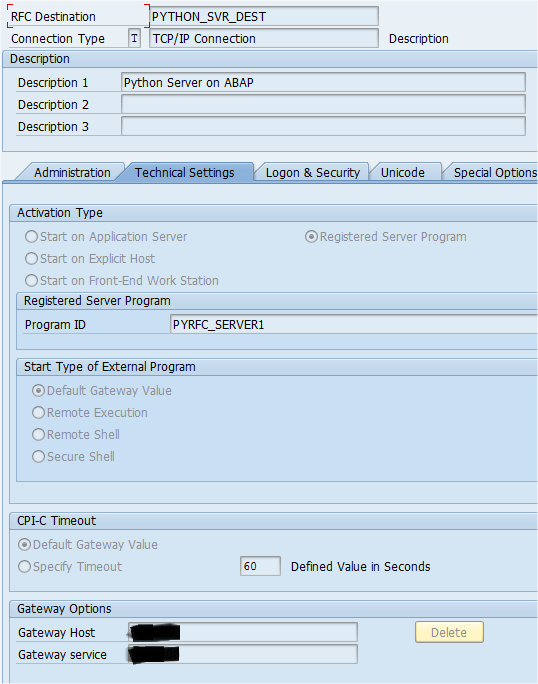
Then, we need to create an TCP/IP connection, so we can call our PyRFC Server. Go to SM59 and create the following.
Now, we need to create a file that will contain our connection information, for both the ERP and the Gateway Server.

In my testing, I used the gwhost that comes from the SMGW but somehow it didn't work properly...I used the value of ashost...so try with one first and if it doesn't work, do it like me.
Now, log into your ERP and create a simple structure called ZXML_RESPONSE.

Create a Table Type using this structure and call it ZXML_RESPONSE_TT.
Now, go to transaction SE37 and create a function module called ZXML_DIFF. This FM will be empty as the work will be done on the Python side.

For now...we're done with the ERP side...let's move to the Python side...
We need two libraries to make this work ListComparator and ElementTree, you can install both using easy_install.
The code is simple, Python will receive two path's, one for each XML, read it's contents, compare the differences and return what has been added and what has been deleted.
| PyRFC_XML_Diff.py |
|---|
from sapnwrfc2 import Server, Connection
from ConfigParser import ConfigParser
from elementtree import ElementTree as ET
from listcomparator.comparator import Comparator

config = ConfigParser()
config.read('sapnwrfc.cfg')


def xml_diff(request_context, XML_1="", XML_2="", ROOT="",
                    ADDITIONS=[], DELETIONS=[]):
    add_list = {}
    del_list = {}
    length = 0
    lower_root = ROOT.encode('utf-8')
    root_old = ET.parse(XML_1).getroot()
    root_new = ET.parse(XML_2).getroot()
    objects_old = root_old.findall(lower_root.lower())
    objects_new = root_new.findall(lower_root.lower())
    objects_old = [ET.tostring(o) for o in objects_old]
    objects_new = [ET.tostring(o) for o in objects_new]
    my_comp = Comparator(objects_old, objects_new)
    my_comp.check()

    for e in my_comp.additions:
        line = e.split("\n")
        length = len(line)
        for i in range(0, length):
            add_list = {}
            add_list.update({"LINE": line[i]})
            ADDITIONS.append(add_list)

    for e in my_comp.deletions:
        line = e.split("\n")
        length = len(line)
        for i in range(0, length):
            del_list = {}
            del_list.update({"LINE": line[i]})
            DELETIONS.append(del_list)

    return {
        'ADDITIONS': ADDITIONS,
        'DELETIONS': DELETIONS
    }

params_connection = config._sections['connection']
conn = Connection(**params_connection)
func_xml_diff = conn.get_function_description("ZXML_DIFF")

params_gateway = config._sections['gateway']
server = Server(**params_gateway)
server.install_function(func_xml_diff, xml_diff)
print "--- Server registration and serving ---"
server.serve(100)
|
Now that we have out Python Server ready...let's define a couple of XML to test this.


We can clearly see that both XML files are different...and that Blag individual has received a suspicious raise in his quantity...let's analyse this...
Go back to transaction SE37 and run the function. It's very important to fill the RFC Target sys parameter with the name we used to named our RFC destination.

The ROOT parameter will tell our function which one is the parent function of the XML files.
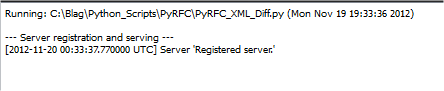
Now, run the PyRFC_XML_Diff.py application and you will see this, that will indicate us that the server is up and running.
Now, run the function and we will get our response from Python.

Now, we can analyse both the ADDITIONS and DELETIONS tables...

We can see that something happened with the account number 0001, which wasn't added, but it's value was modified. Also, in the second XML, Kiara's account was added.

So now, everything fall in line...the account for Blag used to have a quantity of 100 and now it has a quantity of 10,000.
So as you can see, we only use an empty shell from ERP to call all the functionality from Python.
Greetings,
Blag.
martes, 13 de noviembre de 2012
SAP CodeJam Montreal
Thanks to an initiative of Krista Elkin, Jonathan Druker and myself ( with a lot of support from Craig Cmehil and Helena Losada ), SAP CodeJam Montreal is going live on Thursday, December 13, 2012 from 3 to 9 pm in the SAP Labs Montreal offices.


This is your chance to learn more about SAP HANA (Tables, Views, Atrtibute Views, Calculation Views, SQLScript and more), network with people from different companies and background and most important, have fun in this 6 hours event.
This is an event for developers, so might need to have some programming background. But don't worry, previous knowledge of SAP HANA is not needed.
Soon, I will update this blog with the link where you can sign up for the event. And remember, we have limited space so make to sure to sign up quick. (Already updated!)
Upon registration, we will send you an email with details of what you need to bring in order to get the most out of this awesome event.
Also, don't forget to press "Like" on the CodeJam's Facebook Page.
SAP Labs Montreal
111 Rue Duke
Suite 9000
Montreal, Quebec
H3C 2M1
Canada
See you there!
Greetings,
Blag.
sábado, 3 de noviembre de 2012
Revisiting Python and SAP (With PyRFC)
A couple of days back Srdjan Boskovic wrote a blog called Python / ABAP Stack. This for sure, bring me back memories as I already played a lot with sapnwrfc from Piers Harding.
After some email exchanges with Srdjan and Jonas Kunze I was able to set up and start working with it.
You may ask...why another Python to SAP connector? Simply, while Pier's one is awesome, it lacked some features that SAP needed for internal development, so this guys take the hard work of making from the scratch exactly what they needed...one of the beauties of being a developer...you can grab an idea...a turn it into a full blown application or RFC connector in this case...
As a way to introduce PyRFC, the best example is always showing something with the flights tables...which are always present in every ERP installation and as I have it used before on SAP HANA and Python? Yes Sir!, Bottle seemed to be a good option...because you don't want to see more command line screen, don't you?
I will show the code first and the I will tell you about some of the most significant changes that I can see from using PyRFC (And by the way...I fight myself to make my example better and have some error handling, which is always good, even for humble blogs like this one).
| Bottle_PyRFC.py |
|---|
from bottle import get, post, request, run, redirect
from sapnwrfc2 import Connection, ABAPApplicationError, LogonError
from ConfigParser import ConfigParser

conn = ""

@get('/login')
def login_form():
    return '''<DIV ALIGN='CENTER'><BR><BR><BR><BR>
                <H1>Python (Bottle) & SAP - using PyRFC</H1>
                <BR><TABLE BORDER='1' BORDERCOLOR='BLUE'
                     BGCOLOR='WHITE'>
                <FORM METHOD='POST'>
                <TR><TD>User</TD><TD>
                <INPUT TYPE='TEXT' NAME='User'></TD></TR>
                <TR><TD>Password</TD>
                <TD><INPUT TYPE='PASSWORD' NAME='Passwd'></TD></TR>
                <TR><TD COLSPAN='2' ALIGN='CENTER'>
                <INPUT TYPE='SUBMIT' value='Log In' NAME='LOG_IN'>
                <INPUT TYPE='RESET' value='Clear'></TD></TR>
                </FORM>
                <TABLE>
              </DIV>'''

@post('/login')
def login_submit():
    global conn
    try:
        user = request.forms.get('User')
        passwd = request.forms.get('Passwd')
        config = ConfigParser()
        config.read('sapnwrfc.cfg')
        params_connection = config._sections['connection']
        params_connection["user"] = user
        params_connection["passwd"] = passwd
        conn = Connection(**params_connection)
        redirect("/choose")
    except LogonError:
        redirect("/error")

@get('/choose')
def choose_table():
    return '''<CENTER>
                <FORM METHOD='POST'>
                <INPUT TYPE='TEXT' NAME='Table'><BR>
                <INPUT TYPE='SUBMIT' value='Show Table'
                 NAME='Show_Table'>
                </FORM>
              </CENTER>'''

@get('/error')
def error():
    output = "<div align='center'><h1>Invalid username or password</h1></div>"
    return output

@post('/choose')
def show_table():
    global conn
    fields = []
    fields_name = []
    counter = 0
    table = request.forms.get('Table')
    try:
        tables = conn.call("RFC_READ_TABLE", QUERY_TABLE=table, DELIMITER='|')
        data_fields = tables["DATA"]
        data_names = tables["FIELDS"]
        long_fields = len(data_fields)
        long_names = len(data_names)

        for line in range(0, long_fields):
            fields.append(data_fields[line]["WA"].strip())
        for line in range(0, long_names):
            fields_name.append(data_names[line]["FIELDNAME"].strip())

         output = "<div align='center'><h1>%s</h1></center>" % table

        output += "<table border='1'><tr>"
        for line in range(0, long_names):
            field_name = fields_name[line]
            output += "<th bgcolor='#B8D5F5'> %s </th>" % field_name
        output += "</tr>"
        for line in range(0, long_fields):
            counter += 1
            if(counter % 2 == 0):
                output += "<tr bgcolor='#DCE1E5'>"
            else:
                output += "<tr>"
            data_split = fields[line].split("|")
            for line in range(0, long_names):
                output += "<td> %s </td>" % data_split[line]
            output += "</tr>"
        output += "</table>"

     except ABAPApplicationError:
        output = "<div align='center'><h1>Table %s was not found</h1></div>" % table
        return output

     return output
    conn.close()

run(host='localhost', port=8080)
|
So, for me PyRFC has some mayor benefits, like the option to catch ABAPApplicationError and LoginError (I assume that Pier's version have it as well, but I never worried to look for it...shame on me), also the way to call the Function Module is very clean, a simple Python function that will receive as parameters the FM name and the parameters, taking from us the need to define each parameter as an attribute of the object. Also, it's really fast and it can be used on the Server side...but we will talk about that later...in other blog...when I got the chance to actually work with it...
Let's run this program and see how it looks...when running it from Python you might need to go to your browser a pass the following link (as we're executing a Bottle application):
http://localhost:8080/login


As always, was very enjoyable to work with Python, and of course, when mixing it my PyRFC the fun exceed my expectations as right now it's almost 8:00 pm on Saturday night...and I'm posting a blog of what I worked on almost all afternoon...programming is fun...don't forget it...
Greetings,
Blag.
jueves, 9 de agosto de 2012
SUP on AWS - From Blag's point of view
The other day I read My 1st Sybase Unwired Platform app on AWS from Tobias Hofmann which is both a friend and an SAP Mentor. Tobias doesn't seems to be much happy with SUP on Amazon...so of course...I needed to test it myself.
Using the documentation from the all time guru Juergen Schmerder called Get your own Sybase Unwired Platform server on Amazon Web Services I was able to download the SDK and create my AWS image...which, to be honest, got broke as I made some silly mistakes...but it just took me a couple of minutes to clean up the mess, and create a new image that worked like a charm...I had my own SUP server up and running.
After I installed the Android emulator, installing the Sybase Workflow application wasn't hard at all...I simply need to call it like this...
Using the documentation from the all time guru Juergen Schmerder called Get your own Sybase Unwired Platform server on Amazon Web Services I was able to download the SDK and create my AWS image...which, to be honest, got broke as I made some silly mistakes...but it just took me a couple of minutes to clean up the mess, and create a new image that worked like a charm...I had my own SUP server up and running.
After I installed the Android emulator, installing the Sybase Workflow application wasn't hard at all...I simply need to call it like this...
| Installing Sybase Workflow |
|---|
<path_to>\adb install <path_to>\SybaseDataProvider.apk |
The first thing I noticed as I was doing my first example, was something that Tobias experienced himself...a DLL was missing or couldn't be read...

I was really puzzled by this...I even log into the Remote Desktop to copy the file and create the same structure on my laptop...didn't work...until I found a comment from Pasquale de Angelis that magically solved the problem.
Now...I wanted to make a nice example, because reading from the flight tables is too mainstream...so I decided to do something else.
I thought about RFC_ABAP_INSTALL_AND_RUN but...one of input parameters is table, with an structure and even then the preview worked fine I couldn't really find a way to make it work using Personalization Keys...so...of course I create my own ZRFC_ABAP_INSTALL_AND_RUN.
UPDATE: RFC_ABAP_INSTALL_AND_RUN is not released as stated in https://service.sap.com/sap/support/notes/514998 and shouldn't be used on a productive environment. This is just an example on a blog and should be taken as it is.

I basically got rid of the input table and put 8 parameters to hold the source code to be executed.


With the RFC Function Module ready, I could get into the SUP hard work...and BTW...for this to really work I needed to create an empty program called ZTEST on my ERP system.

I create an MBO related to my FM and 8 Personalization Keys, one for each parameter.

I associate the Personalization Keys with the arguments on the MBO.


Inside the screen, I create the parameters and code submission menu.

A simple association of Personalization Keys and Parameter Keys to do the trick.
After that...which really didn't took more than 5 minutes, I was ready for the final test...running a simple ABAP program on Android...
| ABAP LOOP |
|---|
REPORT ZTEST. DATA: COUNTER TYPE I. DO 10 TIMES. COUNTER = COUNTER + 1. WRITE:/ 'Counter value is:', COUNTER. ENDDO. |


It worked just fine! So...no test can be completed without a more complex example...
| ABAP_SELECT |
|---|
REPORT ZTEST. DATA: T_SPFLI TYPE STANDARD TABLE OF SPFLI. FIELD-SYMBOLS: <FS_SPFLI> LIKE LINE OF T_SPFLI. SELECT * FROM SPFLI INTO TABLE T_SPFLI. LOOP AT T_SPFLI ASSIGNING <FS_SPFLI>. WRITE:/ <FS_SPFLI>-CARRID, <FS_SPFLI>-CONNID. ENDLOOP. |


Cool, huh? I didn't have any connection problems with AWS...the service was very stable and reliable...after all, I have an SAP HANA Server and an R Server sitting next to my new SUP server.
Greetings,
Blag.
lunes, 21 de mayo de 2012
When SAP HANA met R - First kiss
If you follow my blogs (I hope you do) then you know I really love the R programming language but I also love SAP HANA and in the past I have dealt with integration between those two:
HANA meets R
R meets HANA
Sanitizing data in SAP HANA with R

You have to choose SUSE Linux Enterprise with 32 bit. I tried with 64 bit and it wasn't funny...didn't work and I lost a lot of time...32 bit for the win!
For the installation, you can follow this link SAP HANA Database Development Guide – Integration with R programming language, but at least in my case, I need to deal with a lot of difficulties, that gladly I'm going to write down in this blog, so you don't have to deal with them
First, we need a compiler as we're going to compile #R from it's source.
Then we need to get and extract the #R source code.
This step really takes a long time...so you better go doing something more productive in the meantime...
When #R is finally installed, we need to download and install the Rserve package.
Now, we have to log into R and do the installation...
If you get an error regarding a personal library...just say "y". Once Rserve is install, we need to create a config file.
Now, we have to create a user that will run the Rserve so we can connect to it from SAP HANA.
For some reason Amazon doesn't provide the password for the root user...but we might need it eventually...so just do this...after all, if your user and you're paying for it...
Now...we're ready to move to move to our SAP HANA server and keep configuring


Open a SQL Editor and copy the following code...
This table is supposed to hold the tickets sales for a given company, during each month of the year 2011. What we want to do here is to determine or predict how are going to our sales on 2012. We're going to use #R for that matter. Create the following script and call it "Predict_Tickets". This script will have two Stored Procedures, called Prediction_Model and Get_Tickets.

HANA meets R
R meets HANA
Sanitizing data in SAP HANA with R
But...those integrations were not done using the SAP way...which means, they are not supported or endorsed by SAP...
Gladly...as of today, there's an official SAP way to do it!
First, we need to read and follow all the instructions detailed in Get your own SAP HANA DB server on Amazon Web Services by the most awesome Juergen Schmerder. (Believe! It took me less than 10 minutes to get my SAP HANA running on my laptop...really...a piece of cake).
With our SAP HANA instance up and running, we can dedicate ourselves to the funny part...the #R part
Go to your AWS Management Console and under Amazon EC2, launch a new instance...

You have to choose SUSE Linux Enterprise with 32 bit. I tried with 64 bit and it wasn't funny...didn't work and I lost a lot of time...32 bit for the win!
For the installation, you can follow this link SAP HANA Database Development Guide – Integration with R programming language, but at least in my case, I need to deal with a lot of difficulties, that gladly I'm going to write down in this blog, so you don't have to deal with them
First, we need a compiler as we're going to compile #R from it's source.
sudo zypper install gcc gcc-c++ gcc-fortran
Then we need to get and extract the #R source code.
wget http://cran.r-project.org/src/base/R-2/R-2.13.0.tar.gz
tar zxf R-2.13.0.tar.gz && cd R-2.13.0
./configure --enable-R-shlib --with-realine=no --with-x=no
make clean
make
make install
This step really takes a long time...so you better go doing something more productive in the meantime...
When #R is finally installed, we need to download and install the Rserve package.
wget http://www.rforge.net/Rserve/snapshot/Rserve_0.6-5.tar.gz
Now, we have to log into R and do the installation...
R
install.packages("/PATH_TO_FILE/Rserve.tar.gz", repos = NULL)
library("Rserve") #To test the installation. If there's no output, then it's working fine
q()
If you get an error regarding a personal library...just say "y". Once Rserve is install, we need to create a config file.
vi /etc/Rserv.conf
maxinbuf 10000000
Maxsendbuf 0
remote enable
#Press ESC key
:w
#Press ESC key
:q!
Now, we have to create a user that will run the Rserve so we can connect to it from SAP HANA.
useradd -m login_name
passwd login_name
For some reason Amazon doesn't provide the password for the root user...but we might need it eventually...so just do this...after all, if your user and you're paying for it...
sudo passwd root
#Assign a password
Great, we're are now ready to start our server! (You need to be logged as the new user that we create in a previous step).
R CMD Rserve --RS-port 6311 --no-save --RS-encoding "utf8"
Now...we're ready to move to move to our SAP HANA server and keep configuring
Right click on your system node at the navigator tab
Select Administration
Select on the right hand side the Configuration tab
Select the indexserver.ini
Select the calcengine

#Add the following parameters...

cer_timeout - 300
cer_rserve_addresses - Our R Amazon server:6311
cer_rserve_maxsendsize - 0
One more thing, and we're ready to roll...go to your AWS Management Console, EC2 and then choose Security Groups. Our R server is going to be assign to "Quicklaunch-1". Just select it and go to Inbound. And add the port "6311".

That's all folks...we're officially ready to go!
On SAP HANA, create a table and call it TICKETS_BY_YEAR with the following structure:

Open a SQL Editor and copy the following code...
insert into "SYSTEM"."TICKETS_BY_YEAR" values('20110101',4195);
insert into "SYSTEM"."TICKETS_BY_YEAR" values('20110201',4245);
insert into "SYSTEM"."TICKETS_BY_YEAR" values('20110301',4971);
insert into "SYSTEM"."TICKETS_BY_YEAR" values('20110401',4469);
insert into "SYSTEM"."TICKETS_BY_YEAR" values('20110501',4257);
insert into "SYSTEM"."TICKETS_BY_YEAR" values('20110601',4973);
insert into "SYSTEM"."TICKETS_BY_YEAR" values('20110701',4470);
insert into "SYSTEM"."TICKETS_BY_YEAR" values('20110801',4981);
insert into "SYSTEM"."TICKETS_BY_YEAR" values('20110901',4530);
insert into "SYSTEM"."TICKETS_BY_YEAR" values('20111001',4167);
insert into "SYSTEM"."TICKETS_BY_YEAR" values('20111101',4059);
insert into "SYSTEM"."TICKETS_BY_YEAR" values('20111201',1483);
This table is supposed to hold the tickets sales for a given company, during each month of the year 2011. What we want to do here is to determine or predict how are going to our sales on 2012. We're going to use #R for that matter. Create the following script and call it "Predict_Tickets". This script will have two Stored Procedures, called Prediction_Model and Get_Tickets.
CREATE TYPE T_PREDICTION_TICKETS AS TABLE (
PERIOD VARCHAR(8),
TICKETS INTEGER
);

DROP PROCEDURE Prediction_Model;
DROP PROCEDURE Get_Tickets;

CREATE PROCEDURE Prediction_Model(IN tickets_year TICKETS_BY_YEAR,OUT result T_PREDICTION_TICKETS)
LANGUAGE RLANG AS
BEGIN
period=as.integer(tickets_year$PERIOD)
tickets=as.integer(tickets_year$TICKETS)
var_year=as.integer(substr(period[1],1,4))
var_year=var_year+1
new_period=gsub("^\\d{4}",var_year,period)
next_year=data.frame(year=new_period)
prt.lm<-lm(tickets ~ period)
pred=round(predict(prt.lm,next_year,interval="none"))
result<-data.frame(PERIOD=new_period,TICKETS=pred)
END;

CREATE PROCEDURE Get_Tickets()
LANGUAGE SQLSCRIPT AS
BEGIN
Tickets = SELECT * FROM TICKETS_BY_YEAR;
CALL Prediction_Model(:Tickets,T_PREDICTION_TICKETS);
INSERT INTO "TICKETS_BY_YEAR" SELECT * FROM :T_PREDICTION_TICKETS;
END;

CALL Get_Tickets();
SELECT * FROM "TICKETS_BY_YEAR";
As you can see, our first Stored Procedure called Prediction_Model, we're using RLANG as the script language...meaning that we're going to embed R code that will go from our SAP HANA to our R Serve and back with the modified information.
Prediction_Model is calling the Stored Procedure Get_Tickets, which is doing a select from the table TICKETS_BY_YEAR and then calling Prediction_Model to finally insert the data back into SAP HANA.
At the end of our script, we call Get_Tickets and do a select to TICKETS_BY_YEAR to verify that our script worked.

Success! Our SAP HANA and R integration work like a charm! We never left SAP HANA Studio, but our code went to the R Server and back to bring us the modified information...all in just 829 milliseconds...really fast considering that both servers are in the cloud...
That's all for now...I will come back with more information on SAP HANA and R as soon as I can...there's still a lot to discover and test.
Greetings,
Blag.
viernes, 18 de mayo de 2012
SAP Free Developer Licenses
This Wednesday, at SAP Sapphire in Orlando, during the Keynote, Vishal Sikka, Head of Technology and Innovation, Member of the Executive Board announced one of the most awesome news...
Free SAP Developer Licenses...yes...FREE!
Now you can have your very own SAP HANA installation running from your PC or Laptop. You only pay for the Amazon Web Services but both the SAP HANA Client and SAP HANA Studio are free for download and use...this means, that you can build, deploy and even sell you applications running on top of SAP HANA.
This is for sure a huge step, allowing us to show that SAP really cares for developers.
Want more information? Follow this easy steps:
1.- Go to SAP Developer Center.
2.- Go to SAP HANA.
3.- Go to Get your own SAP HANA DB server on Amazon Web Services!
4.- Create, configure and setup your Amazon Web Services environment.
5.- Have fun!
Greetings,
Blag.
Free SAP Developer Licenses...yes...FREE!
Now you can have your very own SAP HANA installation running from your PC or Laptop. You only pay for the Amazon Web Services but both the SAP HANA Client and SAP HANA Studio are free for download and use...this means, that you can build, deploy and even sell you applications running on top of SAP HANA.
This is for sure a huge step, allowing us to show that SAP really cares for developers.
Want more information? Follow this easy steps:
1.- Go to SAP Developer Center.
2.- Go to SAP HANA.
3.- Go to Get your own SAP HANA DB server on Amazon Web Services!
4.- Create, configure and setup your Amazon Web Services environment.
5.- Have fun!
Greetings,
Blag.
miércoles, 28 de marzo de 2012
So...what I do at SAP Labs?
I'm sure this a question a lot of people is asking...what I do at SAP Labs? Well...first things first...I don't do ABAP anymore...that's right...I only use it when I have to, but it's the same thing with other technologies I have to play with.
My team is called "Technology Innovation and Developer Experience"...
One of my roles inside my team, is to help building both internal and external tools, so I can actually choose my weapon and start developing...so far I have used Python, Flex, PHP, WebDynpro ABAP and R.
Another of my roles is to blog about new SAP technologies, meaning that I have to blog about SAP HANA, SUP, Gateway, JPASS, SAPUI5, etc.
But...not everything is coding for me...not at all...my other roles include InnoJam management and support, blogging and support at SAP events (Run Better, DKOM, TechEd, Sapphire) and a couple of secret ones that I can't share -:)
So basically, my job is all about Research and Development and engaging developer with the coolest and latest SAP technologies -;)
Greetings,
Blag.
viernes, 9 de marzo de 2012
Work at SAP!
Do you want to work for the best company in the world? Do you want to run faster? Do you want to run better? Best employees run SAP! -:)
My team "Technology Innovation and Developer Experience" is hiring! If you're located on Palo Alto, California or you're so good, that it doesn't matter where you are...apply now!
Hope to see you on my team soon -;)
Greetings,
Blag.
lunes, 2 de enero de 2012
Blag's best blogs picks from 2011
So 2011 is already gone...it was a good year, so now it's the time for to continue with a tradition I started 4 years ago with the blog Blag's best blogs picks from 2007.
I can see with hapiness, that each year, better blogs are being done, and it's hard for me not to include them on the list, so it became bigger each year.
Again, I'm not an expert in each field, far from that, the only thing I did, just like previous years, is browse the blogs from each month, and try to select the ones that for me are the best, or simply are hidden gems....blogs with no comments, but that really delivers something important. Hope you like this list -:) And if you're not in it...sorry, but make a huge list like this is a very overwhelming job, so I'm surely missed really nice blogs -:(
ABAP
Don't try to be smart. Be smart. by Tobias Trapp
Caffeine in Action by Daniel Vocke
ABAP Trapdoors: The Myth of the Instance Constructor by Volker Wegert
Operations Research & ABAP by Tobias Trapp
Open Source
More Barcodes with Barcode Writer in Pure Postscript by Robert Russell
Dealing with R and HANA by Alvaro Tejada Galindo
abap2gapps: is your ABAP ready for the Google cloud? by Ivan Femia
OAuth2: Next generation authentication API by Ivan Femia
On Demand and Software as a Services (SaaS)
Why Dick Hirsch is mostly wrong about ByDesign guerilla tactics by Dennis Howlett
Guerrilla Tactics for SAP’'s OnDemand 'Go to Market' Strategy by Richard Hirsch
Improving My Experience
Does the SAP SCN community need more achievements and rewards? by Tom Cenens
"Programmers are lazy" - InnoJam them! by Chris Paine
Download basket approvals gone with the wind by Tom Cenens
SAP Developer Network
16 SAP Mentor Magic Moments 2010 by Mark Finnern
SCN Blogs Go Mobile by Gali Kling Schneider
SDN Time Capsule : How it all started by Jeff Word by Martin Gillet
Things that drive me crazy on SDN by Martin Maruskin
Top 25 SCN Blogs of all Time by Mark Finnern
Web Dynpro
Kiss of Life for ABAP Dynpro –- It’s going to stay, so let’s improve the integration by Thorsten Franz
Standards
Sorry Singleton I don't love you anymore. by Chris Paine
Community Projects
Can the community be improved? by Dennis Howlett
A simple way of giving back to the community by John Astill
Damned If You Do And Damned If You Do Not by Marilyn Pratt
Governance, Risk and Compliance
Making the case for SAP Mentor alumni program by Dennis Howlett
Beyond SAP
[Plagiarism] Why thieves from portals like saptechies.com are safe ? Bloggers please help... by Michal_Krawczyk_PIXI
OINK OINK! Welcome to the SAP Gamification Cup! by Mario Herger
Is ABAP for Non-ABAPers (Functionals)? by Fabio Luiz Esperati Pagoti
Not your Grandfather’s SAP (Recommended by Ivan Femia) by Thorsten Franz
About 'Embracing Inclusion to Drive Innovation' by Matthias Steiner
R.I.P Dennis Ritchie, and thank you ! by Vijay Vijayasankar
Rest In Peace, Game Changer by Vijay Vijayasankar
A word of thanks by Tom Cenens
Join with SAP and the U.N. as One of the 7 Billion! by Mark Yolton
Ranting
Bad good, and Great Consultants??? by Michelle Crapo
Etiquette Versus Netiquette by Bala Prabahar
Five signs that the new SCN is dysfunctional by Jim Spath
ERP
Embed an HTML landing page into your SAP GUI home screen by John Moy
Why Workday is a Major Threat to SAP by Jarret Pazahanick
Business Process Management
SAPMentors + ASUG +VNSG +SAP = #winning! by Susan Keohan
Business Process Expert
Embracing Inclusion –- Driving Innovation : An Introduction by Marilyn Pratt
SAP TechEd
Why I'm excited about the upcoming TechEd in Las Vegas by Matt Harding
Help an SAP Mentor with his travels? by Jim Spath
SCNotty Goes To Bollywood by Jim Spath
Design Thinking, Women in technology at Tech-ed BLR 2011 a participant’'s view by SINGHKUMUD
Python
Tasting the mix of Python and SAP by Alvaro Tejada Galindo
In-Memory Business Data Management
POV: HANA's impact on ABAP Programming by Ram Batulla
Quick Thoughts about HANA and InMemory Technology by Richard Hirsch
Finding SAP HANA Documentation by John Appleby
An InnoJam Experience - with HANA flavour by Sarat Atluri
Are we putting the cart before the horse? by Bala Prabahar
Experience HANA - the wish list by Vijay Vijayasankar
How much of the game will HANA change? by Vijay Vijayasankar
Why SAP HANA 1.0 SP03 - Project Orange - will be a runaway success by John Appleby
Using Excel on HANA by Thomas Zurek
ExaData, ExaLogic, and now ExaLytics? ExaSperating… by Aiaz Kazi
Mobile
An Android App for searching HELP.SAP.COM by John Moy
Mobile SAP Applications using DHTMLX Touch by Brad Pokroy
SAPMentors Outreach iOS App by Bjoern Weigand
Proudly Presenting the SAP Mentors Outreach Mobile App for Android – Connect with SAP Mentors at SAPphireNOW/ASUG Orlando by Thorsten Franz
Thoughts on the current debate about the Sybase Unwired Platform and options to energize the mobile development community by Richard Hirsch
SAP Mentor Outreach is now available on JQuery Mobile by Ivan Femia
An experiment of Android with HANA In-Memory Database by Sudhir Verma
BSP mobile logon screen using jQueryMobile by Alessandro Spadoni
SAP Streamwork
SAP StreamWork: Picking up Steam? by Tammy Powlas
Social Media and Social Networks
Why Google+'s rapid adoption doesn't impress me by Jamie Oswald
8 Ways to Let You Know SCN is Listening (on Twitter) by Sylvia Santelli
Confessions of mixed emotions about the coming new SCN by Gretchen Y Lindquist
What I Learned About Social Media Marketing from a Webinar on Mobile Marketing by Natascha Thomson
How cool is SCN? by Graham Robinson
What it means to me to be an SAP Mentor by Natascha Thomson
12 SAP Troublemakers by Jarret Pazahanick
I'm outta here !! by Dennis Howlett
Unsolicited Advice for Blogging Marketers by Jamie Oswald
Emerging Technologies
My first Android Application by Girish Kaimal
Ruby
Ruby, Camping and...Gateway? by Alvaro Tejada Galindo
Building a Cross-Platform Mobile App with rhomobile by Mark Teichmann
Run SAP
SAP HANA InnoJam Online, SAP's new developer competition by Anne Hardy
SAP NetWeaver Gateway
Thoughts on NetWeaver Gateway by Graham Robinson
SAP NetWeaver Gateway: 90-day trial version, train race, webinar, and other news by Helena Losada
SAP NetWeaver Gateway: A Poor Man's EDMX Generation Tool by James Wood
Community Day
SAP Inside Track Milan 2011 - The reporting by Ivan Femia
PHP
Consuming SAP NetWeaver Gateway OData web services using PHP by Christopher Reichley
Visual Composer
Old School UI Modeling - Meet HANA by Yariv Zur
Portal Development - Why Web Dynpro Java is replaceable by Tobias Hofmann
miércoles, 7 de diciembre de 2011
Christmas Sale!
Again...up to 30% of discount in my books (printed version) in...
Blag's books in Lulu.com
Available until the first week of January...hurry up and take the deal -;)
Greetings,
Blag.
martes, 1 de noviembre de 2011
And now...for some crazy news...
Those of you who know me in real life, knows that I'm crazy about SAP...and I mean it...I really love SAP...
So...I love them so much, than guess what? I'm going to start officially working for them this November 21st -:D
I'm going to hold the position of Development Expert on Platform Evangelism and Developer Adoption of SAP Labs.
Good news...I'm going to be more on-line than ever, meaning that I'm going to able to post more on the blog -:)
Greetings,
Blag.
martes, 27 de septiembre de 2011
Ruby, Camping and...Gateway?
It's been a long time since my last Ruby blog...so I wanted to something nice...instead of emulate any SAP transaction, it was time for me to engage with new SAP technologies, and Gateway really looks promising...so...what's Gateway?
Gateway is based on OData, which allows us to perform CRUD operations on WebService like applications...in other words...it's just awesome technology -;) If you want to find out more, please refer to this homepage on SCN "SAP NetWeaver Gateway Demo System".
So...we can access Gateway using many technologies, for example JavaScript or Java for Blackberry. But for sure, I wanted to go beyond those awesome examples, and searched for other ways to consume Gateway data...on the OData SDK List I found a Ruby gem called Ruby_OData, which works awesome for services like Netflix OData, but didn't work to well for SAP Gateway services...
As you may know...here on SCN, we're like family, so we like to work together on some nice project, so as you can see here...that's what we did -;)
SAP NETWEAVER GATEWAY DEMO SYSTEM

With the gem working, I knew I wanted to blog about it...build a small Ruby application to show how easy is to use the Ruby_OData gem...but of course...having a DOS style black window wasn't very likely...so I decide to use Camping once again -:) and of course...Camping is not very classy...and I think it's not even maintained anymore...so if you're looking for something nicer, you can use Sinatra instead -;)
As I love to say..."Enough talk! Let's go to the source code!"
Camping_Gateway.rb
gem 'ruby_odata'
require 'ruby_odata'

Camping.goes :Camping_Gateway

module Camping_Gateway::Controllers

  class Index < R '/'
    def get
      render :_login
    end
  end

  class Login
    def post
      @client = input.client
      @user = input.user
      @password = input.password
      render :_showtable
    end
  end

   class ShowTable
    def post
      render :_showtable
    end
  end
end

module Camping_Gateway::Views
  def layout
    html do
      head do
        title {"Camping and Gateway - Flight Example"}
      end
      body { _login }
    end
  end

  def _login
    form:action => R(Login), :method => 'post' do
      h1 {"Camping and Gateway - Flight Example"}

      label 'Client ', :for => 'client';
      input :name => 'client', :type => 'text'; br
      label 'User ', :for => 'user';
      input :name => 'user', :type => 'text'; br
      label 'Password ', :for => 'password';
      input :name => 'password', :type => 'password'; br

      input :type => 'submit', :name => 'login', :value => 'Login'
    end
  end

  def _showtable
    svc = OData::Service.new "http://gw.esworkplace.sap.com/sap/opu/sdata/sap/DEMO_FLIGHT",
                             {:username => @user, :password=> @password,
                              :additional_params=> {'sap-client'=>@client.to_i}}
    svc.z_demo_flightCollection
    flight = svc.execute

    $Data_Names = Array.new
    $Data_Fields = Array.new
    $Data_Split = Array.new

    $Data_Names.push("Airline")       #airline
    $Data_Names.push("City From")     #cityfrom
    $Data_Names.push("Airport From")  #airportfr
    $Data_Names.push("Currency")      #curr_iso
    $Data_Names.push("City To")       #cityto
    $Data_Names.push("Airport To")    #airportto

    for flights in flight do
      puts flights.airline
      $Data_Fields.push(flights.airline + "|" + flights.cityfrom + "|" +
                        flights.airportfr + "|" + flights.curr_iso + "|" +
                        flights.cityto + "|" + flights.airportto)
    end

    $Fields_Len = $Data_Names.length
    $Data_Len = $Data_Fields.length

    table.sample! :cellspacing => 0, :cellpadding => 2 do
      thead do
        tr do
          for i in 0...$Fields_Len
            th "#{$Data_Names[i]}"
          end
        end
      end
      for i in 0...$Data_Len
        tbody do
          tr do
            $Data_Split = $Data_Fields[i].split("|")
            for i in 0...$Fields_Len
              td "#{$Data_Split[i].to_s.strip}"
            end
          end
        end
      end
    end
  end
end
To run this example, we need to provide only 3 simple parameters:Client = 800
Username = GW@ESW
Password = ESW4GW

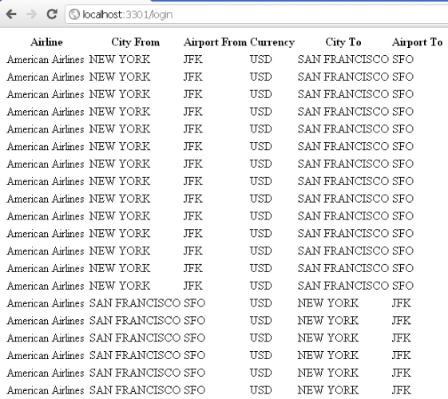
I know what you're going to tell me after you read the source code...why I'm taking the work of reading the date, putting them on an array and looping that? I know I just could read the field from the model and all that...but...for some reason that I still need to discover...the filtering doesn't work as I expected...for example...I should be able to pass a filter to only select the CITYTO = ' NEW YORK', but it doesn't work even when I don't have any errors...so my approach here (and that's for another blog), it to have all the information stored internally to be able to do the filtering after calling the Gateway service...so...if you're an SAP Gateway expert...please let me how to make the filter work -:( Because, I know that if I pass the VALUE, SCHME_ID and SCHEME_AGENCY_ID it's going to work, but only for 1 record...I want a better filter -;)
Hope you enjoy this one...and see you soon with more Gateway coolness!
Greetings,
Blag.
Suscribirse a:
Entradas (Atom)