Mostrando entradas con la etiqueta Games. Mostrar todas las entradas

lunes, 27 de octubre de 2014

LeapTV - Game System Review

I have always love LeapFrog so when I read that we're planning to release a brand new gaming console...I couldn't stop myself from pre-ordering it -;)

LeapTV is in my opinion...a mix between Education, Wii and XBox Kinnect...just enough to keep our little ones engaged, exercised, happy and practice their school skills...
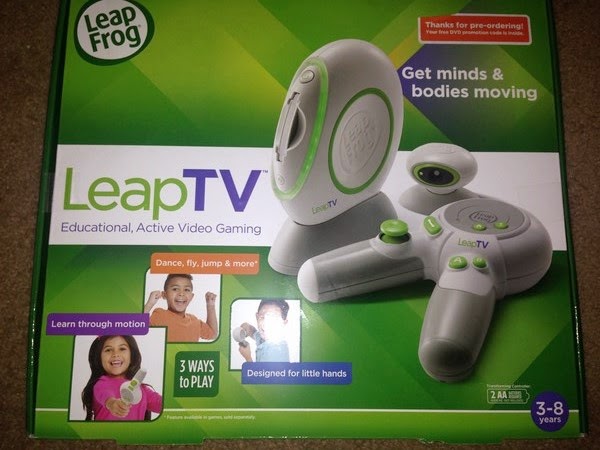

The console comes with a control and a Kinnect like sensor...but no cartrige games...however...it includes a "Pet Play World" game when you register it online...it's a nice game where you need to pick a pet and take care of him/her -;)

Of course...I couldn't left my daughter with just one included game...so I bought a couple more -:)


Kart Racing Supercharged is a "Mario Kart" like game where the kids needs to solve some math questions in order to get better equipment for their cars...

Sports! includes nine games like Super Goallie, Skateboarding and Bowling...and here kids needs to use their addition, subtraction, patterns and shapes skills...


The un-boxing and setup was of course pretty easy and the controller is wireless...


This picture is from the "Pet Play World" game...


And here's the skateboarding game on Sports!


Kart Racing Supercharged is really nice too -;)


I can say...LeapFrog and LeapTV haven't disappoint me at all...this is a great gaming console for little kids and they will open their App Store soon...so the fun will never end -;)

Greetings,

Blag.
Development Culture.

lunes, 13 de octubre de 2014

Robot Turtles - Game Review

Being a geek dad...I couldn't pass the opportunity to buy this game for my daughter -;)


Robot Turtles it's an awesome board game that aims to teach the fundamentals of  programming to little kids.

The game itself is simple...we have a board and place to place our turtle (the game is up to 4 players), we need to place a gem that the turtle needs to reach and here is the fun comes in...

We have cards that indicates the movements that the turtle needs to perform...move forward, move to the left or move to the right.

The kid needs to stack the cards in order to make the turtle move around the board and finally reach the gem in order to win the game.

That's the most basic and simple setup...more complex involves crates, ice blocks and even ice towers...the ice ones can be blasted with a special laser beam card, while the crate can be moved provided that there's enough space left so the crate can be set on a empty slot...

Once you get some movements that can be repeated...like...

Move forward 4 times, then turn left, move forward 4 times again...

The "Move forward 4 times" can be replace by a function card so in would end like...

Function Card, then turn left, Function card...

We also have some rock towers, that can't be blasted away or move, so the kids needs to go around it....


If something goes wrong...the kid can use a "bug" card to undo the last play and rebuild it...which in the end means...repeat the action with a new set of instructions...

The game itself is really nice...and once the kids get comfortable with the mechanics of the game, we can setup really complex scenarios where they need to think how to get the gem in the shortest time using the less possible cards...


I would say...what could be better to teach our young one the joy of programming by playing a nice board game at the same time?

If you got the chance...go ahead and but it...it's really lots of fun -:D

Greetings,

Blag.
Development Culture.

viernes, 11 de abril de 2014

Ball Drop! - The Game

Today...with a lot of happiness and pleasure...I'm releasing my very first Flare3D and Leap Motion powered Flash game called Ball Drop!


Packed with 3 levels...the idea behind Ball Drop! is to guide the ball through the slopes (the must turn red) and drop it into the box...simple but fun...

Of course...it only works with the Leap Motion controller...so if you don't have one...go and buy it -;)

Comments are always welcome...

Oh...by the way...you can download it from here...Ball Drop!

Greetings,

Blag.
Development Culture.


viernes, 20 de mayo de 2011

Tic-Tac-Toe - A Python game


Python? Is that one of the coolest programming languages? Yes it is -:)
So yes, I started learning Python a couple of weeks ago...a month maybe...so how did it started?

I knew Python by name for quite a long time ago...doing Ruby stuff I knew that Ruby inherit a lot from Python (from Perl as well), but I never give it too much of attention.

One day, I said to myself...you must try Python dude! It looks like a nice one...so I put myself in the journey of learning a new programming language.
Most Python people say "Python is easy to learn, it's sexy, it makes write beautiful code"...and you know what? It's damn true -:)

So, as part of my learning process I took a Tic-Tac-Toe I made on Ruby 5 years ago and ported to Python...believe or not...the code is more robust and I managed to cut to 38 less lines...nice, huh?

So here's the code...and keep in mind that I'm a Python newbie...so don't came to me with your "Oh, if you were a real Pythonist, you should thing like this"...because I'm not a Pythonist...at least not yet -;) I'm an ABAPist -:P


#TIC_TAC_TOE
#Made by Blag - 2011

game = False
coordenates = ""
player_won = ""
player_turn = "1"
line1 = ""
line2 = ""
line3 = ""
line4 = ""
line5 = ""

board_array = [" ", " ", " ", " ", " ", " ", " ", " ", " "]
played_moves = [" ", " ", " ", " ", " ", " ", " ", " ", " "]


def clean_lines():
line1 = " "
line2 = " "
line3 = " "
line4 = " "
line5 = " "


def initial_board():
clean_lines()
line1 = " | | "
line2 = "---+---+---"
line3 = " | | "
line4 = "---+---+---"
line5 = " | | "

print "\n"
print (line1)
print (line2)
print (line3)
print (line4)
print (line5)
print "\n"


def board(coordenates, player):
clean_lines()

if board_array[coordenates] == " ":
board_array[coordenates] = player
else:
cheat = True

Move_1 = board_array[0]
Move_2 = board_array[1]
Move_3 = board_array[2]
Move_4 = board_array[3]
Move_5 = board_array[4]
Move_6 = board_array[5]
Move_7 = board_array[6]
Move_8 = board_array[7]
Move_9 = board_array[8]

print "\n"
print " %s | %s | %s " % (Move_1, Move_2, Move_3)
print "---+---+---"
print " %s | %s | %s " % (Move_4, Move_5, Move_6)
print "---+---+--- "
print " %s | %s | %s " % (Move_7, Move_8, Move_9)
print "\n\n"


def print_winner(player):
print "Player ", player, " won\n\n"


def check_who_wins():
game = False
if (board_array[0] != " " and board_array[0] == board_array[1] and
board_array[1] == board_array[2]):
game = True
if board_array[0] == "*":
print_winner(1)
else:
print_winner(2)

if (board_array[3] != " " and board_array[3] == board_array[4] and
board_array[4] == board_array[5]):
game = True
if board_array[3] == "*":
print_winner(1)
else:
print_winner(2)

if (board_array[0] != " " and board_array[0] == board_array[3] and
board_array[3] == board_array[6]):
game = True
if board_array[0] == "*":
print_winner(1)
else:
print_winner(2)

if (board_array[1] != " " and board_array[1] == board_array[4] and
board_array[4] == board_array[7]):
game = True
if board_array[1] == "*":
print_winner(1)
else:
print_winner(2)

if (board_array[2] != " " and board_array[2] == board_array[5] and
board_array[5] == board_array[8]):
game = True

if board_array[2] == "*":
print_winner(1)
else:
print_winner(2)

if (board_array[0] != " " and board_array[0] == board_array[4] and
board_array[4] == board_array[8]):
game = True
if board_array[0] == "*":
print_winner(1)
else:
print_winner(2)

if (board_array[2] != " " and board_array[2] == board_array[4] and
board_array[4] == board_array[6]):
game = True
if board_array[2] == "*":
print_winner(1)
else:
print_winner(2)

wins = 0

for board in board_array:
if board != " ":
wins += 1

if wins == 9:
game = True
print "It's a Tie'.\n\n"

return game


def make_move(player_turn, game, coordenates):
index_coordenates = 0
if game == False:
cheat = False
if player_turn == "1":
coordenates = input("Player 1: ")
coordenates = coordenates
if coordenates <= 0 or coordenates > 9:
print "Please, only values from 1 to 9\n"
make_move(player_turn, game, coordenates)
for moves in played_moves:
if moves == coordenates:
cheat = True
if cheat == True:
cheat = False
print "That move was already made!\n"
make_move(player_turn, game, coordenates)
index_coordenates = coordenates - 1
played_moves[index_coordenates] = coordenates
player = "*"
board(index_coordenates, player)
game = check_who_wins()

if game == False:
cheat = False
player_turn = "2"
if player_turn == "2":
coordenates = input("Player 2: ")
coordenates = coordenates
if coordenates <= 0 or coordenates > 9:
print "Please, only values from 1 to 9\n"
make_move(player_turn, game, coordenates)

for moves in played_moves:
if moves == coordenates:
cheat = True

if cheat == True:
cheat = False
print "That move was already made!\n"
make_move(player_turn, game, coordenates)

index_coordenates = coordenates - 1
played_moves[index_coordenates] = coordenates
player = "O"
board(index_coordenates, player)
game = check_who_wins()
player_turn = "1"
return game

initial_board()


while(game == False):
game = make_move(player_turn, game, coordenates)


Greetings,

Blag.

jueves, 28 de octubre de 2010

VTech's V.Reader...for Geek kids


I usually don't write about kids stuff...but this time I have to make an exception...you'll see...my daughter loves my IPhone and that's a good thing...she learned to use the touch screen, enter the program I download specially for her and stuff...but when I need to check my mail, read a book or make a phone call...it's not that funny and cute anymore -;)

So, the other day my wife and I were looking for some toys for our daughter...a toy laptop actually...and we just get freeze when we discover the VTech's V.Reader, a geeky little toy with guess what...touch screen! and the most important thing for us...it reads stories, with graphics, games, dictionary...what else could be asked for? I grabbed my credit card and bought it right away...along with a Dora the Explorer game -:)

Yesterday, she used it for the first time...and I can tell you, when I took my IPhone out, she didn't even look at it, she just wanted to watch and listen the story all over again...best gift we ever gave her...we can't be more happy -:D

But sure...the magic never stops...if you have an SD Card, you can go online, register you V.Reader and get 6 coins that you can use to download more stories! 1 coin per story, so basically you have a free game cartridge, and 6 games to download...


If your kid is 2 to 6 years...then this is a perfect Christmas present...that's for sure -;)


domingo, 13 de diciembre de 2009

ChessJam - Online chess


I must admit that I'm really bad at Chess...but it doesn't mean I don't like it -;)
So, when I was browsing my RSS Reader, I found ChessJam.

ChessJam is a pretty neat application build on Adobe Flex and ColdFusion running on Adobe AIR.

But you might be asking...what's the big buzz about a Chess game? Easy...you can play against bots or against people from all around the world...chat included...to me...that's awesome -:)


We have to create an account and then log-in.


We can choose to play a single game or chat and challenge other players....


We can choose varios types of games (Depending on the game time play) or enter a Tournament.


We have plenty of room to choose if the want to play against a bot or another human being.


We can choose between a nice 3D look...


or a nice 2D classic view...


When you sign up...you must give out your Country of residence...so the system could run some nice statistics.

So...why don't you give this game a chance? Play it...enjoy it and pass it along -;)

Greetings,

Blag.

jueves, 18 de junio de 2009

My favorite BlackBerry apps...and games...


I own a BlackBerry Pearl 8100 with OS 4.5.0.108 and had download this wonderful app's and games -:)

Zum-Zum


Great, fun and difficult game.

Jetris


A Tetris clone...everybody loves Tetris -;)

Quick Stop Watch


Simple and useful stop watch application.

The Weather Network


It's raining Mike...it's raining...

Medieval Kings Chess 2
(Go to Mobile.BlackBerry.com then Games and finally Free Games.)


Totally awesome game! I suck at Chess...and still love this game -;)

Pacman


Great clone of an all time classic game.

Opera Mini


Best Berry browser...

Google Mobile App


A must have! Includes GMail, GMaps, News, Reader, Calendar, Docs, Photos, Notebook.

Google Sync


Sync your google stuff with you Berry...stay always update -;)

Mobipocker Reader


I just can't live without this! Read PDF books on your Berry! -:D

Got any other free great App or Game? Please let me know -:)

Greetings,

Blag.

miércoles, 29 de abril de 2009

Legends of Zork


A couple of weeks ago I started playing Legends of Zork. But wait a minute...don't think that it's a new version of the all time hall of fame game Zork.

Legends of Zork is a nice game, web based, created by Jolt Online.


When we log in, we are presented to a map so we can choose our destination.


When we explore a territory, we can see our status (life points, money, number of action points and experience points).


In fights, there nothing we can do...only wish that our power, armor and statistics helps us to beat the monsters. Anyway...it's fun to watch how many points you lost trying to beat them up.


While fighting, you can be lucky to find the mysterious Fanucci cards...which can grant you more power (Body, mind or spirit).


So, if you asked me...sure I love this game...it's not a fancy game with 3D blasting graphics...but surely going to give you a lot of fun -;)

Greetings,

Blag.

viernes, 3 de octubre de 2008

Quake Live...It's alive!


A couple of weeks ago...Well...Actually last week LOL I sign up for the Quake Live Beta program...Gladly...Got accepted -;) So I create my account...Download the browser client (Works great on Firefox, haven't test it in other browsers...yet).

So...Have you ever played Quake, Doom or Wolfenstein 3D? I had surely do...I'm a big fan of ID Software games...

Let's look at some pictures...First, you can choose from various characters...


You can access a "Learn first" arena...


A bot called Crash is ready to give the first lessons...


You can even fight Crash in a small DeathMatch practice game...


The graphics are very cool, the movement is very smooth and you got a nice range of weapons...


As in most On-Line games, some additional data is downloaded when you load a new Arena, but this download is very quick -;)


In other words...Quake Live rules!!!

Greetings,

Blag.