miércoles, 22 de junio de 2011

Python, Bottle, Flask and SAP


Original post: Tasting the mix of Python and SAP

It's been a very long time since my last "Tasting the mix of" blog post...but here we are to change that -;)

Lately, I have been learning Python...a sexy, powerful and easy to learn programming language...so of course...every time I learn something new, I want to apply it to the SAP world...and lucky me, Piers Harding had already creating an Python SAPRfc connector -:D

So, with everything setup and working I proceeded to start working on the SE16 emulator using the DOS screen...but then I realized that even when didn't do an SE16, my good friend David Hull was already using Python, SAPRfc and DOS screen in his blog entitled Python and SAP Adventures.

As I had already worked with Micro Frameworks in Ruby, I thought it was a good idea to implement the same using Python...so after my research I found two nice candidates (Take note that I love Micro Frameworks and not so streamed Frameworks...meaning that I don't like, don't know and don't use Rails or Djanjo...I like to keep it simple).

These Micro Frameworks are called Bottle and Flask (Weird name, huh?).

So, to make things simple, I used the YAML approach, where we use a configuration like file where we are going to put our connection strings...something like the SAPLogon.ini


ashost: localhost
sysnr: "00"
client: "001"
lang: EN
trace: 1
loglevel: warn

For the source codes, let's start with Bottle.

SE16_Bottle.py

from bottle import get, post, request, run, redirect, route
import sapnwrfc

conn = ""


@get('/login')
def login_form():
return '''<DIV ALIGN='CENTER'><BR><BR><BR><BR>
<H1>Python (Bottle) & SAP - SE16 Emulator</H1>
<BR><TABLE BORDER='1' BORDERCOLOR='BLUE'
BGCOLOR='WHITE'>
<FORM METHOD='POST'>
<TR><TD>User</TD><TD>
<INPUT TYPE='TEXT' NAME='User'></TD></TR>
<TR><TD>Password</TD>
<TD><INPUT TYPE='PASSWORD' NAME='Passwd'></TD></TR>
<TR><TD COLSPAN='2' ALIGN='CENTER'>
<INPUT TYPE='SUBMIT' value='Log In' NAME='LOG_IN'>
<INPUT TYPE='RESET' value='Clear'></TD></TR>
</FORM>
<TABLE>
</DIV>'''


@post('/login')
def login_submit():
global conn
user = request.forms.get('User')
passwd = request.forms.get('Passwd')
sapnwrfc.base.config_location = "sap.yml"
sapnwrfc.base.load_config()
conn = sapnwrfc.base.rfc_connect({'user': user, 'passwd': passwd})
redirect("/choose")


@get('/choose')
def choose_table():
return '''<CENTER>
<FORM METHOD='POST'>
<INPUT TYPE='TEXT' NAME='Table'><BR>
<INPUT TYPE='SUBMIT' value='Show Table'
NAME='Show_Table'>
</FORM>
</CENTER>'''


@post('/choose')
def show_table():
global conn
fields = []
fields_name = []
table = request.forms.get('Table')
func_disc = conn.discover("RFC_READ_TABLE")
func = func_disc.create_function_call()
func.QUERY_TABLE(table)
func.DELIMITER("|")
func.invoke()
data_fields = func.DATA.value
data_names = func.FIELDS.value
long_fields = len(func.DATA())
long_names = len(func.FIELDS())

for line in range(0, long_fields):
fields.append(data_fields[line]["WA"].strip())
for line in range(0, long_names):
fields_name.append(data_names[line]["FIELDNAME"].strip())

output = "<table border='1'><tr>"
for line in range(0, long_names):
field_name = fields_name[line]
output += "<th> %s </th>" % field_name
output += "</tr>"
for line in range(0, long_fields):
output += "<tr>"
data_split = fields[line].split("|")
for line in range(0, long_names):
output += "<td> %s </td>" % data_split[line]
output += "</tr>"
output += "</table>"
return output
conn.close()

run(host='localhost', port=8080)


Now, let's continue with Flask:

SE16_Flask.py

from flask import Flask, redirect, request
import sapnwrfc
app = Flask(__name__)

conn = ""


@app.route("/")
def login():
return '''<DIV ALIGN='CENTER'><BR><BR><BR><BR>
<H1>Python (Flask) & SAP - SE16 Emulator</H1>
<BR><TABLE BORDER='1' BORDERCOLOR='BLUE'
BGCOLOR='WHITE'>
<FORM ACTION='/login_submit' METHOD='POST'>
<TR><TD>User</TD><TD>
<INPUT TYPE='TEXT' NAME='User'></TD></TR>
<TR><TD>Password</TD>
<TD><INPUT TYPE='PASSWORD' NAME='Passwd'></TD></TR>
<TR><TD COLSPAN='2' ALIGN='CENTER'>
<INPUT TYPE='SUBMIT' value='Log In' NAME='LOG_IN'>
<INPUT TYPE='RESET' value='Clear'></TD></TR>
</FORM>
<TABLE>
</DIV>'''


@app.route("/login_submit", methods=['GET', 'POST'])
def login_submit():
global conn
if request.method == 'POST':
user = request.form['User']
passwd = request.form['Passwd']
sapnwrfc.base.config_location = "sap.yml"
sapnwrfc.base.load_config()
conn = sapnwrfc.base.rfc_connect({'user': user,
'passwd': passwd})
return redirect("/choose")


@app.route("/choose")
def choose_table():
return '''<CENTER>
<FORM ACTION='/show' METHOD='POST'>
<INPUT TYPE='TEXT' NAME='Table'><BR>
<INPUT TYPE='SUBMIT' value='Show Table'
NAME='Show_Table'>
</FORM>
</CENTER>'''


@app.route("/show", methods=['GET', 'POST'])
def show_table():
global conn
if request.method == 'POST':
fields = []
fields_name = []
table = str(request.form['Table'])
func_disc = conn.discover("RFC_READ_TABLE")
func = func_disc.create_function_call()
func.QUERY_TABLE(table)
func.DELIMITER("|")
func.invoke()
data_fields = func.DATA.value
data_names = func.FIELDS.value
long_fields = len(func.DATA())
long_names = len(func.FIELDS())

for line in range(0, long_fields):
fields.append(data_fields[line]["WA"].strip())
for line in range(0, long_names):
fields_name.append(data_names[line]["FIELDNAME"].strip())

output = "<table border='1'><tr>"
for line in range(0, long_names):
field_name = fields_name[line]
output += "<th> %s </th>" % field_name
output += "</tr>"
for line in range(0, long_fields):
output += "<tr>"
data_split = fields[line].split("|")
for line in range(0, long_names):
output += "<td> %s </td>" % data_split[line]
output += "</tr>"
output += "</table>"
return output
conn.close()

if __name__ == "__main__":
app.run()


Same output, different Micro Frameworks...nice, isn't it?

See you soon with another recipe for the "Tasting the mix of..."

Greetings,

Blag.

viernes, 20 de mayo de 2011

Tic-Tac-Toe - A Python game


Python? Is that one of the coolest programming languages? Yes it is -:)
So yes, I started learning Python a couple of weeks ago...a month maybe...so how did it started?

I knew Python by name for quite a long time ago...doing Ruby stuff I knew that Ruby inherit a lot from Python (from Perl as well), but I never give it too much of attention.

One day, I said to myself...you must try Python dude! It looks like a nice one...so I put myself in the journey of learning a new programming language.
Most Python people say "Python is easy to learn, it's sexy, it makes write beautiful code"...and you know what? It's damn true -:)

So, as part of my learning process I took a Tic-Tac-Toe I made on Ruby 5 years ago and ported to Python...believe or not...the code is more robust and I managed to cut to 38 less lines...nice, huh?

So here's the code...and keep in mind that I'm a Python newbie...so don't came to me with your "Oh, if you were a real Pythonist, you should thing like this"...because I'm not a Pythonist...at least not yet -;) I'm an ABAPist -:P


#TIC_TAC_TOE
#Made by Blag - 2011

game = False
coordenates = ""
player_won = ""
player_turn = "1"
line1 = ""
line2 = ""
line3 = ""
line4 = ""
line5 = ""

board_array = [" ", " ", " ", " ", " ", " ", " ", " ", " "]
played_moves = [" ", " ", " ", " ", " ", " ", " ", " ", " "]


def clean_lines():
line1 = " "
line2 = " "
line3 = " "
line4 = " "
line5 = " "


def initial_board():
clean_lines()
line1 = " | | "
line2 = "---+---+---"
line3 = " | | "
line4 = "---+---+---"
line5 = " | | "

print "\n"
print (line1)
print (line2)
print (line3)
print (line4)
print (line5)
print "\n"


def board(coordenates, player):
clean_lines()

if board_array[coordenates] == " ":
board_array[coordenates] = player
else:
cheat = True

Move_1 = board_array[0]
Move_2 = board_array[1]
Move_3 = board_array[2]
Move_4 = board_array[3]
Move_5 = board_array[4]
Move_6 = board_array[5]
Move_7 = board_array[6]
Move_8 = board_array[7]
Move_9 = board_array[8]

print "\n"
print " %s | %s | %s " % (Move_1, Move_2, Move_3)
print "---+---+---"
print " %s | %s | %s " % (Move_4, Move_5, Move_6)
print "---+---+--- "
print " %s | %s | %s " % (Move_7, Move_8, Move_9)
print "\n\n"


def print_winner(player):
print "Player ", player, " won\n\n"


def check_who_wins():
game = False
if (board_array[0] != " " and board_array[0] == board_array[1] and
board_array[1] == board_array[2]):
game = True
if board_array[0] == "*":
print_winner(1)
else:
print_winner(2)

if (board_array[3] != " " and board_array[3] == board_array[4] and
board_array[4] == board_array[5]):
game = True
if board_array[3] == "*":
print_winner(1)
else:
print_winner(2)

if (board_array[0] != " " and board_array[0] == board_array[3] and
board_array[3] == board_array[6]):
game = True
if board_array[0] == "*":
print_winner(1)
else:
print_winner(2)

if (board_array[1] != " " and board_array[1] == board_array[4] and
board_array[4] == board_array[7]):
game = True
if board_array[1] == "*":
print_winner(1)
else:
print_winner(2)

if (board_array[2] != " " and board_array[2] == board_array[5] and
board_array[5] == board_array[8]):
game = True

if board_array[2] == "*":
print_winner(1)
else:
print_winner(2)

if (board_array[0] != " " and board_array[0] == board_array[4] and
board_array[4] == board_array[8]):
game = True
if board_array[0] == "*":
print_winner(1)
else:
print_winner(2)

if (board_array[2] != " " and board_array[2] == board_array[4] and
board_array[4] == board_array[6]):
game = True
if board_array[2] == "*":
print_winner(1)
else:
print_winner(2)

wins = 0

for board in board_array:
if board != " ":
wins += 1

if wins == 9:
game = True
print "It's a Tie'.\n\n"

return game


def make_move(player_turn, game, coordenates):
index_coordenates = 0
if game == False:
cheat = False
if player_turn == "1":
coordenates = input("Player 1: ")
coordenates = coordenates
if coordenates <= 0 or coordenates > 9:
print "Please, only values from 1 to 9\n"
make_move(player_turn, game, coordenates)
for moves in played_moves:
if moves == coordenates:
cheat = True
if cheat == True:
cheat = False
print "That move was already made!\n"
make_move(player_turn, game, coordenates)
index_coordenates = coordenates - 1
played_moves[index_coordenates] = coordenates
player = "*"
board(index_coordenates, player)
game = check_who_wins()

if game == False:
cheat = False
player_turn = "2"
if player_turn == "2":
coordenates = input("Player 2: ")
coordenates = coordenates
if coordenates <= 0 or coordenates > 9:
print "Please, only values from 1 to 9\n"
make_move(player_turn, game, coordenates)

for moves in played_moves:
if moves == coordenates:
cheat = True

if cheat == True:
cheat = False
print "That move was already made!\n"
make_move(player_turn, game, coordenates)

index_coordenates = coordenates - 1
played_moves[index_coordenates] = coordenates
player = "O"
board(index_coordenates, player)
game = check_who_wins()
player_turn = "1"
return game

initial_board()


while(game == False):
game = make_move(player_turn, game, coordenates)


Greetings,

Blag.

domingo, 13 de febrero de 2011

Regular Expressions Book


My newest book is ready to be bought -;)


Printed Book
PDF
Ebook

Enjoy!

Greetings,

Blag.

jueves, 2 de diciembre de 2010

Programming non-sense #2


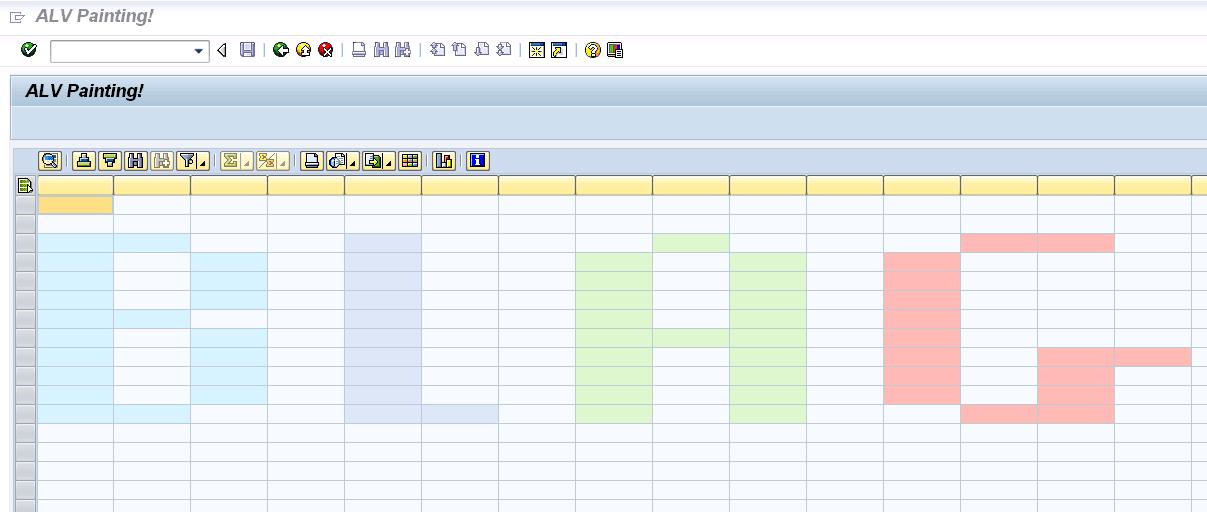
One of my hobbies is to get ABAP to make things that were not really planned in the design of the language...so when I learned how to put colors on ALV cells...I always had the idea to make something using that...so, I came out with a Paint like.

In this scenario, we have 4 available colors, that get activated by doing a doble click on each cell...if the cell is empty...it's color change...if we double click again...the color changes again...and so on until we hit the cell is empty again, so we can start all over again.

Here's a pic, so you can know what I'm talking about...


And this is the source code...I hope you like it -;)


REPORT zalv_painting NO STANDARD PAGE HEADING.

TYPE-POOLS: abap.
CLASS lcl_event_receiver DEFINITION DEFERRED.

DATA: it_fieldcatalog TYPE lvc_t_fcat,
wa_fcat TYPE lvc_s_fcat,
dataref TYPE REF TO data,
new_line TYPE REF TO data,
l_fieldname TYPE string,
data_catalog TYPE REF TO data,
t_stable TYPE STANDARD TABLE OF
lvc_s_stbl WITH HEADER LINE,
ct_fieldcat TYPE lvc_t_fcat,
gs_layout TYPE lvc_s_layo,
gs_variant TYPE disvariant,
custom_container TYPE REF TO
cl_gui_custom_container,
it_color TYPE TABLE OF lvc_s_scol,
it_color_aux TYPE TABLE OF lvc_s_scol,
wa_color_aux TYPE lvc_s_scol,
it_celltab TYPE lvc_t_styl,
event_receiver TYPE REF TO lcl_event_receiver,
grid1 TYPE REF TO cl_gui_alv_grid,
mycontainer TYPE scrfname VALUE 'CUSTOM_ALV',
ls_celltab TYPE lvc_s_styl,
wa_color TYPE lvc_s_scol,
l_color TYPE lvc_col,
l_tabix(2) TYPE c,
ok_code TYPE sy-ucomm,
x_save.

FIELD-SYMBOLS: <row> TYPE table,
<l_line> TYPE ANY,
<l_field> TYPE ANY,
<fs_catalog> TYPE lvc_s_fcat,
<fs_color> LIKE LINE OF it_color,
<fs_color_aux> LIKE LINE OF it_color_aux,
<ct_fieldcat> LIKE LINE OF ct_fieldcat.

*-----------------------------------------------------*
* CLASS LCL_EVENT_RECEIVER DEFINITION *
*-----------------------------------------------------*
CLASS lcl_event_receiver DEFINITION.
PUBLIC SECTION.
METHODS: handle_double_click
FOR EVENT double_click OF cl_gui_alv_grid
IMPORTING e_row e_column.
ENDCLASS. "LCL_EVENT_RECEIVER DEFINITION

*-----------------------------------------------------*
* CLASS lcl_event_receiver IMPLEMENTATION *
*-----------------------------------------------------*
CLASS lcl_event_receiver IMPLEMENTATION.
METHOD handle_double_click.
PERFORM paint_cell USING e_row e_column.
ENDMETHOD. "handle_double_click
ENDCLASS. "LCL_EVENT_RECEIVER IMPLEMENTATION

*=====================================================*
* START-OF-SELECTION *
*=====================================================*
START-OF-SELECTION.
PERFORM create_structure.
PERFORM fill_layout.
PERFORM generate_alv_catalog.
PERFORM call_alv.
CALL SCREEN 0100.

*&----------------------------------------------------*
*& Form CREATE_STRUCTURE *
*&----------------------------------------------------*
FORM create_structure.

DO 20 TIMES.
l_tabix = l_tabix + 1.
CONCATENATE 'FIELD' l_tabix INTO l_fieldname.
wa_fcat-fieldname = l_fieldname.
wa_fcat-ref_table = 'PERF_STRING_STRUCT'.
wa_fcat-ref_field = 'DATA'.
APPEND wa_fcat TO it_fieldcatalog.
ENDDO.

wa_fcat-fieldname = 'COLOR'.
wa_fcat-ref_table = 'PERF_STRING_STRUCT'.
wa_fcat-ref_field = 'DATA'.
APPEND wa_fcat TO it_fieldcatalog.

wa_fcat-fieldname = 'COLOR_CELL'.
wa_fcat-ref_table = 'RESC_DEFAULT_ALV_FIELDS'.
wa_fcat-ref_field = 'COLORTAB'.
APPEND wa_fcat TO it_fieldcatalog.

CALL METHOD cl_alv_table_create=>create_dynamic_table
EXPORTING
it_fieldcatalog = it_fieldcatalog
IMPORTING
ep_table = dataref
EXCEPTIONS
generate_subpool_dir_full = 1
OTHERS = 2.

ASSIGN dataref->* TO <row>.
CREATE DATA new_line LIKE LINE OF <row>.
ASSIGN new_line->* TO <l_line>.

DO 40 TIMES.
INSERT <l_line> INTO TABLE <row>.
ENDDO.

ENDFORM. " CREATE_STRUCTURE

*&----------------------------------------------------*
*& Form FILL_LAYOUT *
*&----------------------------------------------------*
FORM fill_layout.

gs_layout-sel_mode = 'A'.
gs_layout-ctab_fname = 'COLOR_CELL'.

ENDFORM. " FILL_LAYOUT

*&-----------------------------------------------------*
*& Form GENERATE_ALV_CATALOG *
*&-----------------------------------------------------*
FORM generate_alv_catalog.

CREATE DATA data_catalog TYPE lvc_s_fcat.
ASSIGN data_catalog->* TO <fs_catalog>.

CLEAR l_tabix.

DO 20 TIMES.
l_tabix = l_tabix + 1.
CONCATENATE 'FIELD' l_tabix INTO l_fieldname.
APPEND INITIAL LINE TO ct_fieldcat
ASSIGNING <ct_fieldcat>.
<ct_fieldcat>-fieldname = l_fieldname.
ENDDO.

ENDFORM. " GENERATE_ALV_CATALOG

*&------------------------------------------------------*
*& Form CALL_ALV *
*&------------------------------------------------------*
FORM call_alv.

IF custom_container IS INITIAL.
CREATE OBJECT custom_container
EXPORTING
container_name = mycontainer
EXCEPTIONS
cntl_error = 1
cntl_system_error = 2
create_error = 3
lifetime_error = 4
lifetime_dynpro_dynpro_link = 5.
ENDIF.

CREATE OBJECT grid1
EXPORTING
i_parent = custom_container.

CREATE OBJECT event_receiver.

SET HANDLER event_receiver->handle_double_click FOR grid1.

CALL METHOD grid1->set_table_for_first_display
EXPORTING
is_variant = gs_variant
i_save = x_save
i_default = 'X'
is_layout = gs_layout
CHANGING
it_fieldcatalog = ct_fieldcat
it_outtab = <row>.

ENDFORM. " CALL_ALV

*&----------------------------------------------------*
*& Module STATUS_0100 OUTPUT *
*&----------------------------------------------------*
MODULE status_0100 OUTPUT.

SET PF-STATUS '0100'.
SET TITLEBAR 'TITLE'.

ENDMODULE. " STATUS_0100 OUTPUT

*&----------------------------------------------------*
*& Module USER_COMMAND_0100 INPUT *
*&----------------------------------------------------*
MODULE user_command_0100 INPUT.

ok_code = sy-ucomm.

CASE ok_code.
WHEN 'BACK' OR 'STOP' OR 'CANCEL'.
SET SCREEN 0.
LEAVE SCREEN.
ENDCASE.

ENDMODULE. " USER_COMMAND_0100 INPUT

*&----------------------------------------------------*
*& Form PAINT_CELL *
*&----------------------------------------------------*
FORM paint_cell USING p_row
p_column.

READ TABLE <row> ASSIGNING <l_line>
INDEX p_row.
IF sy-subrc EQ 0 AND <l_line> IS ASSIGNED.
ASSIGN COMPONENT 22 OF STRUCTURE <l_line> TO <l_field>.
it_color[] = <l_field>.
READ TABLE it_color ASSIGNING <fs_color>
WITH KEY fname = p_column.
IF sy-subrc EQ 0 AND <fs_color> IS ASSIGNED.
CASE <fs_color>-color-col.
WHEN space or 2.
l_color = 1.
WHEN 1.
l_color = 4.
WHEN 4.
l_color = 5.
WHEN 5.
l_color = 6.
WHEN 6.
l_color = 2. "White
ENDCASE.

MOVE l_color TO <fs_color>-color-col.
MOVE p_column TO <fs_color>-fname.
ELSE.
l_color = 1.
MOVE l_color TO wa_color-color-col.
MOVE p_column TO wa_color-fname.
APPEND wa_color TO it_color.
ENDIF.

ASSIGN COMPONENT 22 OF STRUCTURE <l_line> TO <l_field>.
<l_field> = it_color[].

CALL METHOD grid1->refresh_table_display
EXPORTING
is_stable = t_stable.
ENDIF.

ENDFORM. " PAINT_CELL


Greetings,

Blag.

martes, 30 de noviembre de 2010

Chrstimas Sale!


Starting today and for all December...get a 25% discount in all my books!

Blag en Lulu.com

Go get this awesome sale!

Greetings,

Blag.

miércoles, 10 de noviembre de 2010

XML and RegEx again...


Today I was thinking about XML and RegEx...You can parse an XML document using RegEx, not the best way, but surely is fun...so...what about creating an XML file using RegEx? More fun for sure! -:D Of course...and just to make it clear...there are other more standard and easier ways to achieve the same: Simple Transformations, XLST Transformation y XML DOM.

But as always...this code was very fun to made -;)


TYPES: BEGIN OF TY_XML,
FIELD TYPE STRING,
END OF TY_XML.

DATA: T_DD03P_TAB TYPE STANDARD TABLE OF DD03P,
T_FILETAB TYPE FILETABLE,
T_XML TYPE STANDARD TABLE OF TY_XML.

DATA: L_FLAG TYPE C,
L_AUX TYPE STRING,
L_STRING TYPE STRING,
L_XML_LINE TYPE STRING,
DATA_TAB TYPE REF TO DATA,
SIZE TYPE I,
W_SUBRC TYPE SY-SUBRC,
W_FILE_OUT TYPE STRING.

FIELD-SYMBOLS: TYPE STANDARD TABLE,
TYPE ANY,
TYPE ANY,
LIKE LINE OF T_XML,
LIKE LINE OF T_DD03P_TAB,
LIKE LINE OF T_FILETAB.

SELECTION-SCREEN BEGIN OF BLOCK TEST WITH FRAME.
PARAMETERS:
TABNAME TYPE DD02L-TABNAME,
FILE_OUT LIKE RLGRAP-FILENAME.
SELECTION-SCREEN END OF BLOCK TEST.

START-OF-SELECTION.
PERFORM VALIDATE_TABLE USING TABNAME
CHANGING L_FLAG.
IF L_FLAG EQ SPACE.
PERFORM LOAD_TABLE_STRUCT USING TABNAME.
PERFORM LOAD_TABLE_INFO USING TABNAME.
PERFORM CREATE_XML.
PERFORM DOWNLOAD_XML.
ENDIF.

AT SELECTION-SCREEN ON VALUE-REQUEST FOR FILE_OUT.
CALL METHOD CL_GUI_FRONTEND_SERVICES=>FILE_OPEN_DIALOG
EXPORTING
WINDOW_TITLE = 'Seleccionar archivo'
DEFAULT_FILENAME = '*.xml'
FILE_FILTER = '*.xml'
CHANGING
FILE_TABLE = T_FILETAB
RC = W_SUBRC.

READ TABLE T_FILETAB INDEX 1
ASSIGNING .
FILE_OUT = .
W_FILE_OUT = FILE_OUT.

IF FILE_OUT IS INITIAL.
EXIT.
ENDIF.

*&------------------------------------------------------*
*& Form VALIDATE_TABLE *
*&------------------------------------------------------*
FORM VALIDATE_TABLE USING P_TABNAME
CHANGING P_FLAG.

SELECT SINGLE TABNAME
INTO P_TABNAME
FROM DD02L
WHERE TABNAME EQ P_TABNAME.
IF SY-SUBRC NE 0.
P_FLAG = 'X'.
ELSE.
CLEAR P_FLAG.
ENDIF.

ENDFORM. " VALIDATE_TABLE

*&------------------------------------------------------*
*& Form LOAD_TABLE_STRUCT *
*&------------------------------------------------------*
FORM LOAD_TABLE_STRUCT USING P_TABNAME.

CALL FUNCTION 'DDIF_TABL_GET'
EXPORTING
NAME = P_TABNAME
TABLES
DD03P_TAB = T_DD03P_TAB
EXCEPTIONS
ILLEGAL_INPUT = 1
OTHERS = 2.

ENDFORM. " LOAD_TABLE_STRUCT

*&------------------------------------------------------*
*& Form LOAD_TABLE_INFO *
*&------------------------------------------------------*
FORM LOAD_TABLE_INFO USING P_TABNAME.

CREATE DATA DATA_TAB TYPE STANDARD TABLE OF (P_TABNAME).
ASSIGN DATA_TAB->* TO .
SELECT *
FROM (P_TABNAME)
INTO TABLE .

ENDFORM. " LOAD_TABLE_INFO

*&------------------------------------------------------*
*& Form CREATE_XML *
*&------------------------------------------------------*
FORM CREATE_XML.

APPEND INITIAL LINE TO T_XML ASSIGNING .
-FIELD = ''.
APPEND INITIAL LINE TO T_XML ASSIGNING .
-FIELD = ''.
*XML Logic here!
LOOP AT ASSIGNING .
L_XML_LINE = ''.
LOOP AT T_DD03P_TAB ASSIGNING .
ASSIGN COMPONENT -FIELDNAME OF
STRUCTURE TO .
L_AUX = .
CONDENSE L_AUX NO-GAPS.
CONCATENATE -FIELDNAME '/' L_AUX
INTO L_STRING.
REPLACE REGEX '(\w+)[\/](\w+)' IN L_STRING
WITH '<$1>$2'.
CONCATENATE L_XML_LINE L_STRING INTO L_XML_LINE.
ENDLOOP.
APPEND INITIAL LINE TO T_XML ASSIGNING .
-FIELD = L_XML_LINE.
CONCATENATE -FIELD '
'
INTO -FIELD.
ENDLOOP.
*XML Logic here!
APPEND INITIAL LINE TO T_XML ASSIGNING .
-FIELD = '
'.

ENDFORM. " CREATE_XML

*&------------------------------------------------------*
*& Form DOWNLOAD_XML *
*&------------------------------------------------------*
FORM DOWNLOAD_XML.

CALL METHOD CL_GUI_FRONTEND_SERVICES=>GUI_DOWNLOAD
EXPORTING
BIN_FILESIZE = SIZE
FILENAME = W_FILE_OUT
FILETYPE = 'DAT'
CHANGING
DATA_TAB = T_XML.

ENDFORM. " DOWNLOAD_XML


Greetings,

Blag.

jueves, 4 de noviembre de 2010

Programming non-sense #1


With this post, I want to start a small series about ABAP programs that doesn't bring any value but are fun to code -:) I believe that ABAP coding is fun...believe it or not...

Anyway...my first code, that by the way doesn't work in the best possible way, it's a clock...we simply read the system time and show it on digital form...then, we activate a temporizer that it's going to be executed every second and it's going to read again the system timeand show it on digital format...of course, as we don't have in ABAP and CLRSCR(); or an CLS, we must read every line and modify their contents.


DATA: temporizador TYPE REF TO cl_gui_timer,
hour(2) TYPE c,
minute(2) TYPE c,
second(2) TYPE c,
one(1) TYPE c,
two(1) TYPE c,
line1 TYPE string,
line2 TYPE string,
line3 TYPE string.

*----------------------------------------------------------------------*
* CLASS clock DEFINITION *
*----------------------------------------------------------------------*
CLASS clock DEFINITION.
PUBLIC SECTION.
METHODS: zero IMPORTING line TYPE string,
one IMPORTING line TYPE string,
two IMPORTING line TYPE string,
three IMPORTING line TYPE string,
four IMPORTING line TYPE string,
five IMPORTING line TYPE string,
six IMPORTING line TYPE string,
seven IMPORTING line TYPE string,
eight IMPORTING line TYPE string,
nine IMPORTING line TYPE string,
periods IMPORTING line TYPE string,
show IMPORTING number TYPE c.
ENDCLASS. "clock DEFINITION

*----------------------------------------------------------------------*
* CLASS clock IMPLEMENTATION *
*----------------------------------------------------------------------*
CLASS clock IMPLEMENTATION.
METHOD zero.
CASE line.
WHEN 1.
CONCATENATE line1 ' _ ' INTO line1 SEPARATED BY space RESPECTING BLANKS.
WHEN 2.
CONCATENATE line2 '| |' INTO line2 SEPARATED BY space RESPECTING BLANKS.
WHEN 3.
CONCATENATE line3 '|_|' INTO line3 SEPARATED BY space RESPECTING BLANKS.
ENDCASE.
ENDMETHOD. "zero
METHOD one.
CASE line.
WHEN 1.
CONCATENATE line1 ' ' INTO line1 SEPARATED BY space RESPECTING BLANKS.
WHEN 2.
CONCATENATE line2 ' |' INTO line2 SEPARATED BY space RESPECTING BLANKS.
WHEN 3.
CONCATENATE line3 ' |' INTO line3 SEPARATED BY space RESPECTING BLANKS.
ENDCASE.
ENDMETHOD. "one
METHOD two.
CASE line.
WHEN 1.
CONCATENATE line1 ' _ ' INTO line1 SEPARATED BY space RESPECTING BLANKS.
WHEN 2.
CONCATENATE line2 ' _|' INTO line2 SEPARATED BY space RESPECTING BLANKS.
WHEN 3.
CONCATENATE line3 '|_ ' INTO line3 SEPARATED BY space RESPECTING BLANKS.
ENDCASE.
ENDMETHOD. "two
METHOD three.
CASE line.
WHEN 1.
CONCATENATE line1 ' _ ' INTO line1 SEPARATED BY space RESPECTING BLANKS.
WHEN 2.
CONCATENATE line2 ' _|' INTO line2 SEPARATED BY space RESPECTING BLANKS.
WHEN 3.
CONCATENATE line3 ' _|' INTO line3 SEPARATED BY space RESPECTING BLANKS.
ENDCASE.
ENDMETHOD. "three
METHOD four.
CASE line.
WHEN 1.
CONCATENATE line1 ' ' INTO line1 SEPARATED BY space RESPECTING BLANKS.
WHEN 2.
CONCATENATE line2 '|_|' INTO line2 SEPARATED BY space RESPECTING BLANKS.
WHEN 3.
CONCATENATE line3 ' |' INTO line3 SEPARATED BY space RESPECTING BLANKS.
ENDCASE.
ENDMETHOD. "four
METHOD five.
CASE line.
WHEN 1.
CONCATENATE line1 ' _ ' INTO line1 SEPARATED BY space RESPECTING BLANKS.
WHEN 2.
CONCATENATE line2 '|_ ' INTO line2 SEPARATED BY space RESPECTING BLANKS.
WHEN 3.
CONCATENATE line3 ' _|' INTO line3 SEPARATED BY space RESPECTING BLANKS.
ENDCASE.
ENDMETHOD. "five
METHOD six.
CASE line.
WHEN 1.
CONCATENATE line1 ' _ ' INTO line1 SEPARATED BY space RESPECTING BLANKS.
WHEN 2.
CONCATENATE line2 '|_ ' INTO line2 SEPARATED BY space RESPECTING BLANKS.
WHEN 3.
CONCATENATE line3 '|_|' INTO line3 SEPARATED BY space RESPECTING BLANKS.
ENDCASE.
ENDMETHOD. "six
METHOD seven.
CASE line.
WHEN 1.
CONCATENATE line1 '_ ' INTO line1 SEPARATED BY space RESPECTING BLANKS.
WHEN 2.
CONCATENATE line2 ' | ' INTO line2 SEPARATED BY space RESPECTING BLANKS.
WHEN 3.
CONCATENATE line3 ' | ' INTO line3 SEPARATED BY space RESPECTING BLANKS.
ENDCASE.
ENDMETHOD. "seven
METHOD eight.
CASE line.
WHEN 1.
CONCATENATE line1 ' _ ' INTO line1 SEPARATED BY space RESPECTING BLANKS.
WHEN 2.
CONCATENATE line2 '|_|' INTO line2 SEPARATED BY space RESPECTING BLANKS.
WHEN 3.
CONCATENATE line3 '|_|' INTO line3 SEPARATED BY space RESPECTING BLANKS.
ENDCASE.
ENDMETHOD. "eight
METHOD nine.
CASE line.
WHEN 1.
CONCATENATE line1 ' _ ' INTO line1 SEPARATED BY space RESPECTING BLANKS.
WHEN 2.
CONCATENATE line2 '|_|' INTO line2 SEPARATED BY space RESPECTING BLANKS.
WHEN 3.
CONCATENATE line3 ' _|' INTO line3 SEPARATED BY space RESPECTING BLANKS.
ENDCASE.
ENDMETHOD. "nine
METHOD periods.
CASE line.
WHEN 1.
CONCATENATE line1 ' ' INTO line1 SEPARATED BY space RESPECTING BLANKS.
WHEN 2.
CONCATENATE line2 ' * ' INTO line2 SEPARATED BY space RESPECTING BLANKS.
WHEN 3.
CONCATENATE line3 ' * ' INTO line3 SEPARATED BY space RESPECTING BLANKS.
ENDCASE.
ENDMETHOD. "periods
METHOD show.
CASE number.
WHEN 0.
zero( EXPORTING line = '1' ).
zero( EXPORTING line = '2' ).
zero( EXPORTING line = '3' ).
WHEN 1.
one( EXPORTING line = '1' ).
one( EXPORTING line = '2' ).
one( EXPORTING line = '3' ).
WHEN 2.
two( EXPORTING line = '1' ).
two( EXPORTING line = '2' ).
two( EXPORTING line = '3' ).
WHEN 3.
three( EXPORTING line = '1' ).
three( EXPORTING line = '2' ).
three( EXPORTING line = '3' ).
WHEN 4.
four( EXPORTING line = '1' ).
four( EXPORTING line = '2' ).
four( EXPORTING line = '3' ).
WHEN 5.
five( EXPORTING line = '1' ).
five( EXPORTING line = '2' ).
five( EXPORTING line = '3' ).
WHEN 6.
six( EXPORTING line = '1' ).
six( EXPORTING line = '2' ).
six( EXPORTING line = '3' ).
WHEN 7.
seven( EXPORTING line = '1' ).
seven( EXPORTING line = '2' ).
seven( EXPORTING line = '3' ).
WHEN 8.
eight( EXPORTING line = '1' ).
eight( EXPORTING line = '2' ).
eight( EXPORTING line = '3' ).
WHEN 9.
nine( EXPORTING line = '1' ).
nine( EXPORTING line = '2' ).
nine( EXPORTING line = '3' ).
ENDCASE.
ENDMETHOD. "show
ENDCLASS. "clock IMPLEMENTATION

*----------------------------------------------------------------------*
* CLASS lcl_event_handler DEFINITION *
*----------------------------------------------------------------------*
CLASS lcl_event_handler DEFINITION.
PUBLIC SECTION.
CLASS-METHODS: on_timer FOR EVENT finished OF cl_gui_timer
IMPORTING sender.
ENDCLASS. "lcl_event_handler DEFINITION

*----------------------------------------------------------------------*
* CLASS lcl_event_handler IMPLEMENTATION *
*----------------------------------------------------------------------*
CLASS lcl_event_handler IMPLEMENTATION.
METHOD on_timer.
DATA: g_clock TYPE REF TO clock.

IF NOT g_clock IS BOUND.
CREATE OBJECT g_clock.
ENDIF.

CLEAR: line1, line2, line3.

hour = sy-uzeit+0(2).
one = hour+0(1).
g_clock->show( EXPORTING number = one ).
two = hour+1(1).
g_clock->show( EXPORTING number = two ).
g_clock->periods( EXPORTING line = '1' ).
g_clock->periods( EXPORTING line = '2' ).
g_clock->periods( EXPORTING line = '3' ).
minute = sy-uzeit+2(2).
one = minute+0(1).
g_clock->show( EXPORTING number = one ).
two = minute+1(1).
g_clock->show( EXPORTING number = two ).
g_clock->periods( EXPORTING line = '1' ).
g_clock->periods( EXPORTING line = '2' ).
g_clock->periods( EXPORTING line = '3' ).
second = sy-uzeit+4(2).
one = second+0(1).
g_clock->show( EXPORTING number = one ).
two = second+1(1).
g_clock->show( EXPORTING number = two ).

READ LINE 1.
MODIFY LINE 1 FIELD VALUE line1 FROM line1.
READ LINE 2.
MODIFY LINE 2 FIELD VALUE line2 FROM line2.
READ LINE 3.
MODIFY LINE 3 FIELD VALUE line3 FROM line3.

sender->run( ).
ENDMETHOD.
ENDCLASS.

START-OF-SELECTION.
CREATE OBJECT temporizador.
SET HANDLER lcl_event_handler=>on_timer FOR temporizador.

temporizador->interval = 1.
temporizador->run( ).

DATA: g_clock TYPE REF TO clock.
CREATE OBJECT g_clock.

hour = sy-uzeit+0(2).
one = hour+0(1).
g_clock->show( EXPORTING number = one ).
two = hour+1(1).
g_clock->show( EXPORTING number = two ).
g_clock->periods( EXPORTING line = '1' ).
g_clock->periods( EXPORTING line = '2' ).
g_clock->periods( EXPORTING line = '3' ).
minute = sy-uzeit+2(2).
one = minute+0(1).
g_clock->show( EXPORTING number = one ).
two = minute+1(1).
g_clock->show( EXPORTING number = two ).
g_clock->periods( EXPORTING line = '1' ).
g_clock->periods( EXPORTING line = '2' ).
g_clock->periods( EXPORTING line = '3' ).
second = sy-uzeit+4(2).
one = second+0(1).
g_clock->show( EXPORTING number = one ).
two = second+1(1).
g_clock->show( EXPORTING number = two ).

WRITE:/ line1.
WRITE:/ line2.
WRITE:/ line3.


Greetings,

Blag.

jueves, 28 de octubre de 2010

VTech's V.Reader...for Geek kids


I usually don't write about kids stuff...but this time I have to make an exception...you'll see...my daughter loves my IPhone and that's a good thing...she learned to use the touch screen, enter the program I download specially for her and stuff...but when I need to check my mail, read a book or make a phone call...it's not that funny and cute anymore -;)

So, the other day my wife and I were looking for some toys for our daughter...a toy laptop actually...and we just get freeze when we discover the VTech's V.Reader, a geeky little toy with guess what...touch screen! and the most important thing for us...it reads stories, with graphics, games, dictionary...what else could be asked for? I grabbed my credit card and bought it right away...along with a Dora the Explorer game -:)

Yesterday, she used it for the first time...and I can tell you, when I took my IPhone out, she didn't even look at it, she just wanted to watch and listen the story all over again...best gift we ever gave her...we can't be more happy -:D

But sure...the magic never stops...if you have an SD Card, you can go online, register you V.Reader and get 6 coins that you can use to download more stories! 1 coin per story, so basically you have a free game cartridge, and 6 games to download...


If your kid is 2 to 6 years...then this is a perfect Christmas present...that's for sure -;)


viernes, 22 de octubre de 2010

Good resumes...bad resumes...and resumes from Hell?


While attending SAP Inside Track Newton Square 2010, my good friend Jon Reed from Jonerp.com told me about this book "Resumes from Hell". At first...I didn't knew what to expect, but the name really caught my attention...I was decided to buy it, but as the SAP Community and The Fellowship of the SAP Mentors in so strong, Jon gave me the book for free...along with his signature and a great message -:)


So, I read the book...and it really blown my mind away...those are real resumes created but real people...and as reality is stranger than fiction...those resumes are the worst I have ever seen...some of them are going to make smile, other are going to make you laugh and some others are going to want you to pick up the guy and punch him in the face (You can't hit a lady you know...).

I really enjoyed reading the book, because by seeing how crappy some resumes can be, you can actually took your own and start doing some gardening that would lead to at least...a decent one -:)

You can...sorry...you must buy this book...so here's the link:

Buy Resumes from Hell!

Greetings,

Blag.

viernes, 15 de octubre de 2010

With a little help from my friends...


I think it's good karma, to once in a while write a post sending thanks to all the people that for better or for worse have helped me to become the professional I am today...of course...I can put them all...but a small list is better than nothing -:)

Not in particular order...just...thank you so much for being my friends! And please, don't stop bugging me when it comes to help me out -;)

* Marilyn Pratt
* Jim Spath
* Nigel James
* Leonardo de Araujo
* Craig Cmehil
* Jon Reed
* Dennis Howlett
* Abesh Bhattacharjee
* Sue Keohan
* Mark Finnern
* Aslan Noghre-kar

Greetings,

Blag.